
Friends List Backport
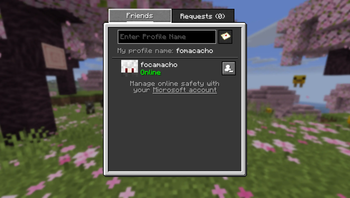
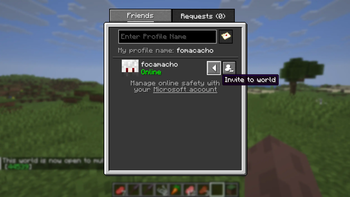
Invite friends to your world with a backport of Mojang's official friends list to older Minecraft versions.
Screenshots
About this Mod
Friends List Backport
This mod backports the Mojang's Official Friends list to older versions of Minecraft.
It allows you to add friends and invite them to your world! No router port opening or third-party services required!

What is the Friends List in Java Edition?
The Friends List is designed to make it easier to jump into a game with your friends in Minecraft: Java Edition! The goal isn’t to replace any of the ways you currently connect with friends and play together – but to give you another option that’s easy to access within the game itself.
We’re starting simple with a few essential features, and you'll be able to test it out for yourself today in Java snapshot.
In the first version, the Friends List will include the ability to add friends to your friends list. You can do this by sending a friend request. You’ll also be able to accept (or decline) incoming friend requests, and cancel friend requests you’ve sent. You’ll then be able to play on local worlds with friends on your Friends List!
Source: https://www.minecraft.net/en-us/article/friends-list-for-java-edition
W.I.P
This mod is still a W.I.P and is in early development. We will continue porting it to more Minecraft versions, and we will also keep it updated as Mojang releases new changes and features for the Friends List in official Minecraft updates.
F.A.Q
I can't see the friends button on main menu.
Check if you have friends list enabled in Online/Xbox settings. Go to Options -> Online -> and make sure "Friends List" is enabled.
I can't send a friend request to my friend.
Make sure you both have friend requests enabled in the configs. Go to Options -> Online... -> And enable "Friends List" and "Allow Requests"
I don't see the option to invite my friend to my world.
You have to first start multiplayer online in that world. Load your world and press ESC, click "Multiplayer..." (old Open-to-Lan button), change Network to Online and Apply Changes.
Now open your friends list and you'll see a button to invite them to your world.
Will it be ported to X version?
This mod is still in early development, my personal plans are to have stable versions for: 26.1.2, 1.21.1, 1.20.1, 1.16.5, 1.12.2, 1.7.10. Other versions will be checked after all these get stable versions.
Available Versions
How to Install Friends List Backport on Your Server
Order Server
Order a Minecraft Java server with at least 3 GB RAM (4 GB recommended).
Set fabric Loader
In the panel under "Egg", select the fabric loader and matching Minecraft version (26.1.2).
Install Mod
Open the mod browser in the dashboard and search for "Friends List Backport". Click "Install" – done! Alternatively, upload the .jar via SFTP to the /mods folder.
Compatibility
Mod Loaders
Minecraft Versions
26.1.2, 1.21.1
Server-side
✗ UnsupportedRecommended RAM
4 GB(min. 3 GB)Frequently Asked Questions
Friends List Backport server crashes on startup – what to do?
Most common cause: wrong fabric version or insufficient RAM. Check the server log (latest.log) for "OutOfMemoryError" or "Mixin" errors. With Mado Hosting: ensure at least 3 GB RAM is allocated and the loader matches the mod version (26.1.2). You can switch loaders with one click in the panel.
Is Friends List Backport compatible with fabric and neoforge?
Friends List Backport officially supports fabric, neoforge for Minecraft 26.1.2, 1.21.1. The Mado dashboard automatically detects incompatible loader combinations.
Server lagging with Friends List Backport – how to optimize performance?
Recommended RAM: 4 GB (per 8 players). Use /spark profiler to check if Friends List Backport consumes the most tick time. Common fixes: reduce server view-distance to 8-10, install "performant" or "starlight" as supplementary mods on Forge. With Mado Hosting, your server runs on NVMe SSDs with dedicated CPU cores for minimal latency.
Similar Mods






Rent Modded Server
Install Friends List Backport with just one click on your server.