
FTB Chunks: Sable Aerospace
Protection of Sable (Create Aeronautics) structures within FTB Claimed Chunks
Screenshots

About this Mod
FTB Chunks: Sable Aerospace
This addon fixes one of the most frustrating problems with Sable (Create Aeronautics) on multiplayer servers: Sable structures do not automatically respect land claims.
By default, moving air structures can still be used, damaged, or interfered with even when they pass through claimed territory. On a public server that quickly turns into griefing, accidental damage, and constant admin cleanup.
FTB Chunks: Sable Aerospace closes that gap.
With this addon installed, FTB Chunks protection is applied to Sable structures as well:
- players cannot freely use other players' Sable structures inside claimed chunks
- players cannot break protected Sable structures inside claimed chunks
- explosion damage is also filtered through FTB Chunks claim rules, so protected structures are not left exposed to creepers or other terrain-damaging explosions when the claim disables them
The addon also adds airspace behavior on top of basic claim protection.
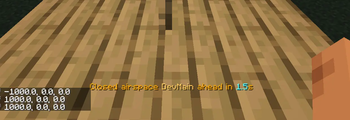
When a player approaches another team's claimed territory by air, they get a predictive warning before crossing the boundary. Enter and exit messages make it clear when someone moves into or out of foreign airspace, which helps avoid accidental intrusions during flight.
There is also a configurable high-altitude free zone. By default, above Y 320 foreign claimed chunks switch to a special ruleset:
- normal use remains allowed
- block breaking is denied
- block placement is denied
- TNT ignition is denied
- airspace warnings are suppressed in that zone
The result is a much cleaner multiplayer experience:
- fewer griefing edge cases around Sable constructs
- better protection that actually follows FTB Chunks rules
- clearer airspace boundaries for players in flight
- less manual intervention for admins
If you run a server with Sable and FTB Chunks, this addon plugs a protection hole that has existed for a long time.
Available Versions
How to Install FTB Chunks: Sable Aerospace on Your Server
Order Server
Order a Minecraft Java server with at least 3 GB RAM (4 GB recommended).
Set neoforge Loader
In the panel under "Egg", select the neoforge loader and matching Minecraft version (1.21.1).
Install Mod
Open the mod browser in the dashboard and search for "FTB Chunks: Sable Aerospace". Click "Install" – done! Alternatively, upload the .jar via SFTP to the /mods folder.
Compatibility
Mod Loaders
Minecraft Versions
1.21.1
Server-side
✓ RequiredRecommended RAM
4 GB(min. 3 GB)Frequently Asked Questions
FTB Chunks: Sable Aerospace server crashes on startup – what to do?
Most common cause: wrong neoforge version or insufficient RAM. Check the server log (latest.log) for "OutOfMemoryError" or "Mixin" errors. With Mado Hosting: ensure at least 3 GB RAM is allocated and the loader matches the mod version (1.21.1). You can switch loaders with one click in the panel.
Is FTB Chunks: Sable Aerospace compatible with neoforge?
FTB Chunks: Sable Aerospace officially supports neoforge for Minecraft 1.21.1. The Mado dashboard automatically detects incompatible loader combinations.
Server lagging with FTB Chunks: Sable Aerospace – how to optimize performance?
Recommended RAM: 4 GB (per 8 players). Use /spark profiler to check if FTB Chunks: Sable Aerospace consumes the most tick time. Common fixes: reduce server view-distance to 8-10, install "performant" or "starlight" as supplementary mods on Forge. With Mado Hosting, your server runs on NVMe SSDs with dedicated CPU cores for minimal latency.
Similar Mods






Rent Modded Server
Install FTB Chunks: Sable Aerospace with just one click on your server.