
FTechResource
Bring the surface mineral veins and mining machines from the Factorio game to the Minecraft
Screenshots
About this Mod
FTech Resource
✨ Highlights
- Surface Ore Veins — Ore patches generate naturally on the terrain surface. No more branch-mining: find, place, collect.
- Terrain‑adaptive surface vein generation — Generates ore veins only on the surface, adaptively adjusting their placement and quantity based on terrain features.
- Two Tiers of Mining Drills
- Burner Mining Drill — runs on coal/charcoal/any fuel. Simple early-game automation.
- Electric Mining Drill — powered by FE (Forge Energy). Mines all veins in range simultaneously. Auto-ejects output to adjacent container.
- Multiple Mineral Types — Coal, iron, copper, gold, redstone, lapis, emerald, diamond (Overworld) + nether quartz (Nether). Each with custom weight, size, and surface tint.
- Rich Configuration
- Disable vanilla ore generation per-block-ID (replace unwanted ores with stone/deepslate/netherrack on chunk load).
- Tune vein generation chance, drill speed, fuel efficiency, and energy consumption.
- Define custom vein types via JSON — add ores from any mod.
- Vanilla+ Feel — Pickaxes work on veins (drops scaled by config). Left-click a vein to collect a few items; automate the rest with drills.
- JEI & Jade Integration — View vein type info (dimension, biome) in JEI. Hover with Jade to see remaining blocks and drill energy.
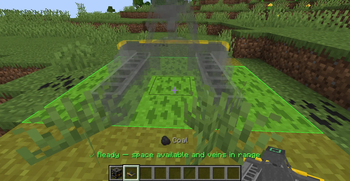
- Clean Placement UX — Live overlay shows drill range and vein locations before you place.
⚙️ Configuration
ftresource_vein_types.json — (generated at config/ftresource/ on first run)
Define which ores appear as surface veins:
Key fields:
| Field | Description |
|---|---|
outputItem |
What the drill (or pickaxe) drops |
weight |
Generation probability relative to other types |
maxBlocks |
Total ore reserves in one patch |
maxPerBlock |
Max blocks per world block (0 = default 64) |
color |
ARGB tint on the vein overlay |
noiseFreq / noiseGamma / shapeThreshold |
Controls vein shape & density |
biomes / dimensions |
Where the vein can generate (empty = all) |
surfaces |
Valid surface blocks to generate on (# prefix for tags) |
surfaceMode |
"auto" (default), "nether" |
Available Versions
How to Install FTechResource on Your Server
Order Server
Order a Minecraft Java server with at least 4 GB RAM (6 GB recommended).
Set neoforge Loader
In the panel under "Egg", select the neoforge loader and matching Minecraft version (1.21.1).
Install Mod
Open the mod browser in the dashboard and search for "FTechResource". Click "Install" – done! Alternatively, upload the .jar via SFTP to the /mods folder.
Compatibility
Mod Loaders
Minecraft Versions
1.21.1
Server-side
✓ RequiredRecommended RAM
6 GB(min. 4 GB)Frequently Asked Questions
FTechResource server crashes on startup – what to do?
Most common cause: wrong neoforge version or insufficient RAM. Check the server log (latest.log) for "OutOfMemoryError" or "Mixin" errors. With Mado Hosting: ensure at least 4 GB RAM is allocated and the loader matches the mod version (1.21.1). You can switch loaders with one click in the panel.
Is FTechResource compatible with neoforge?
FTechResource officially supports neoforge for Minecraft 1.21.1. The Mado dashboard automatically detects incompatible loader combinations.
Server lagging with FTechResource – how to optimize performance?
Recommended RAM: 6 GB (per 5 players). Use /spark profiler to check if FTechResource consumes the most tick time. Common fixes: reduce server view-distance to 8-10, install "performant" or "starlight" as supplementary mods on Forge. With Mado Hosting, your server runs on NVMe SSDs with dedicated CPU cores for minimal latency.
Similar Mods






Rent Modded Server
Install FTechResource with just one click on your server.