![Fullbright [Permanent Night Vision]](https://cdn.modrinth.com/data/fmEdAGPf/a5802390b9569583b5799b4546be7c9321708451.png)
Fullbright [Permanent Night Vision]
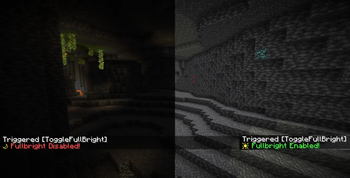
Toggleable Fullbright for every player on the server! Also works in singleplayer.
Screenshots
About this Mod
DESCRIPTION
This fullbright datapack/mod allows you to have full bright for every player on a server. It can be turned on or off with /trigger ToggleFullBright by each player, whenever they want. It also works perfectly fine in singleplayer!
DATAPACK INSTALLATION/UNINSTALLATION GUIDE
Installation
go to your saves folder located here on Windows:
C:\Users(your name)\AppData\Roaming\.minecraft\saves
put the zipped file in the data packs folder, and either restart your world or execute /reload
Uninstallation
- run
/function mpfullbright:uninstall. Do not reload before deleting the pack. - delete the datapack/mod and then run
/reload
OTHER THINGS TO NOTE
Customization
- blacklist players from being able to use full bright by giving them the
FB_blacklistedtag (/tag <player> <add/remove> FB_blacklisted) - disable fullbright from being enabled by default by running
/scoreboard players set FBDisabledByDefault mpfb.config <1/0>(1: true, 0: false)
Notes
- this works fine in singleplayer!
- this datapack will break night vision potions (and make them useless since you can just toggle it on anyway)
- for feedback, bug reports, or other help, join the discord server from the links section of this page!
Available Versions
How to Install Fullbright [Permanent Night Vision] on Your Server
Order Server
Order a Minecraft Java server with at least 3 GB RAM (4 GB recommended).
Set datapack Loader
In the panel under "Egg", select the datapack loader and matching Minecraft version (26.1.2).
Install Mod
Open the mod browser in the dashboard and search for "Fullbright [Permanent Night Vision]". Click "Install" – done! Alternatively, upload the .jar via SFTP to the /mods folder.
Compatibility
Mod Loaders
Minecraft Versions
26.1.2, 26.1.1, 26.1 (+20 more)
Server-side
✓ RequiredRecommended RAM
4 GB(min. 3 GB)Frequently Asked Questions
Fullbright [Permanent Night Vision] server crashes on startup – what to do?
Most common cause: wrong datapack version or insufficient RAM. Check the server log (latest.log) for "OutOfMemoryError" or "Mixin" errors. With Mado Hosting: ensure at least 3 GB RAM is allocated and the loader matches the mod version (26.1.2). You can switch loaders with one click in the panel.
Is Fullbright [Permanent Night Vision] compatible with datapack and fabric and forge and neoforge and quilt?
Fullbright [Permanent Night Vision] officially supports datapack, fabric, forge, neoforge, quilt for Minecraft 26.1.2, 26.1.1, 26.1. Note: Forge and Fabric mods are NOT cross-compatible – pick one loader and stick with it. The Mado dashboard automatically detects incompatible loader combinations.
Server lagging with Fullbright [Permanent Night Vision] – how to optimize performance?
Recommended RAM: 4 GB (per 8 players). Use /spark profiler to check if Fullbright [Permanent Night Vision] consumes the most tick time. Common fixes: reduce server view-distance to 8-10, install "performant" or "starlight" as supplementary mods on Forge. With Mado Hosting, your server runs on NVMe SSDs with dedicated CPU cores for minimal latency.
Similar Mods




Rent Modded Server
Install Fullbright [Permanent Night Vision] with just one click on your server.