
Galactic Research
Research planets. Mine asteroids with mining rockets
Screenshots
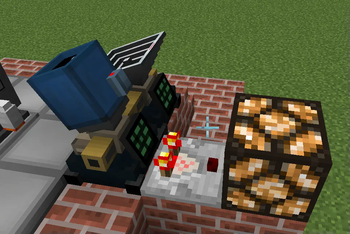
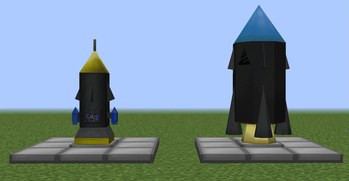
About this Mod
Galactic Research is an addon for original Galacticraft 4 or Galacticraft-Legacy
It brings new gameplay features into game.
Space research
You will have to observe and research planets with Telescope and Satellite Rocket in order to unlock them.
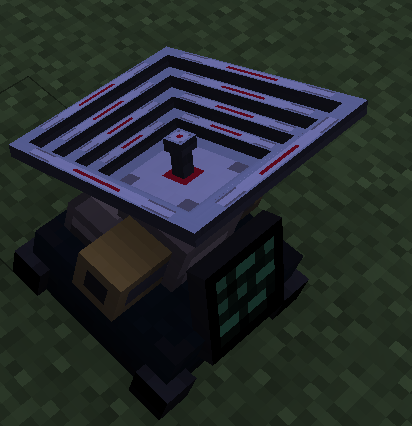
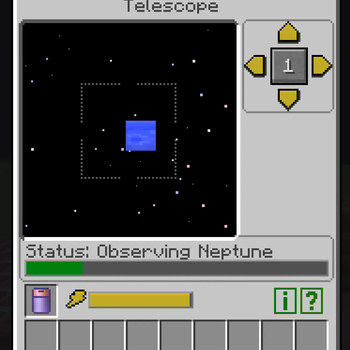
Place a telescope, plug some energy and find celestial objects. Your task is to find body, observe it until telescope collects data.
Then place Mission Control Station next to Telescope.
Mission Control Station has to be attached to rocket pad. Next you need to craft satellite rocket and place it on the pad, do not forget about fuel.
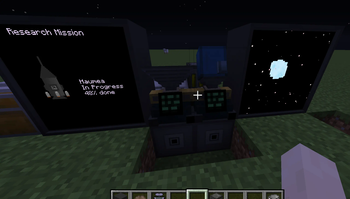
You can output mission status and telescope view on GC Screen Blocks
Then in MCS (Mission Control Station) select the planet to research, and activate the mission.
Press analyze completed missions button when missions are finished. Boom, you now can fly to the planet.
You can customize all the researchable bodies and other settings regarding research process in the galacticresearch.cfg
If you have Extra Planets or Galaxy Space addon you will have to research solar systems. In order to do that you need to place Communication Dish and link it to Mission Control Center. To do that you should use Frequency Module.
Solar systems will appear in MCS and to finally unlock them, you will have to send satellite rocket.
Minable asteroids and mining rocket
Sometimes there will appear random asteroids in Space. Observe them in telescope, and in MCS select the asteroid mission.
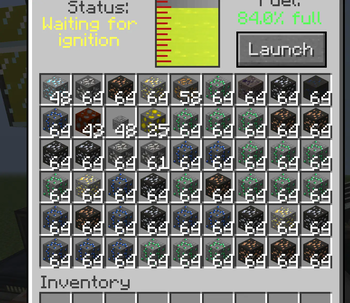
Place mining rocket on the pad and via MCS interface activate the mission. Rocket will fly to the asteroid, dig it and return back to the same pad.
You can customize many aspects of the mining process in the galacticresearch.cfg
Objects locator
MCS can be used as a locator of different objects on planet.
In order to use that functionality you need to build space station on planets orbit.
Then open MCS interface and select the station. Select object to locate and press Locate button.
Currently implemented location of:
villages, mansion, monument, temple, immersive engineering deposits, AE2 metheorites, boss dungeons
Check galacticresearch.cfg for customization
Integration with Computers
Telescope and Mission Control Station has integration with OpenComputers and Computercraft.
So you can fully automate research flow, locator and mining of asteroids.
List of methods:
component.telescope
telescope.getObservationStatus()
telescope.getResearchedBodies()
telescope.rotateTelescope(x, y)
component.mission_control_station
mission_control_station.getMissionsInfo()
mission_control_station.selectMission(name)
mission_control_station.activateMission()
mission_control_station.missionDuration()
mission_control_station.getSpaceStations()
mission_control_station.getLocatableObjects()
mission_control_station.selectSpaceStation(name)
mission_control_station.selectObjectToLocate(name)
mission_control_station.locateObject()
mission_control_station.getLocationData()
mission_control_station.setCoordinates(x,z)
Hard Mode for Dungeon Boss fight
Can be disabled in config. Brings boss fight more challenging.
Now players can't fly in a boss room (no gravisuites or angel rings anymore)
Skelleton boss:
Regenerating and attacking player while holding him. He also adds withering and blindness effect on player.
Summons evolved skeletons around himself
Creeper boss:
Casting fire underneath player (pyrokinetic)
Summons evolved creepers
Spider quen:
Can plase web underneath player and around him
Sometimes can poison player
Summons evolved spiders
Consider issue tracker for new features and bugs.
Available Versions
How to Install Galactic Research on Your Server
Order Server
Order a Minecraft Java server with at least 3 GB RAM (4 GB recommended).
Set forge Loader
In the panel under "Egg", select the forge loader and matching Minecraft version (1.12.2).
Install Mod
Open the mod browser in the dashboard and search for "Galactic Research". Click "Install" – done! Alternatively, upload the .jar via SFTP to the /mods folder.
Compatibility
Mod Loaders
Minecraft Versions
1.12.2
Server-side
✓ RequiredRecommended RAM
4 GB(min. 3 GB)Frequently Asked Questions
Galactic Research server crashes on startup – what to do?
Most common cause: wrong forge version or insufficient RAM. Check the server log (latest.log) for "OutOfMemoryError" or "Mixin" errors. With Mado Hosting: ensure at least 3 GB RAM is allocated and the loader matches the mod version (1.12.2). You can switch loaders with one click in the panel.
Is Galactic Research compatible with forge?
Galactic Research officially supports forge for Minecraft 1.12.2. The Mado dashboard automatically detects incompatible loader combinations.
Server lagging with Galactic Research – how to optimize performance?
Recommended RAM: 4 GB (per 8 players). Use /spark profiler to check if Galactic Research consumes the most tick time. Common fixes: reduce server view-distance to 8-10, install "performant" or "starlight" as supplementary mods on Forge. With Mado Hosting, your server runs on NVMe SSDs with dedicated CPU cores for minimal latency.
Similar Mods





Rent Modded Server
Install Galactic Research with just one click on your server.