
Galacticube
One block at a time, we reach the stars.
Screenshots
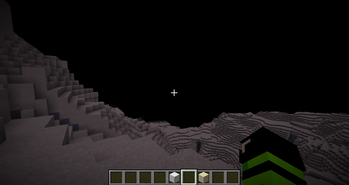
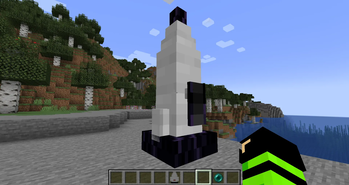
About this Mod
Galacticube 2 is a space exploration mod that expands Minecraft by adding realistic planetary travel, starting with the Moon.
This mod introduces a new dimension, low gravity, vacuum survival mechanics, and the thrill of being the first to walk on an alien world — all built block by block.
It’s not just about going to space.
It’s about feeling like you’re there.
🌑 What’s in This Version
This is the first public alpha of Galacticube 2 — a minimal but functional foundation for future expansion.
Everything you need to reach the Moon is here, even if it’s still raw.
✅ Core Features:
Lunar Rocket — Craft a rocket using iron blocks, redstone, and an observer. Right-click to launch.
Teleport to the Moon — Instant travel to a new dimension: galacticube:moon.
Low Gravity — Jump higher, fall slower. Experience the bounce of lunar movement.
Vacuum Survival — No air on the Moon. Without a helmet, you’ll suffocate.
Glass Helmet — A placeholder for now: wearing glass as a helmet lets you breathe in space.
Lunar Blocks — Mine lunar_stone and lunar_dust. The Moon is made of something new.
Silent World — Black sky, no weather, no mobs. Just you, your breath, and the void.
This is not a flight simulator — yet.
But it is a proof of concept: you can build a rocket, use it, and stand on the Moon.
🔧 Why Download This Mod?
You should download Galacticube 2 if you:
Love space, exploration, and sci-fi.
Want to feel the isolation and wonder of walking on another world.
Enjoy early-access mods and want to follow a project from its first steps.
Are curious about dimension mods, gravity changes, or survival mechanics.
Want to be part of a mod that will grow into a full solar system — with Mars, asteroids, and space stations.
This isn’t just decoration.
It’s the beginning of a journey.
⚠️ What You Need to Know Before Downloading
Version: 0.1 (Alpha) — early development. Expect bugs, changes, and missing features.
No flight animation — teleportation only. The rocket doesn’t fly; it teleports you.
No oxygen system yet — the glass helmet is a placeholder. It disables suffocation, but no tanks or mechanics.
No custom textures — all blocks use default Minecraft materials (e.g., grey stone, glass).
No sound effects — silence is part of the atmosphere (real lunar ambience coming later).
Fabric only — works on Minecraft 1.20.1 (Fabric). Not compatible with Forge, NeoForge, or other versions.
Singleplayer & LAN only — multiplayer server support will come in later versions.
This is not a finished product — it’s the first step.
But it works.
Available Versions
How to Install Galacticube on Your Server
Order Server
Order a Minecraft Java server with at least 3 GB RAM (4 GB recommended).
Set fabric Loader
In the panel under "Egg", select the fabric loader and matching Minecraft version (1.20.1).
Install Mod
Open the mod browser in the dashboard and search for "Galacticube". Click "Install" – done! Alternatively, upload the .jar via SFTP to the /mods folder.
Compatibility
Mod Loaders
Minecraft Versions
1.20.1
Server-side
✗ UnsupportedRecommended RAM
4 GB(min. 3 GB)Frequently Asked Questions
Galacticube server crashes on startup – what to do?
Most common cause: wrong fabric version or insufficient RAM. Check the server log (latest.log) for "OutOfMemoryError" or "Mixin" errors. With Mado Hosting: ensure at least 3 GB RAM is allocated and the loader matches the mod version (1.20.1). You can switch loaders with one click in the panel.
Is Galacticube compatible with fabric?
Galacticube officially supports fabric for Minecraft 1.20.1. The Mado dashboard automatically detects incompatible loader combinations.
Server lagging with Galacticube – how to optimize performance?
Recommended RAM: 4 GB (per 8 players). Use /spark profiler to check if Galacticube consumes the most tick time. Common fixes: reduce server view-distance to 8-10, install "performant" or "starlight" as supplementary mods on Forge. With Mado Hosting, your server runs on NVMe SSDs with dedicated CPU cores for minimal latency.
Similar Mods




Rent Modded Server
Install Galacticube with just one click on your server.
Details
- License
- Creative Commons Attribution Non Commercial No Derivatives 4.0 International
- Server-side
- Unsupported