
Galaxblix
A small mod to bring more life, and expandability to a modded Skyblock Experience.
Screenshots
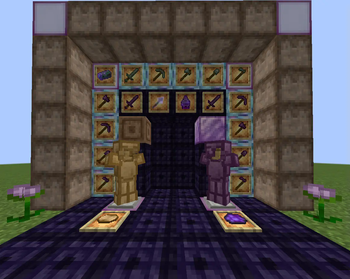
About this Mod
GalaxBlix is a mod that brings multiple things to attempt to improve general improvement and progression to modded Skyblock.
The mod includes-
-Ways to craft obsidian to get access to the nether
-Ways to craft End Portal Frames to get access to the End
-4 new Tool sets, 3 new armor set (For now)
-1 new friend (In the form of a tamable mob)
-Many new recipes to get access to certain blocks, like deepslate, sand, and gravel!
-3 new armor sets (They are very basic, and will hopefully be bettered later on)
-2 new disks! (Short but Copyright free, go wild!)
-8 new blocks
-A new boss that locks a tool and armor set behind it!
-New projectile weapon like the trident!
-And much more to hopefully come later!
(! Disclaimer !)
This mod was made using a program called Mcreator, I'm not very talented at modding, but wished to create something people could enjoy, and I could enjoy, and edit for my runs of skyblock.
The reason this disclaimer is here is because mcreator is limited by the tools made available to me, like I could not edit the models, or textures for custom armors I made, so they are default like armor sets with a color difference (I apologize).
And I do not have access to making new trees or structures at the moment, but maybe if this gets enough love I'll learn to code and improve upon it!
Available Versions
How to Install Galaxblix on Your Server
Order Server
Order a Minecraft Java server with at least 3 GB RAM (4 GB recommended).
Set fabric Loader
In the panel under "Egg", select the fabric loader and matching Minecraft version (1.20.1).
Install Mod
Open the mod browser in the dashboard and search for "Galaxblix". Click "Install" – done! Alternatively, upload the .jar via SFTP to the /mods folder.
Compatibility
Mod Loaders
Minecraft Versions
1.20.1, 1.20
Server-side
✓ RequiredRecommended RAM
4 GB(min. 3 GB)Frequently Asked Questions
Galaxblix server crashes on startup – what to do?
Most common cause: wrong fabric version or insufficient RAM. Check the server log (latest.log) for "OutOfMemoryError" or "Mixin" errors. With Mado Hosting: ensure at least 3 GB RAM is allocated and the loader matches the mod version (1.20.1). You can switch loaders with one click in the panel.
Is Galaxblix compatible with fabric?
Galaxblix officially supports fabric for Minecraft 1.20.1, 1.20. The Mado dashboard automatically detects incompatible loader combinations.
Server lagging with Galaxblix – how to optimize performance?
Recommended RAM: 4 GB (per 8 players). Use /spark profiler to check if Galaxblix consumes the most tick time. Common fixes: reduce server view-distance to 8-10, install "performant" or "starlight" as supplementary mods on Forge. With Mado Hosting, your server runs on NVMe SSDs with dedicated CPU cores for minimal latency.
Similar Mods




Rent Modded Server
Install Galaxblix with just one click on your server.