
Game Rules
Modify game rules in your existing worlds.
Screenshots
About this Mod








Modify game rules in your existing worlds, all without enabling cheats/commands! Open the game rule edit screen through Mod Menu or with the special keybinding created for the mod (by default not bound to any key).
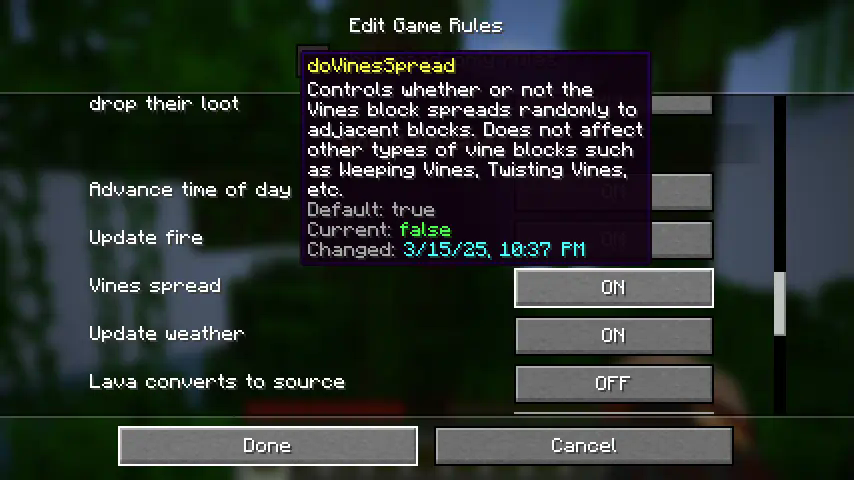
Every game rule in your world is available to edit. For multiplayer servers, editing game rules through the mod requires OP permissions.
An extra restriction exists for hardcore worlds - game rules in hardcore worlds can only be changed once! This was added as a balancing mechanism to allow long-running hardcore worlds to change settings like vine spreading (which may not have been an option years ago at world creation) without feeling too cheaty. The mod will show you the changed date and the exact time and date you changed each of the rules in your world, so that other folks might be able to hold you accountable!
The rules and behavior are still under evaluation (especially in relation to multiplayer servers), so if you have any thoughts or questions, feel free to open an issue on the mod's GitHub repo (https://github.com/Roundaround/mc-fabric-game-rules/issues).
A note on older versions
Game rules have evolved over time, so earlier versions of this mod may look or behave a bit differently. Previous versions also included multiple variants that caused some rules to be immutable; variants have since been cut for simplicity, so every game rule is now editable.
Available Versions
How to Install Game Rules on Your Server
Order Server
Order a Minecraft Java server with at least 3 GB RAM (4 GB recommended).
Set fabric Loader
In the panel under "Egg", select the fabric loader and matching Minecraft version (26.1.2).
Install Mod
Open the mod browser in the dashboard and search for "Game Rules". Click "Install" – done! Alternatively, upload the .jar via SFTP to the /mods folder.
Compatibility
Mod Loaders
Minecraft Versions
26.1.2, 26.1.1, 26.1 (+12 more)
Server-side
✓ RequiredRecommended RAM
4 GB(min. 3 GB)Frequently Asked Questions
Game Rules server crashes on startup – what to do?
Most common cause: wrong fabric version or insufficient RAM. Check the server log (latest.log) for "OutOfMemoryError" or "Mixin" errors. With Mado Hosting: ensure at least 3 GB RAM is allocated and the loader matches the mod version (26.1.2). You can switch loaders with one click in the panel.
Is Game Rules compatible with fabric and forge and neoforge and quilt?
Game Rules officially supports fabric, forge, neoforge, quilt for Minecraft 26.1.2, 26.1.1, 26.1. Note: Forge and Fabric mods are NOT cross-compatible – pick one loader and stick with it. The Mado dashboard automatically detects incompatible loader combinations.
Server lagging with Game Rules – how to optimize performance?
Recommended RAM: 4 GB (per 8 players). Use /spark profiler to check if Game Rules consumes the most tick time. Common fixes: reduce server view-distance to 8-10, install "performant" or "starlight" as supplementary mods on Forge. With Mado Hosting, your server runs on NVMe SSDs with dedicated CPU cores for minimal latency.
Similar Mods






Rent Modded Server
Install Game Rules with just one click on your server.