
Game Mod
A full-featured mini-game manager with countdown display, settings GUI, custom spawn radius, and world border control.
Screenshots


About this Mod
⚔ GameMod
— Fabric 1.21.x
A full-featured mini-game manager with countdown display, settings GUI, custom spawn radius, and world border control.
Required Dependencies (install alongside this mod)
| Mod | Download |
|---|---|
| Fabric API | https://modrinth.com/mod/fabric-api |
| Cloth Config | https://modrinth.com/mod/cloth-config |
| ModMenu | https://modrinth.com/mod/modmenu |
Commands (requires op level 2)
Game Control
| Command | Effect |
|---|---|
/game start |
Begin countdown (if set) then launch the game |
/game stop |
Cancel countdown or end an active game |
/game cooldown <time> |
Set countdown duration (e.g. 10s, 5m, 2h) |
/game cooldown |
Show current cooldown setting |
Settings
| Command | Effect |
|---|---|
/game settings or /game settings list |
Print all current settings |
/game settings display actionbar |
Show countdown in the action bar |
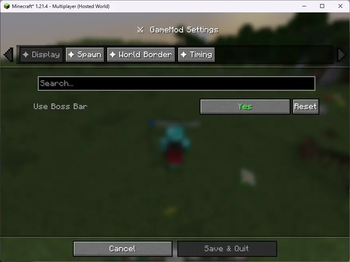
/game settings display bossbar |
Show countdown in a boss bar |
/game settings spawn here |
Set spawn to your current position |
/game settings spawn <x> <y> <z> |
Set spawn to exact coordinates |
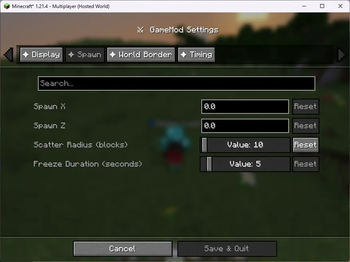
/game settings radius <blocks> |
Scatter players within N blocks of spawn (0 = exact) |
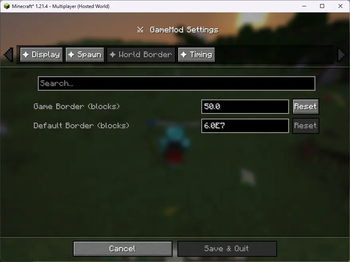
/game settings border <size> |
Set world border diameter for the game |
/game settings cooldown <time> |
Same as /game cooldown <time> |
/game settings reset |
Reset everything to defaults |
Settings GUI (ModMenu)
Open the Mods screen in-game → find Game Mod → click the ⚙ button.
Categories:
- Display — boss bar vs action bar toggle
- Spawn Location — X / Y / Z coordinates + scatter radius
- World Border — game size and post-game reset size
- Cooldown — duration in
s / m / hformat
Settings are saved to config/gamemod.json automatically.
How it Works
/game start flow
- Checks for an active countdown or game (blocks if already running)
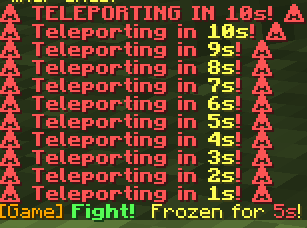
- If cooldown > 0: counts down, displaying progress on all players' screens
- At zero (or instantly): teleports all online players to a random position within the spawn radius, sets world border centred on the spawn coordinates, sets everyone to Survival
Random radius teleport
- If
radius = 0: all players land on the exact spawn point - If
radius > 0: each player gets a random angle and distance within the radius; Y is found automatically using the terrain heightmap (players always land on solid ground, not in mid-air or underground)
Eliminated players
When a player dies while a game is active they are automatically switched to Spectator mode. /game stop returns all spectators to Survival.
Countdown display
| Remaining | Action bar colour | Boss bar colour |
|---|---|---|
| > 10s | 🟢 Green | Green |
| 6 – 10s | 🟡 Yellow | Yellow |
| ≤ 5s | 🔴 Red | Red |
Config file
config/gamemod.json — edited by the GUI or commands, reloaded on next server start.
{
  "useBossBar": false,
  "spawnX": 0.0,
  "spawnY": 64.0,
  "spawnZ": 0.0,
  "spawnRadius": 25,
  "gameBorderSize": 200.0,
  "defaultBorderSize": 60000000.0,
  "cooldownSeconds": 30
}
Available Versions
How to Install Game Mod on Your Server
Order Server
Order a Minecraft Java server with at least 3 GB RAM (4 GB recommended).
Set fabric Loader
In the panel under "Egg", select the fabric loader and matching Minecraft version (26.1.1).
Install Mod
Open the mod browser in the dashboard and search for "Game Mod". Click "Install" – done! Alternatively, upload the .jar via SFTP to the /mods folder.
Compatibility
Mod Loaders
Minecraft Versions
26.1.1, 26.1, 1.21.11 (+11 more)
Server-side
✓ RequiredRecommended RAM
4 GB(min. 3 GB)Frequently Asked Questions
Game Mod server crashes on startup – what to do?
Most common cause: wrong fabric version or insufficient RAM. Check the server log (latest.log) for "OutOfMemoryError" or "Mixin" errors. With Mado Hosting: ensure at least 3 GB RAM is allocated and the loader matches the mod version (26.1.1). You can switch loaders with one click in the panel.
Is Game Mod compatible with fabric and forge and neoforge?
Game Mod officially supports fabric, forge, neoforge for Minecraft 26.1.1, 26.1, 1.21.11. Note: Forge and Fabric mods are NOT cross-compatible – pick one loader and stick with it. The Mado dashboard automatically detects incompatible loader combinations.
Server lagging with Game Mod – how to optimize performance?
Recommended RAM: 4 GB (per 8 players). Use /spark profiler to check if Game Mod consumes the most tick time. Common fixes: reduce server view-distance to 8-10, install "performant" or "starlight" as supplementary mods on Forge. With Mado Hosting, your server runs on NVMe SSDs with dedicated CPU cores for minimal latency.
Similar Mods




Rent Modded Server
Install Game Mod with just one click on your server.