
Garnished Stone Automation
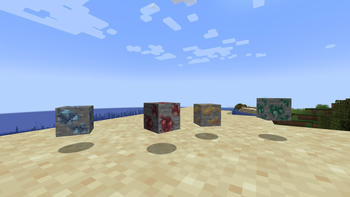
Makes Crimsite, Veridium, Asurine, and Ochrum automatable once again using Create: Garnished
Screenshots

About this Mod

Unhappy with the rework of Mastic Resin in the Create: Garnished mod? Perhaps you use 20,000 Veridium for every build that you create, or maybe you just like having fast and easy automation of Iron or Zinc. Well, here's just the mod for you!
The Rework
Create: Garnished v1.9 reworks the Mastic Resin system to no longer allow you to automatically generate the Create mod stones. This was done as a balance adjustment alongside a decoration overhaul.The Processing
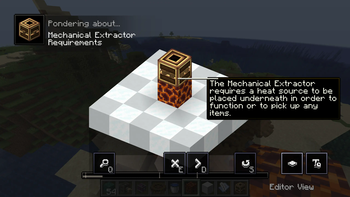
This mod adds a way for you to automate these stones once again - not without some work, but still. To get the infinite materials of your dreams - you must heat, a lot. You will need to craft a Mechanical Extractor if you want to get anywhere close to automation.Provided alongside the Mechanical Extractor are some ponder entries to help you get started - though, you can also view the information below.
Requirements
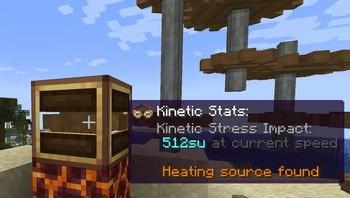
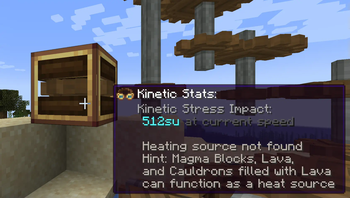
While there are no speed requirements for the Mechanical Extractor, there is something else - the heat. Currently, the only way to provide heat to the Mechanical Extractor and therefore the only way to properly utilize the machine is by placing a Magma Block or some other "heated block" underneath. Without this, it won't even allow you to insert items.Vehement Clusters
Vehement Clusters can be obtained in a few ways - one of them being recycling, but that's talked about later on. One way to obtain them is to provide a Mechanical Extractor with certain Vultanite variants.Recycling
Crimsite, Veridium, Asurine, and Ochrum can all be inserted into the Mechanical Extractor to get varying amounts of Vehement Clusters - a recycling mechanic.Available Versions
How to Install Garnished Stone Automation on Your Server
Order Server
Order a Minecraft Java server with at least 3 GB RAM (4 GB recommended).
Set fabric Loader
In the panel under "Egg", select the fabric loader and matching Minecraft version (1.21.1).
Install Mod
Open the mod browser in the dashboard and search for "Garnished Stone Automation". Click "Install" – done! Alternatively, upload the .jar via SFTP to the /mods folder.
Compatibility
Mod Loaders
Minecraft Versions
1.21.1, 1.21, 1.20.1 (+1 more)
Server-side
✓ RequiredRecommended RAM
4 GB(min. 3 GB)Frequently Asked Questions
Garnished Stone Automation server crashes on startup – what to do?
Most common cause: wrong fabric version or insufficient RAM. Check the server log (latest.log) for "OutOfMemoryError" or "Mixin" errors. With Mado Hosting: ensure at least 3 GB RAM is allocated and the loader matches the mod version (1.21.1). You can switch loaders with one click in the panel.
Is Garnished Stone Automation compatible with fabric and forge and neoforge and quilt?
Garnished Stone Automation officially supports fabric, forge, neoforge, quilt for Minecraft 1.21.1, 1.21, 1.20.1. Note: Forge and Fabric mods are NOT cross-compatible – pick one loader and stick with it. The Mado dashboard automatically detects incompatible loader combinations.
Server lagging with Garnished Stone Automation – how to optimize performance?
Recommended RAM: 4 GB (per 8 players). Use /spark profiler to check if Garnished Stone Automation consumes the most tick time. Common fixes: reduce server view-distance to 8-10, install "performant" or "starlight" as supplementary mods on Forge. With Mado Hosting, your server runs on NVMe SSDs with dedicated CPU cores for minimal latency.
Similar Mods





Rent Modded Server
Install Garnished Stone Automation with just one click on your server.