Gate Keep
Allows restricting and scheduling dimension access based on date/time.
Screenshots

About this Mod
Gate Keep
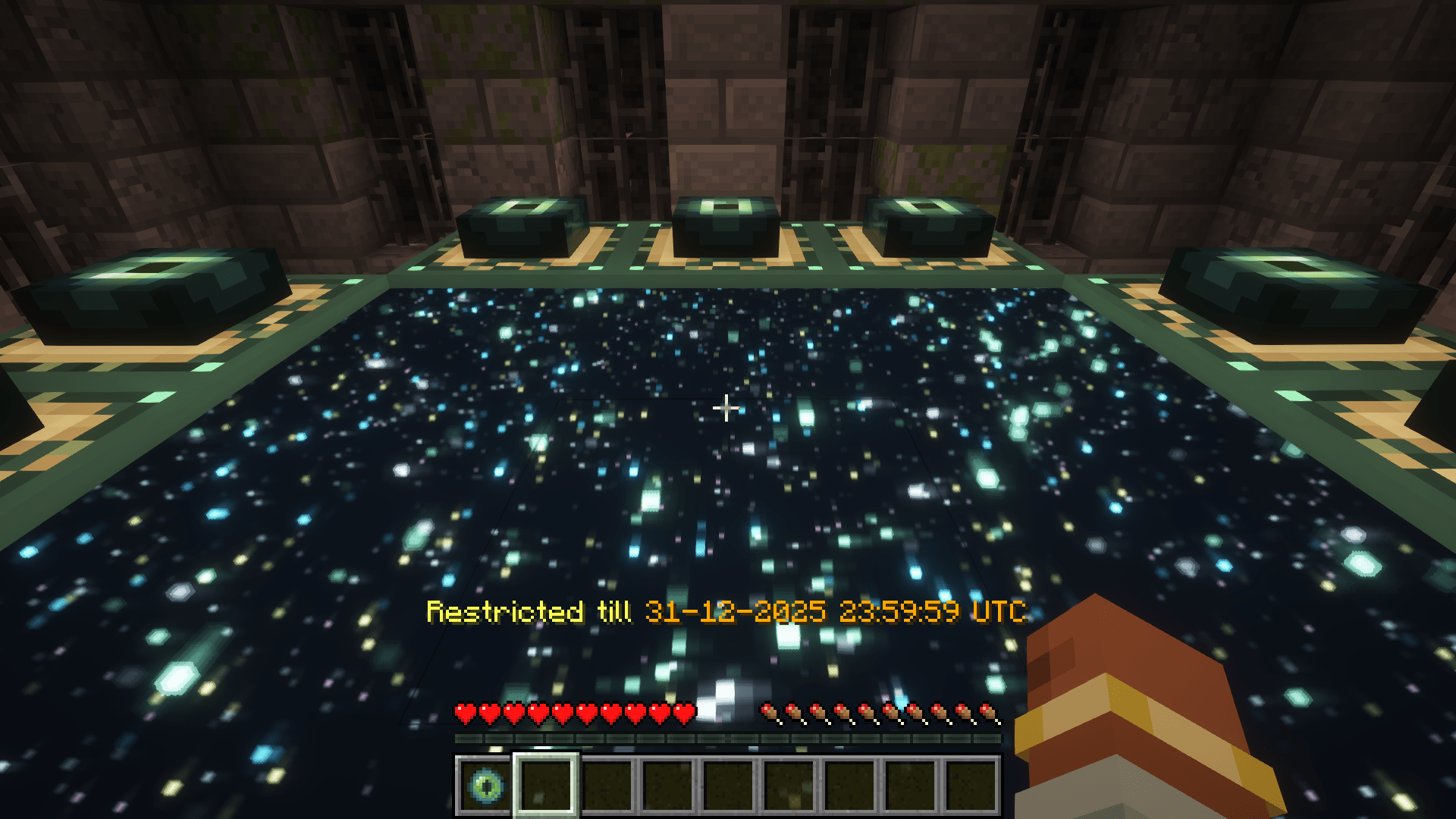
Allows server admins to control access to dimensions. With GateKeep, you can completely restrict dimensions or set up time-based restrictions that automatically unlock at specific dates and times.
Features
- Dimension Restriction: Completely block access to any dimension
- Time-Based Restrictions: Schedule dimensions to unlock at specific dates and times
- Customizable Messages: Configure the messages players receive when attempting to access restricted dimensions
- Automated Announcements: Server-wide announcements when time-restricted dimensions become available
Configuration
GateKeep uses a JSON configuration file located at config/gatekeep.json. The config file is created automatically when the mod is first loaded (in-case of a crash or mis-behavior re-check the config and deleting it and generating a fresh one)
Configuration Options
{
  "disabledDimensions": [
    "minecraft:the_end"
  ],
  "announce": true,
  "restrictedDimensionMessage": "&c%dimension% dimension is restricted",
  "timedDimensionRestrictedMessage": "&eRestricted till &6%time%",
  "unrestrictedAnnouncementMessage": "&a%dimension% dimension is now open!",
  "timeRestrictions": {
    "minecraft:the_end": {
      "enabled": true,
      "timeZone": "UTC",
      "unlockDateTime": "2024-12-31T23:59:59"
    }
  }
}
Configuration Explanation
- disabledDimensions: List of dimensions that are completely disabled
- announce: Whether to announce when time-restricted dimensions unlock
- restrictedDimensionMessage: Message displayed when a player tries to access a disabled dimension
- timedDimensionRestrictedMessage: Message displayed when a player tries to access a time-restricted dimension
- unrestrictedAnnouncementMessage: Message announced when a time-restricted dimension becomes available
- timeRestrictions: List of dimensions with time-based restrictions
- enabled: Whether the time restriction is active
- timeZone: Time zone for the unlock time (uses standard time zone IDs)
- unlockDateTime: Date and time when the dimension will unlock (ISO format)
Message Formatting
Messages support Minecraft color codes using the & character:
&0to&9,&ato&f: Colors&k: Obfuscated&l: Bold&m: Strikethrough&n: Underline&o: Italic&r: Reset
In the configuration messages, you can use the following variables:
%dimension%: Will be replaced with the formatted dimension name%time%: Will be replaced with the formatted unlock time (for time-restricted dimensions)
Examples
Basic Setup: Disable The End
{
  "disabledDimensions": ["minecraft:the_end"],
  "announce": true,
  "timeRestrictions": {}
}
Time-Restricted Nether
{
  "disabledDimensions": [],
  "announce": true,
  "timeRestrictions": {
    "minecraft:the_nether": {
      "enabled": true,
      "timeZone": "America/New_York",
      "unlockDateTime": "2024-06-01T12:00:00"
    }
  }
}
Multiple Restrictions
{
  "disabledDimensions": ["minecraft:the_end"],
  "announce": true,
  "timeRestrictions": {
    "minecraft:the_nether": {
      "enabled": true,
      "timeZone": "UTC",
      "unlockDateTime": "2024-05-15T18:00:00"
    },
    "twilightforest:twilight_forest": {
      "enabled": true,
      "timeZone": "UTC",
      "unlockDateTime": "2024-07-22T15:06:20"
    }
  }
}
How It Works
- When a player or entity attempts to change dimensions including through commands or other means that use minecrafts internal code to travel through dimensions, the mod checks if the destination dimension is restricted
- If the dimension is in the
disabledDimensionslist, access is denied - If the dimension has a time restriction that hasn't passed its unlock time, access is denied
- Players with permission level 4 (operators) can bypass all restrictions when in creative mode
- The mod regularly checks if time-restricted dimensions have reached their unlock time, these checks run on a background thread to minimize performance impact
- When a time-restricted dimension becomes available, an announcement is sent to all online players (if enabled)
Compatibility
GateKeep should be compatible with most modded dimensions and forms of dimensional travel.
Available Versions
How to Install Gate Keep on Your Server
Order Server
Order a Minecraft Java server with at least 3 GB RAM (4 GB recommended).
Set fabric Loader
In the panel under "Egg", select the fabric loader and matching Minecraft version (1.21.10).
Install Mod
Open the mod browser in the dashboard and search for "Gate Keep". Click "Install" – done! Alternatively, upload the .jar via SFTP to the /mods folder.
Compatibility
Mod Loaders
Minecraft Versions
1.21.10, 1.21.9, 1.21.8 (+11 more)
Server-side
✓ RequiredRecommended RAM
4 GB(min. 3 GB)Frequently Asked Questions
Gate Keep server crashes on startup – what to do?
Most common cause: wrong fabric version or insufficient RAM. Check the server log (latest.log) for "OutOfMemoryError" or "Mixin" errors. With Mado Hosting: ensure at least 3 GB RAM is allocated and the loader matches the mod version (1.21.10). You can switch loaders with one click in the panel.
Is Gate Keep compatible with fabric and neoforge and quilt?
Gate Keep officially supports fabric, neoforge, quilt for Minecraft 1.21.10, 1.21.9, 1.21.8. The Mado dashboard automatically detects incompatible loader combinations.
Server lagging with Gate Keep – how to optimize performance?
Recommended RAM: 4 GB (per 8 players). Use /spark profiler to check if Gate Keep consumes the most tick time. Common fixes: reduce server view-distance to 8-10, install "performant" or "starlight" as supplementary mods on Forge. With Mado Hosting, your server runs on NVMe SSDs with dedicated CPU cores for minimal latency.
Similar Mods






Rent Modded Server
Install Gate Keep with just one click on your server.