
Gateway of Doom
Throw a Devil Eye to summon a wave-based combat portal — survive all waves to claim powerful rewards. Three difficulties, fully configurable waves, rewards, debuffs and mob drops for server admins.
Screenshots
About this Mod
Throw a Devil Eye. Tear open a portal. Survive the waves. Claim the loot.
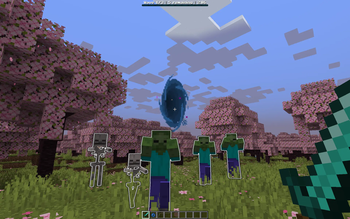
Gateway of Doom turns any open patch of ground into a high-stakes mob arena. Hurl a Devil Eye like an Eye of Ender — it streaks forward, finds a safe spot, and rips open a glowing floating portal that summons wave after wave of monsters. Fight them off against the clock, survive an optional final boss, and the gateway showers you with rewards. Fail, and it closes with a curse.
Every eye is fully configurable, and you can craft your own custom eyes right inside the game — no config files, no restarts required.
⚔ How It Works
- Throw a Devil Eye — it behaves like an Eye of Ender, flying out ahead of you.
- A portal blooms in mid-air, 3–5 blocks above the ground, in your eye's signature color. The mod automatically scans for a safe, open arena so mobs never spawn inside lava, water, or a wall.
- Waves begin. A boss bar tracks the current wave, how many mobs remain, and your countdown timer. Spawned mobs glow and gently float down on slow-fall, then hunt you down.
- Clear every mob before the timer runs out to advance. Beat the last wave — and the optional boss wave — to win.
- Win: rewards rain from the portal, plus bonus XP. Lose: the gateway fails and hits nearby players with debuffs.
Mobs are kept on a leash around the portal — wander too far and they're pulled back, so the fight always comes to the arena.
✦ Three Ready-to-Play Eyes
The mod ships with three hand-tuned difficulties, each themed around a dimension:
| Eye | Theme | Where to use it | Boss | Flavor of loot |
|---|---|---|---|---|
| 🔵 Devil Eye (Easy) | Overworld horde | The Overworld | A hulking, oversized brute | Iron, gold, bread, emeralds, diamonds, XP bottles |
| 🔴 Devil Eye (Medium) | Nether onslaught | The Nether | An empowered Wither Skeleton | Diamonds, gold blocks, blaze rods, ender pearls, golden apples, netherite scrap |
| 🟣 Devil Eye (Hard) | End nightmare | The End (outer islands) | The Wither | Netherite, diamond blocks, enchanted golden apple, totem, shulker shells, a rare Elytra |
Each eye comes with its own multi-wave gauntlet, a scaling boss, themed rewards with individual drop chances, and failure debuffs that punish defeat.
★ Earn the Eyes — Two Ways to Find Them
You don't just spawn eyes from a menu (though admins can). By default, eyes are something you discover:
- Chest loot — eyes are injected into themed structure chests. Easy eyes hide in dungeons, mineshafts and strongholds; Medium in bastions and Nether fortresses; Hard in End City treasure.
- Mob drops — slaying the right hostile mobs in the right dimension has a chance to drop the matching eye.
Both sources, the chances, and exactly which chests and mobs they come from are fully configurable per eye.
🛠 Build Your Own Eyes — Full In-Game Editor
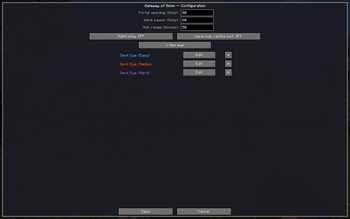
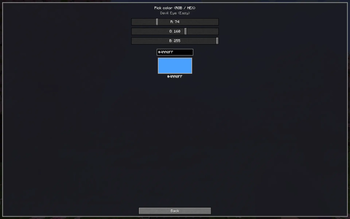
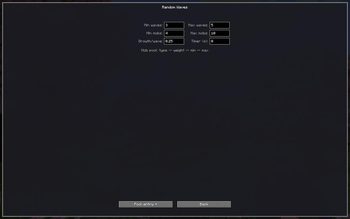
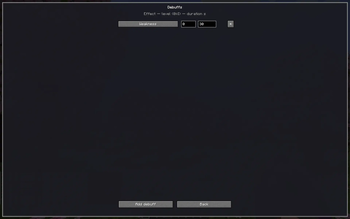
Open the admin menu with /doom (requires operator permissions) and design completely custom gateways — no file editing, no server restart. Create unlimited eyes, each with its own name and custom RGB/HEX color (the portal, particles, and boss bar all match it).
For every eye you control:
- 🌊 Waves — choose Fixed waves (hand-pick the exact mobs and counts per wave) or Random waves (define a weighted mob pool, min/max waves, mob budgets, and per-wave growth so each run is different).
- 💪 Mob strength — independent Health, Damage, and Speed boosts (as %), applied cleanly on top of true vanilla base stats so it plays nicely with other mods.
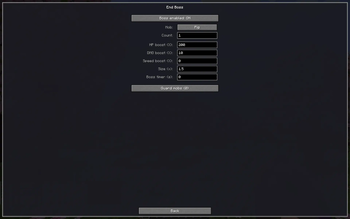
- 👑 End boss — toggle a final boss wave with its own mob type, count, size scale, HP/DMG/speed, and time limit. Add guard mobs (each with their own size and strength) and even extra bosses. A dedicated boss health bar appears during the fight.
- 🎁 Rewards — any items, any counts, each with its own % drop chance, plus completion XP.
- ☠ Failure debuffs — pick the status effects, levels, and durations applied to players when a gateway is failed.
- 🪙 Eye drops — decide which mobs drop this eye (with per-mob chance) and which chest loot tables it's injected into (or inject into every chest), with separate chest/mob drop chances.
- 🌍 Dimensions — set where each eye can be found (as loot) and where it can be activated (opens a portal), independently.
Even friendly mobs (a pig, a cow…) can be used as wave or boss mobs — the mod automatically makes them aggressive so they actually fight back.
⚙ Global Settings & Admin Tools
- Portal opening speed and pause between waves (in ticks).
- Mob range — the leash radius mobs are tethered to.
- Night only — optionally restrict portal activation to nighttime in day/night dimensions.
- Wave mob vanilla loot — toggle whether wave mobs drop their normal loot (off by default, so the reward system is the star).
- Commands:
/doomor/doom menu— open the configuration menu/doom eye give <name|id> [n]— hand out any eye/doom reload//doom reset— reload or restore default config/doom cleanup [mobs]— instantly remove stray portals and/or wave mobs across all dimensions
🧩 Built to Be Robust
- Smart spawn placement — scans for a genuinely safe arena (solid floor, open air, no lava/water/hazards) before opening, and gives the eye back if there's nowhere safe.
- Keeps ticking when you leave — portals force-load their chunks, so a gateway keeps running even if you step into another dimension, then cleans up after itself.
- No litter — abandoned gateways close on their own, and all wave mobs are tagged and cleaned up so nothing wanders off.
- Reload-safe — in-progress gateways and their waves survive world reloads.
- Multiplayer-ready — the boss bar is shared with everyone in range, and players who leave the area are dropped from it cleanly.
🎯 Perfect For
- Survival players who want an on-demand combat challenge with real rewards.
- Map & modpack makers who need fully customizable, color-coded encounter portals.
- Server admins building events, arenas, or progression gates — all configurable live, in-game.
🗺️ Roadmap
- Selection of various portal types
- Unique items for portal activation
Throw the eye. Face the doom. Take the spoils. ☠
❤️ Credits & Links
Made with ❤️ by Mrstilu2k6
🔗 Modrinth · 🔗 CurseForge · ☕ PayPal
Inspiration from gateways to eternity
💬 Found a bug? Have a suggestion? Drop it in the comments or open an issue — every piece of feedback helps shape the 2.0 update!
☕ Enjoying the mod? If you'd like to support my work, a small tip is greatly appreciated. Every bit of support helps me dedicate more time to updates and new features!
Available Versions
How to Install Gateway of Doom on Your Server
Order Server
Order a Minecraft Java server with at least 3 GB RAM (4 GB recommended).
Set fabric Loader
In the panel under "Egg", select the fabric loader and matching Minecraft version (26.1.2).
Install Mod
Open the mod browser in the dashboard and search for "Gateway of Doom". Click "Install" – done! Alternatively, upload the .jar via SFTP to the /mods folder.
Compatibility
Mod Loaders
Minecraft Versions
26.1.2, 26.1.1, 26.1 (+5 more)
Server-side
✓ RequiredRecommended RAM
4 GB(min. 3 GB)Frequently Asked Questions
Gateway of Doom server crashes on startup – what to do?
Most common cause: wrong fabric version or insufficient RAM. Check the server log (latest.log) for "OutOfMemoryError" or "Mixin" errors. With Mado Hosting: ensure at least 3 GB RAM is allocated and the loader matches the mod version (26.1.2). You can switch loaders with one click in the panel.
Is Gateway of Doom compatible with fabric and forge and neoforge?
Gateway of Doom officially supports fabric, forge, neoforge for Minecraft 26.1.2, 26.1.1, 26.1. Note: Forge and Fabric mods are NOT cross-compatible – pick one loader and stick with it. The Mado dashboard automatically detects incompatible loader combinations.
Server lagging with Gateway of Doom – how to optimize performance?
Recommended RAM: 4 GB (per 8 players). Use /spark profiler to check if Gateway of Doom consumes the most tick time. Common fixes: reduce server view-distance to 8-10, install "performant" or "starlight" as supplementary mods on Forge. With Mado Hosting, your server runs on NVMe SSDs with dedicated CPU cores for minimal latency.
Similar Mods




Rent Modded Server
Install Gateway of Doom with just one click on your server.