Gear Tinkering
Adds new uses for the smithing table : repair cost resetting, trim removal, curse removal, enchantment transferring and book unsigning!
Screenshots
About this Mod
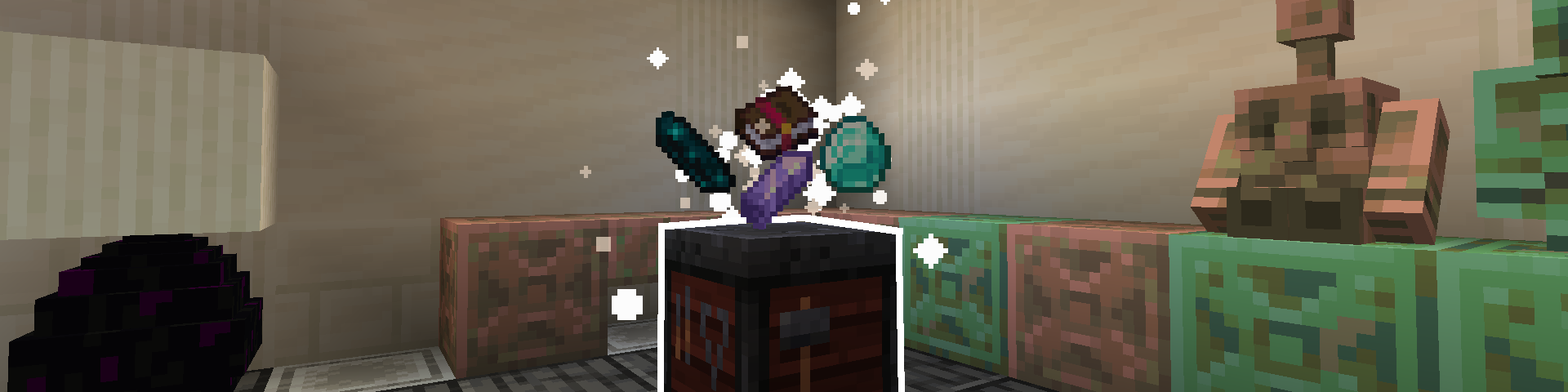
This data pack adds many new uses to the smithing table that should make working with your tools and armor much less of a pain. All "recipes" work by combining certain items by throwing them on top of a smithing table.
You can use /function gear_tinkering:_config to access a config menu, allowing you to disable any features you don't like. By default, all features are enabled.
If you want to uninstall the data pack, it's recommended to run the /function gear_tinkering:_uninstall command to get rid of the scoreboards this data pack adds.
Here's a full list of every included feature :
Repair Cost Resetting
Combine amethyst shards with an item to lower its repair cost! This can be done as many times as you'd like, with each amethyst shard lowering repair cost by one. You'll know the repair cost is at its minimum when a white puff of smoke appears on the item and amethyst shards don't combine with it anymore.
This should make enchanting using books less of a struggle and make repairing using an anvil somewhat of a viable option compared to mending.
(For those who don't know, in vanilla Minecraft, every time an item is repaired or combined with another item at an anvil, the hidden "repair cost" value of the item goes up and makes repairing and combining it more expensive until the anvil displays a "Too Expensive!" message that makes working with the item further impossible.)
Trim Removal
Combine a diamond with a trimmed armor piece item to remove its trim! For some reason, there isn't a way to remove armor trims in vanilla. Because of the way this is implemented, it should work with the Tool Trims mod, Elytra Trims mod, and really any other mod that adds trims (as long as the trims work using a trim component and not a custom component, so it wouldn't work with the Tool Trims data pack for example).
Curse Removal
Combine an echo shard with a cursed item (an item with curse of vanishing or binding) to remove the curses! Be careful though, as doing this will summon a vex... (this is configurable, so you can make it not spawn a vex if you want. But that's no fun.)
Enchantment Transferring
Combine an enchanted item with a regular book to transfer the enchantments from the item to the book! There are tons of ways this could be useful, for example extracting enchantments from gold tools found in ruined portal chests or iron tools found in end cities in order to have those enchantments on actual useful gear. Some might consider this a bit overpowered, but that's why there's a configuration menu that lets you disable this if you don't want it.
Book Unsigning (1.21.5 and up only)
Combine an written, signed book with a feather and an ink sac to unsign the book! This lets you write in it again as if it had never been signed, though the author and title of the book will be lost. Useful for if you've accidentally signed a book you weren't done with!
Available Versions
How to Install Gear Tinkering on Your Server
Order Server
Order a Minecraft Java server with at least 3 GB RAM (4 GB recommended).
Set datapack Loader
In the panel under "Egg", select the datapack loader and matching Minecraft version (26.1.2).
Install Mod
Open the mod browser in the dashboard and search for "Gear Tinkering". Click "Install" – done! Alternatively, upload the .jar via SFTP to the /mods folder.
Compatibility
Mod Loaders
Minecraft Versions
26.1.2, 26.1.1, 26.1 (+25 more)
Server-side
✓ RequiredRecommended RAM
4 GB(min. 3 GB)Frequently Asked Questions
Gear Tinkering server crashes on startup – what to do?
Most common cause: wrong datapack version or insufficient RAM. Check the server log (latest.log) for "OutOfMemoryError" or "Mixin" errors. With Mado Hosting: ensure at least 3 GB RAM is allocated and the loader matches the mod version (26.1.2). You can switch loaders with one click in the panel.
Is Gear Tinkering compatible with datapack and fabric and forge and neoforge and quilt?
Gear Tinkering officially supports datapack, fabric, forge, neoforge, quilt for Minecraft 26.1.2, 26.1.1, 26.1. Note: Forge and Fabric mods are NOT cross-compatible – pick one loader and stick with it. The Mado dashboard automatically detects incompatible loader combinations.
Server lagging with Gear Tinkering – how to optimize performance?
Recommended RAM: 4 GB (per 8 players). Use /spark profiler to check if Gear Tinkering consumes the most tick time. Common fixes: reduce server view-distance to 8-10, install "performant" or "starlight" as supplementary mods on Forge. With Mado Hosting, your server runs on NVMe SSDs with dedicated CPU cores for minimal latency.
Similar Mods




![[TaCZ] Timeless and Classics Zero](https://cdn.modrinth.com/data/SzzJttH8/fd27766d2bb8390d284696b1dbd358f87e081439_96.webp)

Rent Modded Server
Install Gear Tinkering with just one click on your server.