
GearTags
A Mod that Displays Info about Other Players' Gear in an Overlay like Nametags.
Screenshots
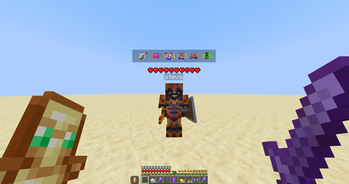


About this Mod
🎯 GearTags — Gear Durability / Count at a Glance
Ever wondered how much durability your enemy's armor or weapons have? If so, GearTags got you Covered!

GearTags is a lightweight, client-sided fabric mod that displays other players Armor and Hand Items durability / count directly above them just like nametags giving you the edge in battles.
✨ Features
In-world gear overlays
- Shows what armor and weapons other players have equipped.
- Uses Color-Coded durability text so you can instantly distinguish gear durability.
- Works seamlessly on almost all servers (vanilla or modded) since it’s fully client-side.
Configurable display
- Easily tweak Overlay, Item Icon & Text visuals.
Simple commands & menus
/geartags— Open the GearTags config screen directly in-game.- Mod Menu integration — Configure settings through Mod Menu if installed.
Lightweight & flexible
- Renders efficiently without lag.
- Perfect for PvP & Co-Operative Play.
Toggle Keybind
- Supports a keybind to toggle the Overlay.
- Configurable under vanilla controls settings in miscellaneous category.
- Default Keybind:
none
🛠️ Use Cases
- PvP — Always know who's Armor/Food will last longer.
- Co-op — Always know when your teammate's gear would break.
- Casual play — Simply enjoy knowing what others are using without intrusive menus.
📦 Dependencies
GearTags requires:
GearTags recommends:
✅ Permissions
You may include this mod in any modpack, public or private, without asking for permission, as long as proper credit is given.
📜 License
GearTags is licensed under the MIT License.
You are free to use, modify, and redistribute this mod or its source code, provided that proper credit is given to MysticBlazeYT.
Available Versions
How to Install GearTags on Your Server
Order Server
Order a Minecraft Java server with at least 3 GB RAM (4 GB recommended).
Set fabric Loader
In the panel under "Egg", select the fabric loader and matching Minecraft version (1.21.11).
Install Mod
Open the mod browser in the dashboard and search for "GearTags". Click "Install" – done! Alternatively, upload the .jar via SFTP to the /mods folder.
Compatibility
Mod Loaders
Minecraft Versions
1.21.11, 1.21.10, 1.21.9 (+15 more)
Server-side
✗ UnsupportedRecommended RAM
4 GB(min. 3 GB)Frequently Asked Questions
GearTags server crashes on startup – what to do?
Most common cause: wrong fabric version or insufficient RAM. Check the server log (latest.log) for "OutOfMemoryError" or "Mixin" errors. With Mado Hosting: ensure at least 3 GB RAM is allocated and the loader matches the mod version (1.21.11). You can switch loaders with one click in the panel.
Is GearTags compatible with fabric?
GearTags officially supports fabric for Minecraft 1.21.11, 1.21.10, 1.21.9. The Mado dashboard automatically detects incompatible loader combinations.
Server lagging with GearTags – how to optimize performance?
Recommended RAM: 4 GB (per 8 players). Use /spark profiler to check if GearTags consumes the most tick time. Common fixes: reduce server view-distance to 8-10, install "performant" or "starlight" as supplementary mods on Forge. With Mado Hosting, your server runs on NVMe SSDs with dedicated CPU cores for minimal latency.
Similar Mods



![[TaCZ] Timeless and Classics Zero](https://cdn.modrinth.com/data/SzzJttH8/fd27766d2bb8390d284696b1dbd358f87e081439_96.webp)


Rent Modded Server
Install GearTags with just one click on your server.