
Gelcraft
Enhance your Minecraft experience with this datapack! Add new tools, weapons, and unique items to the game, designed to expand your adventures and bring variety to your world. Perfectly balanced and fully integrated, these additions are crafted to elevate
Screenshots


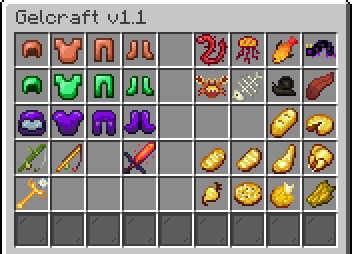


About this Mod





🔗 Join the Community!
Need help, want to report bugs, or just chat with others using this datapack?
👉 Join our Discord server — everyone’s welcome!
📦 Installation Guide:
This Datapack is compatible with Minecraft 1.21.4+.
To install:
- Remove any previous version of the datapack.
- Place the new version into your world's
datapacksfolder.
⚠️ Important:
Make sure to download and enable the Resource Pack
💬 Feedback & Support:
Found a bug? Have a question or suggestion?
Feel free to leave a comment and I’ll get back to you as soon as I can!
❓ FAQ
Q1: Where can I download the Resource Pack?
A1: Open the Datapack download page — there will be an additional Resourcepack file available for download separately.
Show step by step
Step 𝟭
Go to version tab

Step 𝟮
Select any version you want to download and then click into it. (This image just for example)

Step 𝟯
Scroll down to the bottom until you find Files. It have two file, ones for DP and ones for RP

Q2: Is this datapack support in multiplayer?
A2: Yes, definitely!
Available Versions
How to Install Gelcraft on Your Server
Order Server
Order a Minecraft Java server with at least 3 GB RAM (4 GB recommended).
Set datapack Loader
In the panel under "Egg", select the datapack loader and matching Minecraft version (1.21.8).
Install Mod
Open the mod browser in the dashboard and search for "Gelcraft". Click "Install" – done! Alternatively, upload the .jar via SFTP to the /mods folder.
Compatibility
Mod Loaders
Minecraft Versions
1.21.8, 1.21.7, 1.21.6 (+2 more)
Server-side
✓ RequiredRecommended RAM
4 GB(min. 3 GB)Frequently Asked Questions
Gelcraft server crashes on startup – what to do?
Most common cause: wrong datapack version or insufficient RAM. Check the server log (latest.log) for "OutOfMemoryError" or "Mixin" errors. With Mado Hosting: ensure at least 3 GB RAM is allocated and the loader matches the mod version (1.21.8). You can switch loaders with one click in the panel.
Is Gelcraft compatible with datapack and fabric and forge and minecraft and neoforge and quilt?
Gelcraft officially supports datapack, fabric, forge, minecraft, neoforge, quilt for Minecraft 1.21.8, 1.21.7, 1.21.6. Note: Forge and Fabric mods are NOT cross-compatible – pick one loader and stick with it. The Mado dashboard automatically detects incompatible loader combinations.
Server lagging with Gelcraft – how to optimize performance?
Recommended RAM: 4 GB (per 8 players). Use /spark profiler to check if Gelcraft consumes the most tick time. Common fixes: reduce server view-distance to 8-10, install "performant" or "starlight" as supplementary mods on Forge. With Mado Hosting, your server runs on NVMe SSDs with dedicated CPU cores for minimal latency.
Similar Mods




![[TaCZ] Timeless and Classics Zero](https://cdn.modrinth.com/data/SzzJttH8/fd27766d2bb8390d284696b1dbd358f87e081439_96.webp)

Rent Modded Server
Install Gelcraft with just one click on your server.
Details
- License
- Creative Commons Attribution Non Commercial Share Alike 4.0 International
- Server-side
- Required