
Gelaria
Frozen world dimension + many ice and snow variants, including slabs, stairs and walls, new creatures and unique game mechanics.
Screenshots
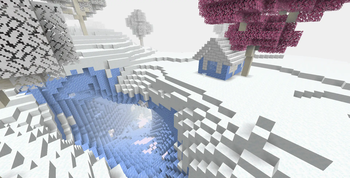
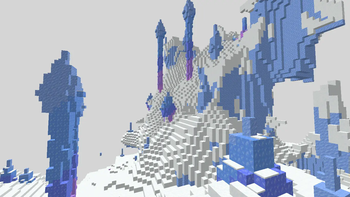
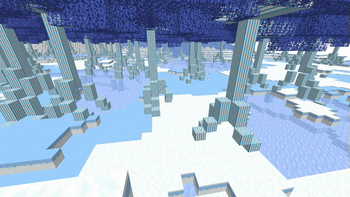


About this Mod
Vanilla-friendly winter-themed (no christmas) frozen world dimension with exclusive biomes, creatures, game progression and many different variants of ice and snow, including coloured ice, packed snow, stairs, slabs, walls, glowing ice which doesn't melt ice and snow and ice tools with innate silk touch for mining ice and snow variants. Exploration akin to the feeling of an alien planet which is both blooming and desolate depending on where you go.
- Stackable Powder Snow: allows Powder Snow to stack as a block in the inventory.
- New Sword Enchantment: Frostbite.
- New Potion Effects: Freezing and Cold Resistance.
- Water in cold biomes will now freeze the player as Powder Snow when not wearing leather or fur (new) armour (can be disabled by commands).
- Changes the recipes for compressing ice blocks to use 4 of the previous tier instead of 9, new ice colours, stairs, slabs and walls.
- New, more convenient recipes for turning snowballs into snow layer and vice versa.
- Packed snow blocks and packed snow bricks, with stairs, slabs and walls.
Built-in compatibility with Tconstruct (1.16.5 only), On Thin Ice (1.20.1 only), Ice and Fire, Iron's Spellbooks, Biomes We've Gone, Twilight Forest, Ars Nouveau, Realistic Minerals, ColdSweat, ToughAsNails, Pollution of the Realms and Draugr Invasion.
It is completely possible to leave the dimension and complete the game purely with Gelarian materials, in case players find themselves stuck in Gelaria of if they wish to start the game there. Ice does not melt in the dimension.
To construct a Gelarian portal, make a 5x5 frame out of any cold block, can be vertical or horizontal, fill the 3x3 inside with 8 transparent ice blocks and then place an Enchanted Ice in the middle. The portal does not light instantaneously, but slowly converts the ice into portal blocks. The portal can be made of any size but each 3×3 area requires one Enchanted Ice.
Can I use this mod in my modpack?
Absolutely! The goal of Gelaria is to integrate into Minecraft and feel as if it was part of the Vanilla game, that is why it does not add any new Creative Inventory tab. This mod is planned since 2012, way before Packed Ice was added to the game, back when all ice was transparent and meltable. Only now this mod is finally being realised.
Playing as a Yeti
To become a Yeti or turn your players into Yeti, use the command /isyeti [playerName] [true/false], this will give them immunity to freezing and additional held breath time. From version 3.81 onwards, this command will also change the player's size. A method to become a cold creature in survival without commands is planned. You can check if a given player is a Yeti by typing /isyeti [playerName].
Commands
/isYeti [PlayerName] [true/false]: makes a player a Yeti or not.
/isYeti [PlayerName]: informs you if a player is a Yeti or not.
/gamerule decreasePenguinSpawning [true/false] (default: false): decreases the amount of Penguins spawning to reduce RAM usage. If True, Penguins will not spawn if there are already Penguins within a given radius, similar to how Endermen and Ghasts spawn in the Nether. This gamerule was removed in version 3.80 as penguin spawning was changed to match vanilla passive mob spawning.
/gamerule doWaterFreeze [true/false] (default: true): if True, unprotected players touching water in snowy biomes will freeze as if in Powder Snow.
/gamerule doAirFreeze [true/false] (default: false) [WIP]: if True, unprotected players will always freeze in snowy biomes when not near a warm light source (not currently working).
Make your mods compatible with Gelaria!
I don't expect moddders to add compatibility with my mods, so I try my best to make them compatible with everything I can, but if you wish to help:
- Tag any ice block in the block tag gelaria:ice_blocks, this will ensure the Ice Pickaxe's innate silk touch works on them and that they can be used as Gelarian portal frames.
- Tag any snow block which is mineable with a shovel in the block tag gelaria:snow_blocks, this will ensure the Ice Shovel's innate silk touch works on them and that they can be used as Gelarian portal frames.
- Any snow block not mineable with a Shovel and any other sort of cold block can be tagged as gelaria:cold_blocks. Blocks tagged as gelaria:ice_blocks and gelaria:snow_blocks are automatically added to gelaria:cold_blocks.
- In Minecraft version 1.20.1 and lower, these tags use the forge namespace rather than gelaria.
Should my creature be tagged as gelaria:cold_creatures?
- If your entity has adapted to cold environments but needs to protect itself from it via fur, fat or other method such as polar bears, goats and mammoths, they are not gelaria:cold_creatures, and should be tagged only as minecraft:freeze_immune_entity_types and/or minecraft:powder_snow_walkable_mobs. Be aware that water in frozen biomes deals freezing damage when Gelaria is installed, so marine animals who live in frigid waters should also be included in minecraft:freeze_immune_entity_types.
- If your entity is made from the cold itself and benefits from it such as ice elementals and snow golems, then they should be tagged as gelaria:cold_creatures, this will ensure they are immune to all cold damage from every mod that is compatible with Gelaria, they will also have snow particles around them in recent versions. In the future, it is planned for Cold Creatures to not attack one another unless provoked. Entities tagged as gelaria:cold_creatures are automatically added to minecraft:freeze_immune_entity_types and minecraft:powder_snow_walkable_mobs.
Available Versions
How to Install Gelaria on Your Server
Order Server
Order a Minecraft Java server with at least 3 GB RAM (4 GB recommended).
Set forge Loader
In the panel under "Egg", select the forge loader and matching Minecraft version (1.21.10).
Install Mod
Open the mod browser in the dashboard and search for "Gelaria". Click "Install" – done! Alternatively, upload the .jar via SFTP to the /mods folder.
Compatibility
Mod Loaders
Minecraft Versions
1.21.10, 1.21.9, 1.21.8 (+9 more)
Server-side
✓ RequiredRecommended RAM
4 GB(min. 3 GB)Frequently Asked Questions
Gelaria server crashes on startup – what to do?
Most common cause: wrong forge version or insufficient RAM. Check the server log (latest.log) for "OutOfMemoryError" or "Mixin" errors. With Mado Hosting: ensure at least 3 GB RAM is allocated and the loader matches the mod version (1.21.10). You can switch loaders with one click in the panel.
Is Gelaria compatible with forge and neoforge?
Gelaria officially supports forge, neoforge for Minecraft 1.21.10, 1.21.9, 1.21.8. The Mado dashboard automatically detects incompatible loader combinations.
Server lagging with Gelaria – how to optimize performance?
Recommended RAM: 4 GB (per 8 players). Use /spark profiler to check if Gelaria consumes the most tick time. Common fixes: reduce server view-distance to 8-10, install "performant" or "starlight" as supplementary mods on Forge. With Mado Hosting, your server runs on NVMe SSDs with dedicated CPU cores for minimal latency.
Similar Mods




Rent Modded Server
Install Gelaria with just one click on your server.