
Gems
A Minecraft mod that adds jewelry, gems and new tools
About this Mod
To make your first jewelry you need to get geode from deepslate with geologist's hammer.
Geode can be sawed using stonecutter (shift + right click). The stone wich geode contains can be either vanilla or gem from this mod. Gem can be polished using grindstone (shift + right click) and then it will be ready to use in jewelry craft. Every jewelry has its own abilities when you wear it
Aquamarine earrings give you a conduit power effect when you're in water
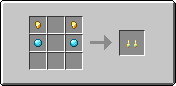
Topaz ring sets mobs which you hit on fire
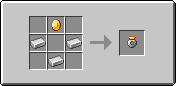
Aventurine necklace heals you every time you hit an enemy (has 0.5 sec timer)
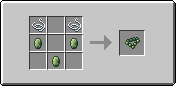
Ruby pendant highlights enemies in a small radius
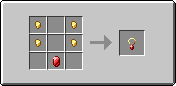
Jade amulet increases your damage against undead
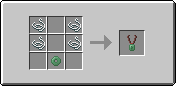
Miner's Amulet gives you haste and night vision when you're under 0 level
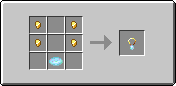
Garnet ring saves you and gives buffs when your hp is below 6 but takes 30 second to recharge
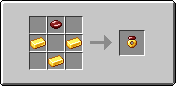
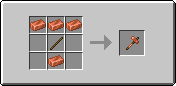
Also this mod introduces new tools better than netherite and each one has its own ability. To craft this tools you will need rare geode called rich geode and get omnishard from it. Omnishard can be polished to omniessence but can't be used in jewelry craft. You need to smith your netherite tool (sword, axe or pickaxe) with omniessence using any polished gem as a template
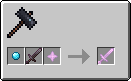
Omnisword gives you random buff and random debuff to your enemy every time you hit him
Omnipicaxe swaps between silk touch, fortune 3 and nothing (other enchantments aren't affected) and also can mine geodes like geologist's hammer
Omniaxe drops from 2 to 5 planks of the same wood type when you strip a log
Available Versions
How to Install Gems on Your Server
Order Server
Order a Minecraft Java server with at least 3 GB RAM (4 GB recommended).
Set fabric Loader
In the panel under "Egg", select the fabric loader and matching Minecraft version (1.20.1).
Install Mod
Open the mod browser in the dashboard and search for "Gems". Click "Install" – done! Alternatively, upload the .jar via SFTP to the /mods folder.
Compatibility
Mod Loaders
Minecraft Versions
1.20.1
Server-side
✓ RequiredRecommended RAM
4 GB(min. 3 GB)Frequently Asked Questions
Gems server crashes on startup – what to do?
Most common cause: wrong fabric version or insufficient RAM. Check the server log (latest.log) for "OutOfMemoryError" or "Mixin" errors. With Mado Hosting: ensure at least 3 GB RAM is allocated and the loader matches the mod version (1.20.1). You can switch loaders with one click in the panel.
Is Gems compatible with fabric?
Gems officially supports fabric for Minecraft 1.20.1. The Mado dashboard automatically detects incompatible loader combinations.
Server lagging with Gems – how to optimize performance?
Recommended RAM: 4 GB (per 8 players). Use /spark profiler to check if Gems consumes the most tick time. Common fixes: reduce server view-distance to 8-10, install "performant" or "starlight" as supplementary mods on Forge. With Mado Hosting, your server runs on NVMe SSDs with dedicated CPU cores for minimal latency.
Similar Mods




Rent Modded Server
Install Gems with just one click on your server.