
GeoScanner
Ore scanner with two modes — signal detector and full ESP. Server protection built-in. Forge 1.20.1.
Screenshots

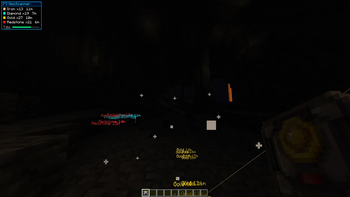

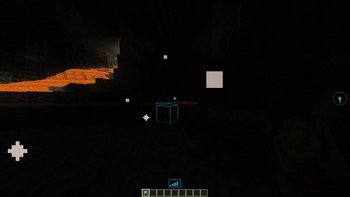
About this Mod
Russian :
GeoScanner - Инструмент сканирования руд с двумя режимами работы, серверной защитой и кастомным HUD. Forge 1.20.1.
Режимы работы
Обычный режим
Сканирует руды в радиусе 12 блоков. Результат отображается в виде детектора сигнала — 5 вертикальных полосок над хотбаром. Чем ближе ближайшая руда, тем больше полосок активировано; цвет соответствует типу руды. При наведении прицела на обнаруженный блок под прицелом появляется его название на языке игры. Выделение блоков видимо только при прямой видимости (depth test включён). Никакого X-Ray, никаких координат.
Делюкс режим
Полноценный ESP с рендерингом сквозь породу:
- Заливка блоков с пульсацией
- Двойной контур (широкий + точный)
- Линии от игрока к ближайшей руде каждого типа
- Billboard-подписи с расстоянием в 3D-пространстве
- HUD-панель со статистикой и таймером обратного отсчёта
- Отслеживание игроков в радиусе 64 блоков с ESP-рамкой
- Авто-скан с настраиваемым интервалом (15 / 30 / 60 / 120 с)
- Меню настроек — клавиша F6
Серверная защита
Делюкс-режим автоматически блокируется при подключении к публичным серверам. Попытка зайти с активным Делюксом перехватывается ещё до установки соединения — мод предложит переключиться в обычный режим. В качестве «публичного сервера» не считаются: localhost, LAN, e4mc, playit.gg и аналогичные туннели.
Серверный конфиг (geoscanner-server.toml) позволяет принудительно отключить X-Ray на уровне сервера независимо от клиентского режима.
Предмет
- Крафт: 2 заряда
- Кулдаун: 2 секунды
- При израсходовании зарядов предмет превращается в «Сломанный ГеоСканер» — чинится на верстаке
- Поддерживаемые руды: алмаз, изумруд, золото, железо, редстоун, лазурит, медь, древний обломок, уголь
- Полная локализация: русский и английский
Forge 1.20.1
Режим Deluxe предназначен для использования только на одиночных или частных серверах. Защита публичных серверов обеспечивается самим модом.
English :
GeoScanner — Ore scanning tool with two operating modes, server-side protection and a custom HUD. Forge 1.20.1.
Modes
Normal Mode
Scans for ores within a 12-block radius. Results are displayed as a signal detector — 5 vertical bars above the hotbar. The closer the nearest ore, the more bars are lit; color matches the ore type. When the crosshair is aimed at a detected block, its localized name appears below the crosshair. Block highlighting is only visible with direct line of sight (depth test enabled). No X-Ray, no coordinates.
Deluxe Mode
Full ESP with through-wall rendering:
- Block fill with pulse animation
- Double outline (thick + sharp)
- Lines from the player to the nearest ore of each type
- Billboard labels with distance in 3D space
- HUD panel with ore statistics and a countdown timer
- Player tracking within 64 blocks with ESP bounding box
- Auto-scan with configurable interval (15 / 30 / 60 / 120 s)
- Settings menu — F6
Server Protection
Deluxe mode is automatically blocked when connecting to public servers. Attempting to join with Deluxe active is intercepted before the connection is established — the mod will prompt the player to switch to Normal mode. The following are not considered public servers: localhost, LAN, e4mc, playit.gg and similar tunnels.
The server config (geoscanner-server.toml) allows forcing X-Ray off at the server level regardless of the client's active mode.
Item
- Craft: 2 charges
- Cooldown: 2 seconds
- When charges are depleted the item becomes a "Broken GeoScanner" — repaired at a crafting table
- Supported ores: diamond, emerald, gold, iron, redstone, lapis lazuli, copper, ancient debris, coal
- Full localization: English and Russian
Forge 1.20.1
Available Versions
How to Install GeoScanner on Your Server
Order Server
Order a Minecraft Java server with at least 3 GB RAM (4 GB recommended).
Set forge Loader
In the panel under "Egg", select the forge loader and matching Minecraft version (1.20.1).
Install Mod
Open the mod browser in the dashboard and search for "GeoScanner". Click "Install" – done! Alternatively, upload the .jar via SFTP to the /mods folder.
Compatibility
Mod Loaders
Minecraft Versions
1.20.1
Server-side
✓ RequiredRecommended RAM
4 GB(min. 3 GB)Frequently Asked Questions
GeoScanner server crashes on startup – what to do?
Most common cause: wrong forge version or insufficient RAM. Check the server log (latest.log) for "OutOfMemoryError" or "Mixin" errors. With Mado Hosting: ensure at least 3 GB RAM is allocated and the loader matches the mod version (1.20.1). You can switch loaders with one click in the panel.
Is GeoScanner compatible with forge?
GeoScanner officially supports forge for Minecraft 1.20.1. The Mado dashboard automatically detects incompatible loader combinations.
Server lagging with GeoScanner – how to optimize performance?
Recommended RAM: 4 GB (per 8 players). Use /spark profiler to check if GeoScanner consumes the most tick time. Common fixes: reduce server view-distance to 8-10, install "performant" or "starlight" as supplementary mods on Forge. With Mado Hosting, your server runs on NVMe SSDs with dedicated CPU cores for minimal latency.
Similar Mods




![[TaCZ] Timeless and Classics Zero](https://cdn.modrinth.com/data/SzzJttH8/fd27766d2bb8390d284696b1dbd358f87e081439_96.webp)

Rent Modded Server
Install GeoScanner with just one click on your server.