
Geotagged Screenshots
Enriches screenshots with metadata like in-game coordinates to make them viewable in Xaero's World Map.
Screenshots
About this Mod
Ever wanted to make memorable memories memorizable? Give this mod a shot.
📜 Motivation
Minecraft saves all taken screenshots inside a single folder without context information. Making it difficult if you are looking for specific screenshots of a certain world or a special place.
This can be improved so that players can take an imaginary journey back to visited places.
💡 About
Whenever you create a new screenshot in Minecraft this mods adds various information about your in-game location to the screenshot file.
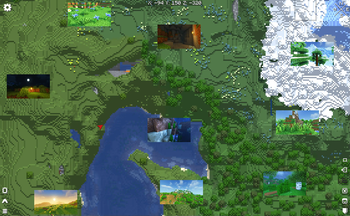
In addition to that it also creates new waypoints to Xaero's World Map and Minimap to the exact same location in a separate waypoint set: Geotagged Screenshots
These two pieces of information are being used to render the screenshots in Xaero's World Map.
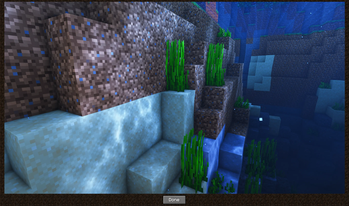
All of these can be viewed in a full screen viewer by left-clicking it.
Both mods, Xaero's World Map and Minimap, are required dependencies.

⚙️ How does it work?
Geotagged Screenshots currently adds the following metadata to newly created screenshots:
- a generated screenshot identifier
- a generated identifier of the world in which the screenshot was taken
- player coordinates at the time of creation
- dimension-id at the time of creation
Furthermore it creates a separate directory for thumbnails (each file includes the same metadata as the original one). These thumbnails are used to display them in the world map. Screenshots will only be loaded for the fullscreen viewer.
❗ Important Notes
- This mod has been tested carefully. However it is still in beta. Please report any bugs you are facing.
- This project is not associated neither officially supported by Xaero's World Map/Minimap.
- Geotagged Screenshots tries to be as less invasive as possible. However it needed to achieve compatbility with Xaero's World Map and Minimap by itself. Before reporting any bugs to Xaero make sure the bug is still happen without Geotagged Screenshots installed. Otherwise report it to me.
- Removing a screenshots waypoint will make the screenshot dissapear from the world map.
🔭 Limitations and Roadmap
Currently world backups needs to include the thumbnails directory since they are not recreated. This will be improved in future.Thumbnail regeneration has been added in 0.2.0- Location metadata is only added to newly created screenshots. Enriching existing ones will be added in the future.
- A proper config file is work in progress
📝 FAQ
Q: I cannot see my created screenshots in the world map.
A: Make sure to select the waypoint set "Geotagged Screenshots".
Q: Can I use Geotagged Screenshots in my modpack?
A: Yes - Feel free to include it - Remember to give credit and don't claim it as your own creation.
Q: Are you going to create or support a Fabric version?
A: No. But every other dev is allowed to do so under the given conditions of the license.
Q: Can you add
A: Please create a feature request on GitHub.
🔨 ModLoader
This mod is only available for Forge. Support for NeoForge will be added with the next major release at the earliest.
🌎 Links
Available Versions
How to Install Geotagged Screenshots on Your Server
Order Server
Order a Minecraft Java server with at least 3 GB RAM (4 GB recommended).
Set forge Loader
In the panel under "Egg", select the forge loader and matching Minecraft version (1.20.1).
Install Mod
Open the mod browser in the dashboard and search for "Geotagged Screenshots". Click "Install" – done! Alternatively, upload the .jar via SFTP to the /mods folder.
Compatibility
Mod Loaders
Minecraft Versions
1.20.1, 1.19.2
Server-side
✓ RequiredRecommended RAM
4 GB(min. 3 GB)Frequently Asked Questions
Geotagged Screenshots server crashes on startup – what to do?
Most common cause: wrong forge version or insufficient RAM. Check the server log (latest.log) for "OutOfMemoryError" or "Mixin" errors. With Mado Hosting: ensure at least 3 GB RAM is allocated and the loader matches the mod version (1.20.1). You can switch loaders with one click in the panel.
Is Geotagged Screenshots compatible with forge?
Geotagged Screenshots officially supports forge for Minecraft 1.20.1, 1.19.2. The Mado dashboard automatically detects incompatible loader combinations.
Server lagging with Geotagged Screenshots – how to optimize performance?
Recommended RAM: 4 GB (per 8 players). Use /spark profiler to check if Geotagged Screenshots consumes the most tick time. Common fixes: reduce server view-distance to 8-10, install "performant" or "starlight" as supplementary mods on Forge. With Mado Hosting, your server runs on NVMe SSDs with dedicated CPU cores for minimal latency.
Similar Mods




Rent Modded Server
Install Geotagged Screenshots with just one click on your server.