
GeotetraArmor Fork
this project is a fork of yiran1457 geotetraarmor addon, with some changes and bug fixes.
Screenshots
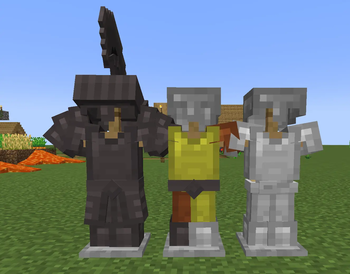
About this Mod
This is a fork of the GeoTetraArmor mod, originally created by yi_ran (yiran1457). This version focuses on stability fixes and expanding the original content.
🛠️ What has been fixed?
The original mod was experiencing stability issues. In this fork, I have addressed:
Damage Crashes: Fixed the critical issue where the game would crash upon taking damage while wearing certain armor pieces.
General Stability: Improved code handling to prevent unexpected shutdowns during gameplay.
✨ New Content
Beyond fixes, I've added new features to enhance your Tetra experience:
New Armor Type: Added light armor to contrast with the heavy armor.
More Honings: Expanded the honing options, giving you more ways to specialize and upgrade your gear.
🙏 Credits & Licensing
Original Mod: GeoTetraArmor
License: This fork is distributed under the GNU Lesser General Public License v3 (LGPLv3).
As per the license, this project is open-source, and I provide this version to keep the community's experience smooth and bug-free.
💬 Feedback & Suggestions
This is a work in progress! I am actively looking for feedback to improve the mod.
Did you find a bug?
Do you have a suggestion for a new honing or armor part?
Please let me know in the comments or open an issue on the repository. Your input is essential to making this the best bridge between Tetra and GeckoLib!
Available Versions
How to Install GeotetraArmor Fork on Your Server
Order Server
Order a Minecraft Java server with at least 3 GB RAM (4 GB recommended).
Set forge Loader
In the panel under "Egg", select the forge loader and matching Minecraft version (1.20.1).
Install Mod
Open the mod browser in the dashboard and search for "GeotetraArmor Fork". Click "Install" – done! Alternatively, upload the .jar via SFTP to the /mods folder.
Compatibility
Mod Loaders
Minecraft Versions
1.20.1
Server-side
✓ RequiredRecommended RAM
4 GB(min. 3 GB)Frequently Asked Questions
GeotetraArmor Fork server crashes on startup – what to do?
Most common cause: wrong forge version or insufficient RAM. Check the server log (latest.log) for "OutOfMemoryError" or "Mixin" errors. With Mado Hosting: ensure at least 3 GB RAM is allocated and the loader matches the mod version (1.20.1). You can switch loaders with one click in the panel.
Is GeotetraArmor Fork compatible with forge and neoforge?
GeotetraArmor Fork officially supports forge, neoforge for Minecraft 1.20.1. The Mado dashboard automatically detects incompatible loader combinations.
Server lagging with GeotetraArmor Fork – how to optimize performance?
Recommended RAM: 4 GB (per 8 players). Use /spark profiler to check if GeotetraArmor Fork consumes the most tick time. Common fixes: reduce server view-distance to 8-10, install "performant" or "starlight" as supplementary mods on Forge. With Mado Hosting, your server runs on NVMe SSDs with dedicated CPU cores for minimal latency.
Similar Mods




![[TaCZ] Timeless and Classics Zero](https://cdn.modrinth.com/data/SzzJttH8/fd27766d2bb8390d284696b1dbd358f87e081439_96.webp)

Rent Modded Server
Install GeotetraArmor Fork with just one click on your server.