
Give Me My XP
Datapack/mod adding new ways to earn experience points. Gain XP from: Harvest crops, mining (toggleable), crafting and more...
Screenshots
About this Mod
Give Me My XP – Expand Your XP Sources!
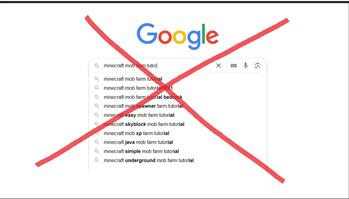
Give Me My XP is a Minecraft datapack that enhances the game by adding new ways to earn experience points, making the game progression more rewarding and dynamic. No more need for building ugly mob farms - with this pack you can gain XP from farming crops, exploring, crafting, mining, chopping trees, and more! Some XP sources, such as mining and tree chopping, can be toggled On or Off using simple commands. There is also a fun little challenge where if players complete multiple trades with villagers in less than a minute, they will be rewarded with additional experience...
Additionally, killing the Warden now grants a more deserving reward, making it truly feel like the REAL boss battle.
Features:
- Gain XP from farming crops, crafting, exploring, mining, tree chopping, and shield blocking.
- Configurable XP gain rate: Half XP, Normal XP, or Double XP.
- New XP reward for defeating the Warden!
- Admin-friendly customization with trigger commands.
- Multiplayer-compatible and fully server-friendly.
- Toggle XP from mining and tree chopping on/off with an easy command.
- Compatible with simple harvest (right click harvest) feature from Quark mod.
- Trading minigame.
Admin Commands:
Spoiler
An admin is a player with the is_admin tag, automatically given to the first player who joins the world. In singleplayer, you'll have full access to /trigger commands.
Toggling XP from mining and tree chopping (admin only):
- Enable XP from mining blocks and tree chopping:
/trigger blockXP set 1 - Disable XP from mining and tree chopping:
/trigger blockXP set 2
Selecting XP gain rate (admin only):
- Half XP gain:
/trigger selectXP set 1 - Normal XP gain:
/trigger selectXP set 2 - Double XP gain:
/trigger selectXP set 3
XP Sound Configuration (for all players):
- Enable XP sound when earning XP:
/trigger sound_config set 1 - Disable XP sound when earning XP:
/trigger sound_config set 2
How does it work?
This datapack utilizes Minecraft scoreboards to track player progression and reward XP based on the selected XP gain rate. For example, when a player mines 50 stone, they will receive:
- 5 XP on Half XP mode
- 10 XP on Normal XP mode
- 20 XP on Double XP mode
When harvesting crops, the datapack modifies loot tables, giving fully grown crops a chance to drop XP orbs in addition to their regular yield. For crops that don’t have growth stages, such as sugarcane or mushrooms, the datapack uses the scoreboard system to track harvesting.
Supported crops:
Spoiler
- Beetroots, Wheat, Potatoes, Carrots, Nether Wart
- Red Mushroom, Brown Mushroom
- Pumpkins, Melons
- Cocoa, Glow Berries, Sweet Berries
- Grass, Fern, Dead Bush
- Sugarcane, Cactus
Installation Instructions: (datapack)
Spoiler
Download the datapack file.
Open your Minecraft world save folder:
C:\Users\<YourUsername>\AppData\Roaming\.minecraft\saves\<YourWorldName>\datapacksCopy the downloaded datapack file into the datapacks folder.
Start your Minecraft world and use
/reloadto load the datapack.
Available Versions
How to Install Give Me My XP on Your Server
Order Server
Order a Minecraft Java server with at least 3 GB RAM (4 GB recommended).
Set datapack Loader
In the panel under "Egg", select the datapack loader and matching Minecraft version (1.20.1).
Install Mod
Open the mod browser in the dashboard and search for "Give Me My XP". Click "Install" – done! Alternatively, upload the .jar via SFTP to the /mods folder.
Compatibility
Mod Loaders
Minecraft Versions
1.20.1, 1.20
Server-side
✓ RequiredRecommended RAM
4 GB(min. 3 GB)Frequently Asked Questions
Give Me My XP server crashes on startup – what to do?
Most common cause: wrong datapack version or insufficient RAM. Check the server log (latest.log) for "OutOfMemoryError" or "Mixin" errors. With Mado Hosting: ensure at least 3 GB RAM is allocated and the loader matches the mod version (1.20.1). You can switch loaders with one click in the panel.
Is Give Me My XP compatible with datapack and fabric and forge and neoforge and quilt?
Give Me My XP officially supports datapack, fabric, forge, neoforge, quilt for Minecraft 1.20.1, 1.20. Note: Forge and Fabric mods are NOT cross-compatible – pick one loader and stick with it. The Mado dashboard automatically detects incompatible loader combinations.
Server lagging with Give Me My XP – how to optimize performance?
Recommended RAM: 4 GB (per 8 players). Use /spark profiler to check if Give Me My XP consumes the most tick time. Common fixes: reduce server view-distance to 8-10, install "performant" or "starlight" as supplementary mods on Forge. With Mado Hosting, your server runs on NVMe SSDs with dedicated CPU cores for minimal latency.
Similar Mods




Rent Modded Server
Install Give Me My XP with just one click on your server.
Details
- License
- Creative Commons Attribution Non Commercial No Derivatives 4.0 International
- Server-side
- Required