
G.L.A.S.S Remastered
A work in progress modern remaster of General Layman's Aesthetic Spying Screen.
Screenshots
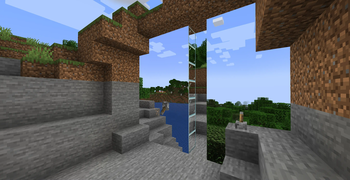
About this Mod

G.L.A.S.S Remastered
The original 1.12 mod can be found here by iChun.
Please note that currently this mod is in ALPHA and is not intended for survival mode, do not use it in worlds you care about or create backups if you really want to.
It's back! The remastered version of G.L.A.S.S is making a return, but it's still early in development.
As I'm currently short on time due to moving into university, the Alpha build won’t be fully polished. The textures, block models, and UI are not finalized, and some key features are still missing, such as:
- Multi-face projections that line up
- Survival mode recipes
- Polished textures, models and stable connections between panels and their linked terminals.
Expect bugs, as this version is more of a proof of concept rather than a finished product. Your feedback is essential to shaping the future of the mod, so feel free to experiment with it and share your thoughts!
Usage
Place down a "G.L.A.S.S Terminal" - found in the redstone tab and either create a new projection channel or use the default channel.
Once you've linked the terminal block to a channel, you can build your projection plane! Simply place a "G.L.A.S.S Projector" down in the direction you want the projection to face in and use glass blocks to extend the projection!
For more information, consult the showcase video below.
Bugs, Bugs and Bugs... oh my!
Here's some notable bugs, and how to fix it.
- If the projection doesn't vanish after you turn a projector off, turn all projectors in your world off then run the
/kill @e[type=immersive_portals:portal]command. After you run it it should be fixed, this is caused by a client-server desync. - You cant type the letter
einto the terminal GUI's channel name field, you just cant, im not sure why but it's just friggen weird lmao.
Technical Explanation
Yes, it's ARR, but you can still view the source on GitHub
The mod utilizes the Immersive Portals API to create seamless portals with customized shapes. At the core, a bounding box (represented by the BoundingBox2D class) is dynamically generated by scanning nearby glass blocks. This bounding box determines the dimensions of the portal, taking into account the relative positions of glass blocks surrounding the projector.
The portal is created using the Custom Shape API, specifically leveraging SpecialFlatPortalShape. The glass blocks' coordinates are normalized and added to a 2D mesh (Mesh2D), where the mod applies the appropriate transformations to fit within the specified dimensions. This allows for more complex and non-rectangular portal shapes, offering builders greater flexibility in design.
When the projector is activated, the mod calculates the correct portal orientation and size based on the bounding box and facing direction of the projector block. The resulting portal is then placed in the world and dynamically updated, with options for flipping and adjusting the portal shape. The mod ensures that the portal links to the appropriate destination dimension using the channel system, allowing players to create immersive structures with interconnected dimensions.
Available Versions
How to Install G.L.A.S.S Remastered on Your Server
Order Server
Order a Minecraft Java server with at least 3 GB RAM (4 GB recommended).
Set fabric Loader
In the panel under "Egg", select the fabric loader and matching Minecraft version (1.21.1).
Install Mod
Open the mod browser in the dashboard and search for "G.L.A.S.S Remastered". Click "Install" – done! Alternatively, upload the .jar via SFTP to the /mods folder.
Compatibility
Mod Loaders
Minecraft Versions
1.21.1, 1.20.1
Server-side
✓ RequiredRecommended RAM
4 GB(min. 3 GB)Frequently Asked Questions
G.L.A.S.S Remastered server crashes on startup – what to do?
Most common cause: wrong fabric version or insufficient RAM. Check the server log (latest.log) for "OutOfMemoryError" or "Mixin" errors. With Mado Hosting: ensure at least 3 GB RAM is allocated and the loader matches the mod version (1.21.1). You can switch loaders with one click in the panel.
Is G.L.A.S.S Remastered compatible with fabric?
G.L.A.S.S Remastered officially supports fabric for Minecraft 1.21.1, 1.20.1. The Mado dashboard automatically detects incompatible loader combinations.
Server lagging with G.L.A.S.S Remastered – how to optimize performance?
Recommended RAM: 4 GB (per 8 players). Use /spark profiler to check if G.L.A.S.S Remastered consumes the most tick time. Common fixes: reduce server view-distance to 8-10, install "performant" or "starlight" as supplementary mods on Forge. With Mado Hosting, your server runs on NVMe SSDs with dedicated CPU cores for minimal latency.
Similar Mods





Rent Modded Server
Install G.L.A.S.S Remastered with just one click on your server.