
Glissando
Tune your note blocks with ease and comfort!
Screenshots
About this Mod
🎶 Hi there! Thank you for checking out Glissando! 🎶






❗ Important
Glissando is currently under some major construction! I will update it when I can, but it may not be soon. I'm not lying when I say that more than half the codebase is being totally reworked xD
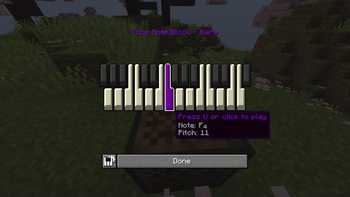
Glissando is a Fabric mod that attempts to fix what I personally believe to be some severe issues when it comes to the way note blocks work, allowing music-making to be more comfortable and satisfying than ever before! Glissando's highly-customizable GUI fits right into this mod's goal: as few clicks as possible.
Check out the wiki for a more in-depth overview of Glissando's features!
📝 Getting Started 📝
Glissando's production operates on Stonecutter, allowing for easy multi-version scheming. Every release will be available for all the same game versions as the latest release of YetAnotherConfigLib, the API used to build Glissando's configuration screen.
- Make sure you're running a Fabric instance of the game. If you're playing from the vanilla launcher, follow the Fabric installation guide. If you're playing from a third-party launcher like Prism, you'll need to follow their own instructions which you can often find on their respective websites. For example, here is Prism's guide to downloading mods.
- If you're not using a third-party launcher with in-built mod installation, you'll need to download the latest version of Glissando for your game version from the GitHub releases page or on Modrinth. Drag the
.jarfile into your mods folder and launch the game!
❗ Important
Glissando requires both Fabric API and YetAnotherConfigLib. Without them, the game will fail to start!
🛠️ Configuration 🛠️
Glissando prides itself on its extensive feature customizability, which is why there is a button to bring up the menu right inside the interface itself! It looks like this, iconized by a tiny keyboard with a gear in the corner:
Alternatively, you can access the configuration screen via Mod Menu directly, as shown below.
❗ Note
There is an option to disable the config button if you have Mod Menu installed, but it won't be available to you if you don't. Otherwise you won't be able to access the configuration screen at all!
❗ Tip
You can preview any graphical changes you may have made to the GUI by clicking the "Preview GUI" button at the top of the Visuals tab!
🗺️ Roadmap 🗺️
[x] Basic keyboard functionality
[x] Widget tooltips
[x] Note coloring
[x] Configuration
[x] Data-driven instruments
[ ] Scale restriction
[ ] MIDI device support (?)
🤗 Support Me! 🤗
Modding takes a lot of work, so if you're enjoying what I'm doing and wish to show your gratitude, you have the option to give me a tip over on Ko-fi. It's entirely up to you. I would appreciate it massively!

Available Versions
How to Install Glissando on Your Server
Order Server
Order a Minecraft Java server with at least 3 GB RAM (4 GB recommended).
Set fabric Loader
In the panel under "Egg", select the fabric loader and matching Minecraft version (1.21.4).
Install Mod
Open the mod browser in the dashboard and search for "Glissando". Click "Install" – done! Alternatively, upload the .jar via SFTP to the /mods folder.
Compatibility
Mod Loaders
Minecraft Versions
1.21.4, 1.21.3, 1.21.2 (+8 more)
Server-side
✓ RequiredRecommended RAM
4 GB(min. 3 GB)Frequently Asked Questions
Glissando server crashes on startup – what to do?
Most common cause: wrong fabric version or insufficient RAM. Check the server log (latest.log) for "OutOfMemoryError" or "Mixin" errors. With Mado Hosting: ensure at least 3 GB RAM is allocated and the loader matches the mod version (1.21.4). You can switch loaders with one click in the panel.
Is Glissando compatible with fabric?
Glissando officially supports fabric for Minecraft 1.21.4, 1.21.3, 1.21.2. The Mado dashboard automatically detects incompatible loader combinations.
Server lagging with Glissando – how to optimize performance?
Recommended RAM: 4 GB (per 8 players). Use /spark profiler to check if Glissando consumes the most tick time. Common fixes: reduce server view-distance to 8-10, install "performant" or "starlight" as supplementary mods on Forge. With Mado Hosting, your server runs on NVMe SSDs with dedicated CPU cores for minimal latency.
Rent Modded Server
Install Glissando with just one click on your server.