
Gloom
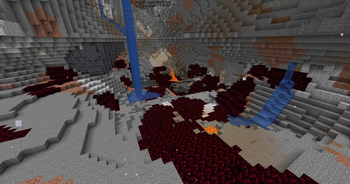
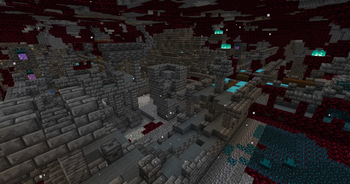
A work in progress representation of Tears of the Kingdom gloom and it's content.
Screenshots
About this Mod
A WIP minecraft representation of the Tears of the Kingdom gloom functionalities and effects.
This mod adds the infamous gloom from tears of the kingdom which has spread extensivly throughout the underground portions of the world.
As a counter to the gloom you will also be able to find the Sundelion flower which can be brewed into a potion that can cure the gloom effect.
As a fair warning this project is being developed by a new modder that may or may not know what they are doing for the most part. There may be bugs and I will work to resolve these whenever I get the chance.
The main feature of this mod are the three status effects that are currently available.
The gloom effect currently reduces the player's max health and serves as a reminder to be causious underground, the effect is permenant unless countered with the refresh effect. The effect can primarily be obtained by stepping on gloom blocks
The refresh effect is the opposite of the gloom effect, it removes it and slowly restores the player's max health to it's original values. This effect can be obtainted by steping into an area that is exposed to the sky with an elevation above y = 40. The seond way to get this effect is by creating a potion of light using Sundelion petals and an awkward potion.
The third effect is malice, which is the lethal part of the gloom. This effect, similar to instant damage, hurts the player, but in tandom with gloom it will reduce the players max health. The effect can primarily be obtained by stepping on gloom blocks
Available Versions
How to Install Gloom on Your Server
Order Server
Order a Minecraft Java server with at least 3 GB RAM (4 GB recommended).
Set fabric Loader
In the panel under "Egg", select the fabric loader and matching Minecraft version (1.20.4).
Install Mod
Open the mod browser in the dashboard and search for "Gloom". Click "Install" – done! Alternatively, upload the .jar via SFTP to the /mods folder.
Compatibility
Mod Loaders
Minecraft Versions
1.20.4, 1.20.3, 1.20.2
Server-side
✓ RequiredRecommended RAM
4 GB(min. 3 GB)Frequently Asked Questions
Gloom server crashes on startup – what to do?
Most common cause: wrong fabric version or insufficient RAM. Check the server log (latest.log) for "OutOfMemoryError" or "Mixin" errors. With Mado Hosting: ensure at least 3 GB RAM is allocated and the loader matches the mod version (1.20.4). You can switch loaders with one click in the panel.
Is Gloom compatible with fabric?
Gloom officially supports fabric for Minecraft 1.20.4, 1.20.3, 1.20.2. The Mado dashboard automatically detects incompatible loader combinations.
Server lagging with Gloom – how to optimize performance?
Recommended RAM: 4 GB (per 8 players). Use /spark profiler to check if Gloom consumes the most tick time. Common fixes: reduce server view-distance to 8-10, install "performant" or "starlight" as supplementary mods on Forge. With Mado Hosting, your server runs on NVMe SSDs with dedicated CPU cores for minimal latency.
Similar Mods




Rent Modded Server
Install Gloom with just one click on your server.