
Glyphix
A mod to improve font support and add emojis
Screenshots
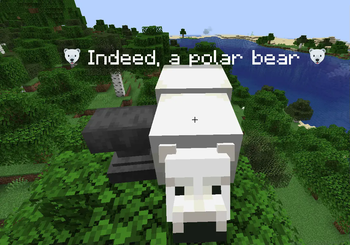
About this Mod
Glyphix
A mod to improve font support for Minecraft.
Features
- 100% client side. Anyone who has this mod will see emojis as properly rendered.
- Full twemoji support by default
- Proper width calculations. Because emojis are multiple characters, Minecraft has a hard time dealing with width, but
- Different emoji atlases
- Fast. This mod does not improve vanilla speed, but even with more features it does not slow down. If I can think of a way to speed up vanilla that will definitely get added to this mod.
This mod is still in beta because overhauling Minecraft's font is super finicky. If there are any bugs, please report them to the issue tracker.
How to use emojis
Just copy and paste the raw emoji. In unicode.org it's the browser column. Anything in the twitter column should work by default.
Planned Features
- Ligature support from
.ttffonts. Emojis are essentially just ligatures so it probably won't be too hard to add more support. - Use an actual bold font when rendering bold. Currently Minecraft just renders text twice when it is supposed to be bold, I want to add support for a specified bold font.
- Use an actual italic font when rendering italic. Currently minecraft just slices text.
- Fix some weird
.ttfbugs. There are some inaccuracies with spacing and.ttffont. Another goal of the project is to make it render correctly. - Text box weirdness with emojis. Textboxes uses string length and not glyph length for some calculations which can make rendering weird. Fixing these will require a bit of work, but should improve usability.
- Chat hooks to automatically convert strings like
:grinning_face:-> 😀 for incoming and outgoing messages. - Other built in emoji fonts
Changing Emoji Atlas
There is a script ./scripts/emoji_atlas.py that will convert a directory of emojis into an atlas with JSON file specifying locations. The emojis name has to be <unicode>.png with multi-character emojis as <unicode>-<unicode>.png and so on. It shouldn't be too hard to modify the python script to change the names if there is a different naming scheme for whatever emojis you choose.
The script will generate 2 files. emoji_atlas.png and emoji_positions.png. Put these into a resourcepack under assets/glyphix/emoji/. Reload texturepacks and the new emojis should render correctly.
Currently, emojis have to be square for them to render correctly.
Available Versions
How to Install Glyphix on Your Server
Order Server
Order a Minecraft Java server with at least 3 GB RAM (4 GB recommended).
Set fabric Loader
In the panel under "Egg", select the fabric loader and matching Minecraft version (1.19.2).
Install Mod
Open the mod browser in the dashboard and search for "Glyphix". Click "Install" – done! Alternatively, upload the .jar via SFTP to the /mods folder.
Compatibility
Mod Loaders
Minecraft Versions
1.19.2
Server-side
✗ UnsupportedRecommended RAM
4 GB(min. 3 GB)Frequently Asked Questions
Glyphix server crashes on startup – what to do?
Most common cause: wrong fabric version or insufficient RAM. Check the server log (latest.log) for "OutOfMemoryError" or "Mixin" errors. With Mado Hosting: ensure at least 3 GB RAM is allocated and the loader matches the mod version (1.19.2). You can switch loaders with one click in the panel.
Is Glyphix compatible with fabric and quilt?
Glyphix officially supports fabric, quilt for Minecraft 1.19.2. The Mado dashboard automatically detects incompatible loader combinations.
Server lagging with Glyphix – how to optimize performance?
Recommended RAM: 4 GB (per 8 players). Use /spark profiler to check if Glyphix consumes the most tick time. Common fixes: reduce server view-distance to 8-10, install "performant" or "starlight" as supplementary mods on Forge. With Mado Hosting, your server runs on NVMe SSDs with dedicated CPU cores for minimal latency.
Similar Mods






Rent Modded Server
Install Glyphix with just one click on your server.