
Goblinmine's Minecart Tweaks
This mod caters to those longing for minecarts to once again become a practical means of travel!
Screenshots
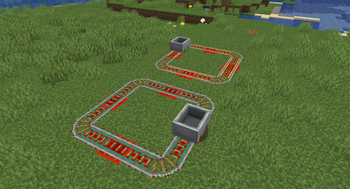
About this Mod
Transform your minecart experience with Goblinmine's Minecart Tweaks! This mod revitalizes the vanilla minecart system, making it a viable and efficient transportation option in Minecraft. Say goodbye to the limitations of traditional minecart travel and embrace the new features that bring speed, efficiency, and convenience to your rail networks.
Current Features
- Copper Rails: Introducing copper rails, a cost-effective alternative to powered rails. Crafted with copper, these rails are not only cheaper but also slightly faster than vanilla powered rails, providing a balanced upgrade for your rail system.
- Improved Powered Rails: Experience a significant boost in speed with enhanced powered rails. Travel faster and more efficiently across your worlds, reducing travel time and increasing productivity.
Upcoming Features
- Minecart Chaining: Soon, you will be able to chain multiple minecarts together, creating train-like systems for more extensive and organized transportation.
- Enhanced Furnace Minecart: The furnace minecart will receive an inventory slot capable of holding a whole stack of burnable items, increasing its operational time and reducing the need for constant refueling.
- Chunk Loading: Future updates will enable the furnace minecart to load chunks autonomously, allowing it to travel long distances without requiring a player to keep the chunks loaded.
- Automated Fuel Management: The furnace minecart will be able to draw fuel from a connected chest minecart, streamlining the refueling process and ensuring continuous operation without manual intervention.
Stay tuned for updates and new features that will continue to improve and expand the capabilities of your minecart rail systems!
Available Versions
How to Install Goblinmine's Minecart Tweaks on Your Server
Order Server
Order a Minecraft Java server with at least 3 GB RAM (4 GB recommended).
Set fabric Loader
In the panel under "Egg", select the fabric loader and matching Minecraft version (1.21).
Install Mod
Open the mod browser in the dashboard and search for "Goblinmine's Minecart Tweaks". Click "Install" – done! Alternatively, upload the .jar via SFTP to the /mods folder.
Compatibility
Mod Loaders
Minecraft Versions
1.21, 1.20.6, 1.20.5 (+4 more)
Server-side
✓ RequiredRecommended RAM
4 GB(min. 3 GB)Frequently Asked Questions
Goblinmine's Minecart Tweaks server crashes on startup – what to do?
Most common cause: wrong fabric version or insufficient RAM. Check the server log (latest.log) for "OutOfMemoryError" or "Mixin" errors. With Mado Hosting: ensure at least 3 GB RAM is allocated and the loader matches the mod version (1.21). You can switch loaders with one click in the panel.
Is Goblinmine's Minecart Tweaks compatible with fabric?
Goblinmine's Minecart Tweaks officially supports fabric for Minecraft 1.21, 1.20.6, 1.20.5. The Mado dashboard automatically detects incompatible loader combinations.
Server lagging with Goblinmine's Minecart Tweaks – how to optimize performance?
Recommended RAM: 4 GB (per 8 players). Use /spark profiler to check if Goblinmine's Minecart Tweaks consumes the most tick time. Common fixes: reduce server view-distance to 8-10, install "performant" or "starlight" as supplementary mods on Forge. With Mado Hosting, your server runs on NVMe SSDs with dedicated CPU cores for minimal latency.
Similar Mods


Rent Modded Server
Install Goblinmine's Minecart Tweaks with just one click on your server.
Details
- License
- Creative Commons Attribution Non Commercial Share Alike 4.0 International
- Server-side
- Required