
Golden Key
Adds piglins from Minecraft Legends
Screenshots
About this Mod
Geckolib is required!
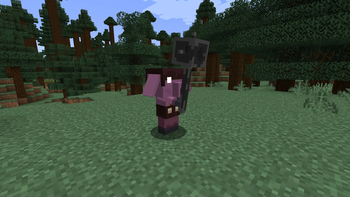
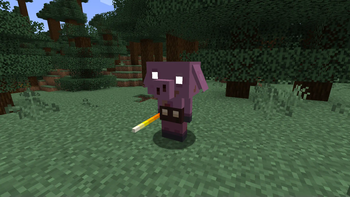
The Golden Key Minecraft mod introduces a variety of piglins from Minecraft Legends, complete with orginal textures and sounds. Here's a breakdown of the mod features:
List of Mobs:
- Blaze Runt (all hordes),
- Mace Runt (all hordes),
- Clanger (all hordes),
- Pigmadillo,
- Seeker (2 Hordes),
- Warboar,
- Portal Guard,
- Lava Launcher,
- Sporeback,
- Legendary mobs (Creeper, Skeleton, Zombie and illager),
- Brute,
- Spore Medic (all hordes),
- The Beast,
- The Unbreakable,
- The Devourer,
- Great Hog
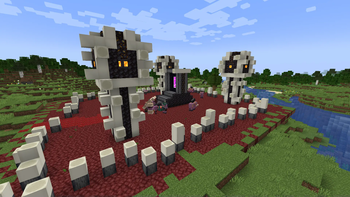
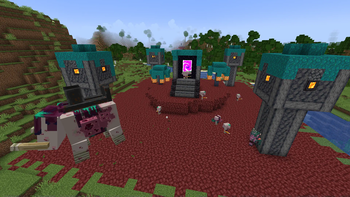
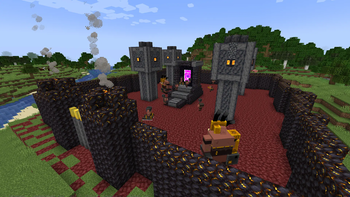
Upon creating a world, piglins initiate raids in the overworld. They construct bases with portals in very random locations, and the player's objective is to defeat the piglins and destroy the portals.
There are three hordes, each constructing its own bases with a portal:
- Horde of Hunt
- Horde of Bastion
- Horde of Spore
After destroying three portals of a single horde, a boss of that particular horde spawns. Killing each boss from all three hordes triggers the appearance of the Great Hog, the final boss, at the world's spawn. Defeating the Great Hog stops the spawning of piglins and their bases.
Blue Flag - Purpose and Usage
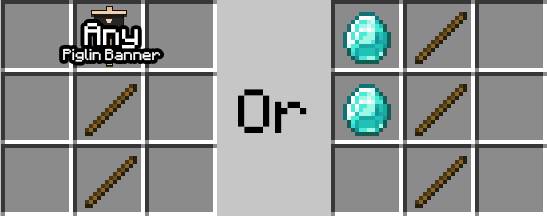
The Blue Flag is crafted using one of any horde banner and two sticks or three sticks and two diamonds. Here's the crafting recipe:
The Blue Flag serves the purpose of taming various mobs in the game. To use it, right-click in the air while being near a mob, including dogs, cats, and legendary mobs. Tamed mobs will follow and protect the player.
Legendery mobs are mobs that spawn instead of zombies, skeletons, creepers and illagers. This can be changed with gamerule.
Credits: All textures and sounds used in this mod is from minecraft legends - game created by Mojang Studios
NOTE: This project is currently abandoned due to problems with my MCreator Workspace of Golden Key. Which means there are no other updates to this mod, but if someone want to continue this project just give me a credit and add me as member named "Orginal Creator" and also i can help with creating this mod but first i need to learn how to create mods for forge.
Available Versions
How to Install Golden Key on Your Server
Order Server
Order a Minecraft Java server with at least 4 GB RAM (6 GB recommended).
Set forge Loader
In the panel under "Egg", select the forge loader and matching Minecraft version (1.20.1).
Install Mod
Open the mod browser in the dashboard and search for "Golden Key". Click "Install" – done! Alternatively, upload the .jar via SFTP to the /mods folder.
Compatibility
Mod Loaders
Minecraft Versions
1.20.1
Server-side
✓ RequiredRecommended RAM
6 GB(min. 4 GB)Frequently Asked Questions
Golden Key server crashes on startup – what to do?
Most common cause: wrong forge version or insufficient RAM. Check the server log (latest.log) for "OutOfMemoryError" or "Mixin" errors. With Mado Hosting: ensure at least 4 GB RAM is allocated and the loader matches the mod version (1.20.1). You can switch loaders with one click in the panel.
Is Golden Key compatible with forge?
Golden Key officially supports forge for Minecraft 1.20.1. The Mado dashboard automatically detects incompatible loader combinations.
Server lagging with Golden Key – how to optimize performance?
Recommended RAM: 6 GB (per 5 players). Use /spark profiler to check if Golden Key consumes the most tick time. Common fixes: reduce server view-distance to 8-10, install "performant" or "starlight" as supplementary mods on Forge. With Mado Hosting, your server runs on NVMe SSDs with dedicated CPU cores for minimal latency.
Similar Mods




Rent Modded Server
Install Golden Key with just one click on your server.