
GoldenMaus's Bronze Tools
A lightweight mod that adds balanced bronze tools and armor.
Screenshots
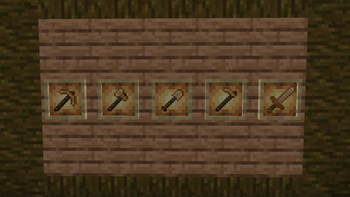


About this Mod
🛡️ GoldenMaus’s Bronze Tools
A refined, mid-tier gear expansion mod focused on balance, compatibility, and classic metallurgy.
🔧 New Materials & Gear
Forge a full set of bronze armor and tools, offering greater durability and enchantability than iron without being as strong as diamond.
All bronze tools and armor pieces can be recycled in a furnace to get Bronze Nuggets
🏗️ Blocks and Beacons
Bronze, Tin and Raw Tin blocks
Bronze and Tin blocks can be used as Beacon bases, allowing you to build functional beacons.
🪓 Resource Gathering & Ore Generation
A new tin ore is added to the Overworld, generating naturally between Y-level 40 and 128.
Once collected, copper and tin can be crushed with the help of hammers to use in the Bronze Blend recipe.
🔥 Smelting & Alloying
Bronze Blend is crafted from Crushed Copper and Tin
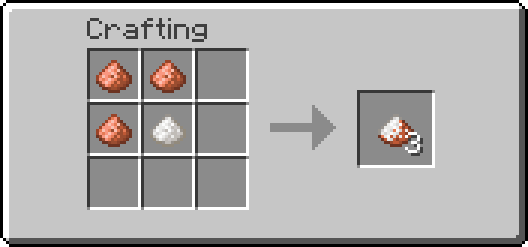
The resulting Bronze Blend can only be smelted in the Blast Furnace
🧩 Mod Compatibility
It includes Forge-standard tags for all major items and blocks:
Ingots, raw materials, dusts, nuggets, ores, storage blocks, tools, and armor
This means your bronze resources will automatically integrate with automation systems, machines, crafting recipes, and pipes from mods like Create, Thermal Expansion, Mekanism, and more — no extra configuration needed.
✅ Why Use This Mod?
Fully self-contained and compatible with vanilla progression
Simple yet flexible design — perfect for lightweight tech or adventure modpacks
No unnecessary APIs or dependencies — just clean Forge code and standard practices
📜 License: All Rights Reserved
Details
This mod is licensed under All Rights Reserved.
You may:
-Download and use this mod for personal use.
-Share the original, unmodified mod file directly with friends.
-Include the mod in modpacks.
You may not:
-Reupload this mod publicly to any website or file host without my permission.
-Modify, decompile, or reverse-engineer the mod.
-Sell or monetize this mod in any form. (Except in modpacks)
-Reuse any assets or textures
If you're unsure whether something is allowed, ask first.
Available Versions
How to Install GoldenMaus's Bronze Tools on Your Server
Order Server
Order a Minecraft Java server with at least 3 GB RAM (4 GB recommended).
Set forge Loader
In the panel under "Egg", select the forge loader and matching Minecraft version (1.21.10).
Install Mod
Open the mod browser in the dashboard and search for "GoldenMaus's Bronze Tools". Click "Install" – done! Alternatively, upload the .jar via SFTP to the /mods folder.
Compatibility
Mod Loaders
Minecraft Versions
1.21.10, 1.21.9, 1.21.8 (+6 more)
Server-side
✓ RequiredRecommended RAM
4 GB(min. 3 GB)Frequently Asked Questions
GoldenMaus's Bronze Tools server crashes on startup – what to do?
Most common cause: wrong forge version or insufficient RAM. Check the server log (latest.log) for "OutOfMemoryError" or "Mixin" errors. With Mado Hosting: ensure at least 3 GB RAM is allocated and the loader matches the mod version (1.21.10). You can switch loaders with one click in the panel.
Is GoldenMaus's Bronze Tools compatible with forge and neoforge?
GoldenMaus's Bronze Tools officially supports forge, neoforge for Minecraft 1.21.10, 1.21.9, 1.21.8. The Mado dashboard automatically detects incompatible loader combinations.
Server lagging with GoldenMaus's Bronze Tools – how to optimize performance?
Recommended RAM: 4 GB (per 8 players). Use /spark profiler to check if GoldenMaus's Bronze Tools consumes the most tick time. Common fixes: reduce server view-distance to 8-10, install "performant" or "starlight" as supplementary mods on Forge. With Mado Hosting, your server runs on NVMe SSDs with dedicated CPU cores for minimal latency.
Similar Mods




Rent Modded Server
Install GoldenMaus's Bronze Tools with just one click on your server.