
GoldenMaus's Copper Tools
Give copper a real purpose!
Screenshots
About this Mod
⚒️ Copper Equipment Expansion
Give copper a real purpose!
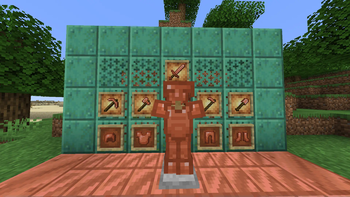
Tired of copper being just for decoration or lightning rods? This mod brings copper to life by adding a full set of copper tools and armor, making early-game progression more dynamic and rewarding.
🛡️ Features:
Copper Tools: Pickaxe, Axe, Shovel, Hoe, and Sword — better than stone, with durability close to iron but slower speed.
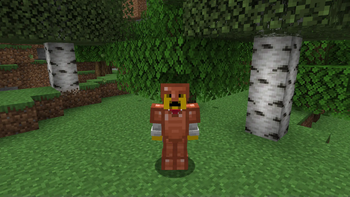
Copper Armor: Helmet, Chestplate, Leggings, and Boots — stylish and practical, offering protection between leather and iron.
Crafting follows vanilla-style recipes using copper ingots.
Armor and tools can be recycled in the furnace for copper nuggets.
🔧 Compatibility:
No dependencies.
Tags included for use with datapacks and mods.
📜 License: All Rights Reserved
Details
This mod is licensed under All Rights Reserved.
You may:
-Download and use this mod for personal use.
-Share the original, unmodified mod file directly with friends.
-Include the mod in modpacks.
You may not:
-Reupload this mod publicly to any website or file host without my permission.
-Modify, decompile, or reverse-engineer the mod.
-Sell or monetize this mod in any form. (Except in modpacks)
-Reuse any assets or textures
If you're unsure whether something is allowed, ask first.
Available Versions
How to Install GoldenMaus's Copper Tools on Your Server
Order Server
Order a Minecraft Java server with at least 3 GB RAM (4 GB recommended).
Set forge Loader
In the panel under "Egg", select the forge loader and matching Minecraft version (1.21.10).
Install Mod
Open the mod browser in the dashboard and search for "GoldenMaus's Copper Tools". Click "Install" – done! Alternatively, upload the .jar via SFTP to the /mods folder.
Compatibility
Mod Loaders
Minecraft Versions
1.21.10, 1.21.9, 1.21.8 (+6 more)
Server-side
✓ RequiredRecommended RAM
4 GB(min. 3 GB)Frequently Asked Questions
GoldenMaus's Copper Tools server crashes on startup – what to do?
Most common cause: wrong forge version or insufficient RAM. Check the server log (latest.log) for "OutOfMemoryError" or "Mixin" errors. With Mado Hosting: ensure at least 3 GB RAM is allocated and the loader matches the mod version (1.21.10). You can switch loaders with one click in the panel.
Is GoldenMaus's Copper Tools compatible with forge and neoforge?
GoldenMaus's Copper Tools officially supports forge, neoforge for Minecraft 1.21.10, 1.21.9, 1.21.8. The Mado dashboard automatically detects incompatible loader combinations.
Server lagging with GoldenMaus's Copper Tools – how to optimize performance?
Recommended RAM: 4 GB (per 8 players). Use /spark profiler to check if GoldenMaus's Copper Tools consumes the most tick time. Common fixes: reduce server view-distance to 8-10, install "performant" or "starlight" as supplementary mods on Forge. With Mado Hosting, your server runs on NVMe SSDs with dedicated CPU cores for minimal latency.
Similar Mods




Rent Modded Server
Install GoldenMaus's Copper Tools with just one click on your server.