
GoldenMaus's Titanium Tools
A lightweight expansion introducing Titanium — the perfect step between Diamond and Netherite.
Screenshots
About this Mod
🔩 GoldenMaus's titanium tools
A lightweight expansion introducing Titanium — the perfect step between Diamond and Netherite.
🧱 What This Mod Adds
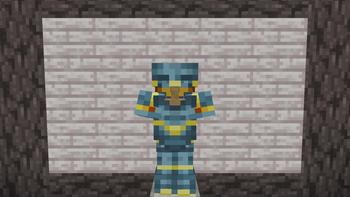
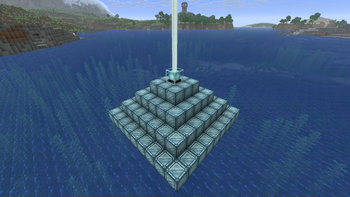
GoldenMaus's titanium tools is a minimalistic, self-contained mod that introduces a new high-tier metal into Minecraft: Titanium. You can make titanium tools and armor, even use it as a beacon base.
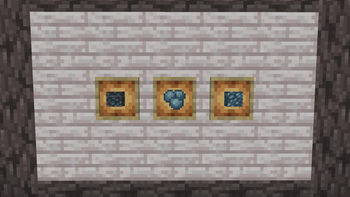
🔍 Titanium Ore
Generation Range:
Spawns in the Overworld between Y-levels -63 and -32
Harvesting Requirements:
Requires at least a Diamond Pickaxe or stronger to mine
Mining with lower-tier tools will destroy the block
Ore Design:
Naturally integrated into vanilla-like generation
Found only in deepslate.
🔥 Smelting & Crafting
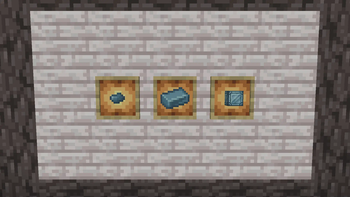
Smelt Titanium Ore into Titanium Ingots using a furnace or blast furnace.
Titanium Ingots are used to craft:
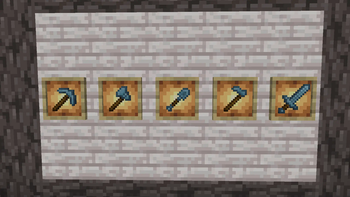
Full Toolset (Pickaxe, Axe, Shovel, Hoe, Sword)
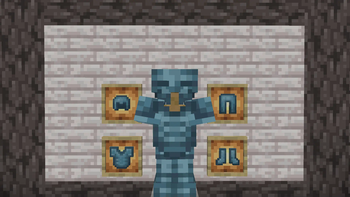
Full Armor Set (Helmet, Chestplate, Leggings, Boots)
🛡️ Titanium Gear Stats
Titanium gear is placed between Diamond and Netherite in terms of durability, damage, efficiency, and armor value.
⚔️ Tools:
- More durable and faster than Diamond
- Less powerful than Netherite, making it a balanced stepping stone for progression
- Fully compatible with vanilla enchantments
🛡️ Armor:
- Stronger protection than Diamond
- Ideal for players who want an upgrade without the grind of Netherite
🔗 Mod Integration & Tags
All items, tools, armor, blocks, and ingots are fully tagged using Minecraft's standard and Forge tag systems for:
- Ore dictionary (forge:ores, forge:ingots, forge:storage_blocks, etc.)
- Tool material types (forge:tools/pickaxe, etc.)
- Armor material categories
- Compatible with datapacks, automation systems, and modded recipes
This ensures full support for:
- Modpacks
- Automation mods
- Crafting tweaks
- Loot table extensions
- Third-party recipe integration
⚙️ Technical & Compatibility
- Lightweight, no external dependencies
- Safe to add to existing worlds (new ore spawns in unexplored chunks)
- Fully self-contained: no worldgen conflicts, no intrusive gameplay changes
🧭 Ideal For:
- Modpack creators seeking a lightweight and balanced progression mod
- Players who want enhanced mining rewards without overhauling core gameplay
📜 License: All Rights Reserved
Details
This mod is licensed under All Rights Reserved.
You may:
-Download and use this mod for personal use.
-Share the original, unmodified mod file directly with friends.
-Include the mod in modpacks.
You may not:
-Reupload this mod publicly to any website or file host without my permission.
-Modify, decompile, or reverse-engineer the mod.
-Sell or monetize this mod in any form. (Except in modpacks)
-Reuse any assets or textures
If you're unsure whether something is allowed, ask first.
Available Versions
How to Install GoldenMaus's Titanium Tools on Your Server
Order Server
Order a Minecraft Java server with at least 3 GB RAM (4 GB recommended).
Set forge Loader
In the panel under "Egg", select the forge loader and matching Minecraft version (1.21.10).
Install Mod
Open the mod browser in the dashboard and search for "GoldenMaus's Titanium Tools". Click "Install" – done! Alternatively, upload the .jar via SFTP to the /mods folder.
Compatibility
Mod Loaders
Minecraft Versions
1.21.10, 1.21.9, 1.21.8 (+6 more)
Server-side
✓ RequiredRecommended RAM
4 GB(min. 3 GB)Frequently Asked Questions
GoldenMaus's Titanium Tools server crashes on startup – what to do?
Most common cause: wrong forge version or insufficient RAM. Check the server log (latest.log) for "OutOfMemoryError" or "Mixin" errors. With Mado Hosting: ensure at least 3 GB RAM is allocated and the loader matches the mod version (1.21.10). You can switch loaders with one click in the panel.
Is GoldenMaus's Titanium Tools compatible with forge and neoforge?
GoldenMaus's Titanium Tools officially supports forge, neoforge for Minecraft 1.21.10, 1.21.9, 1.21.8. The Mado dashboard automatically detects incompatible loader combinations.
Server lagging with GoldenMaus's Titanium Tools – how to optimize performance?
Recommended RAM: 4 GB (per 8 players). Use /spark profiler to check if GoldenMaus's Titanium Tools consumes the most tick time. Common fixes: reduce server view-distance to 8-10, install "performant" or "starlight" as supplementary mods on Forge. With Mado Hosting, your server runs on NVMe SSDs with dedicated CPU cores for minimal latency.
Rent Modded Server
Install GoldenMaus's Titanium Tools with just one click on your server.