
golem
adds a block that keeps track of items for Copper Golems so they waste less time looking in boxes
Screenshots

About this Mod
Vanilla Copper Golems will simply navigate to the nearest chest when it has something in its hand. After only 10 chests, it gives up and forgets everything it's touched in hopes of finding the right one.
This mod attempts to fix this, or at least make them more viable for larger storage rooms, while still maintaining the Vanilla behavior of "trial-and-error" if there's no knowledge about that item.
Copper Memory Block
The new block added by this mod. Copper Golems near the block will discover it in the same way it finds chests, and will latch onto the closest one automagically.
A Memory Block does a simple task: when a Golem stores an item in a chest, it will add that chest to the memory it's latched onto. Golems later sorting the same item will check to see if the memory knows about any chests that had that item sorted into them already, and will check those first if it does. If the Golem finds that the chest no longer contains that item, it'll make sure it gets removed from the memory.
If you ever want to clear the memory, just break it!
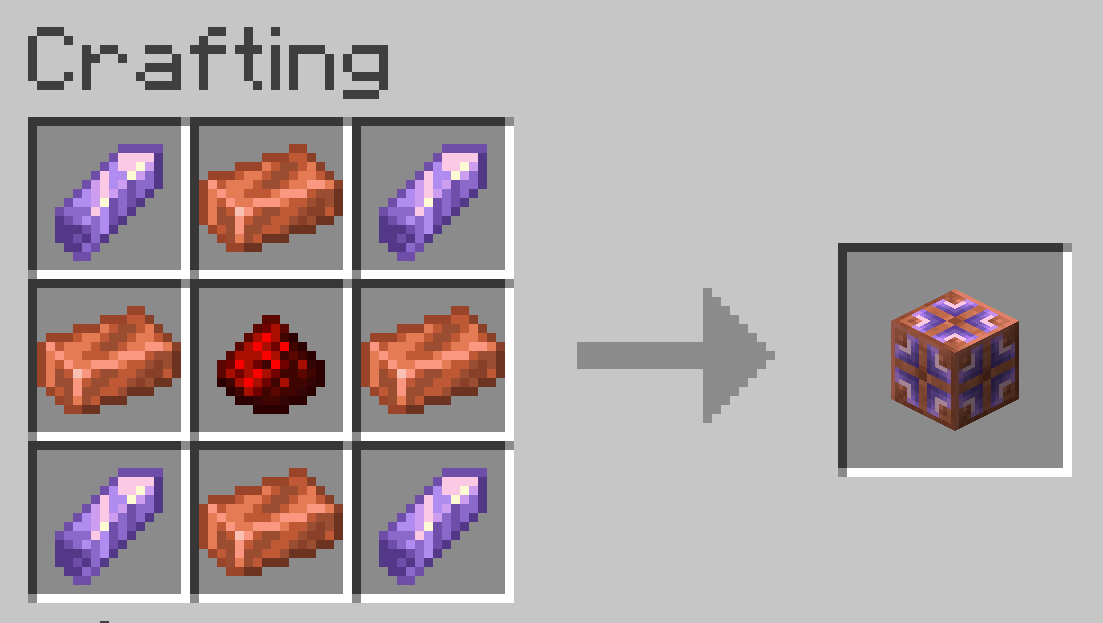
Why not give Golems a memory of their own?
Doing this with a block allow Golems to "communicate" in a way. If you have multiple Golems and one stores an item, other Golems can quickly realize that and go in that direction rather than having to discover that chest for themselves.
It also avoids duplicating the data for each Golem. If you have a lot of them, this might actually be meaningful, even if just a little bit.
Available Versions
How to Install golem on Your Server
Order Server
Order a Minecraft Java server with at least 3 GB RAM (4 GB recommended).
Set fabric Loader
In the panel under "Egg", select the fabric loader and matching Minecraft version (26.1.2).
Install Mod
Open the mod browser in the dashboard and search for "golem". Click "Install" – done! Alternatively, upload the .jar via SFTP to the /mods folder.
Compatibility
Mod Loaders
Minecraft Versions
26.1.2, 26.1.1, 26.1 (+3 more)
Server-side
✓ RequiredRecommended RAM
4 GB(min. 3 GB)Frequently Asked Questions
golem server crashes on startup – what to do?
Most common cause: wrong fabric version or insufficient RAM. Check the server log (latest.log) for "OutOfMemoryError" or "Mixin" errors. With Mado Hosting: ensure at least 3 GB RAM is allocated and the loader matches the mod version (26.1.2). You can switch loaders with one click in the panel.
Is golem compatible with fabric?
golem officially supports fabric for Minecraft 26.1.2, 26.1.1, 26.1. The Mado dashboard automatically detects incompatible loader combinations.
Server lagging with golem – how to optimize performance?
Recommended RAM: 4 GB (per 8 players). Use /spark profiler to check if golem consumes the most tick time. Common fixes: reduce server view-distance to 8-10, install "performant" or "starlight" as supplementary mods on Forge. With Mado Hosting, your server runs on NVMe SSDs with dedicated CPU cores for minimal latency.
Similar Mods





Rent Modded Server
Install golem with just one click on your server.