
Good Asset Fetcher
Beta 1.7.3 library mod to provide assets from any version of Minecraft to other mods.
Screenshots

About this Mod
Good Asset Fetcher



Library mod for StationAPI that provides an interface for other mods to fetch resources from official Mojang jars on the
fly when starting the game; this allows mods to utilise the game's assets without incurring license violations.
Currently only supports clientside assets (not datapacks).
Requirements
- Minecraft Beta 1.7.3
- Babric
- StationAPI
- Fabric Language Kotlin
Usage (for developers)
Import
pw.tmpim.mygoodmods:good-asset-fetcherfrom Maven (see the version badge above for the latest version):repositories { maven("https://repo.lem.sh/releases") { name = "Lemmmy Repo" content { includeGroupAndSubgroups("sh.lem") includeGroupAndSubgroups("pw.tmpim") } } } dependencies { modImplementation("pw.tmpim.mygoodmods:good-asset-fetcher:1.0.4") }Register a client-only endpoint for your mod in
fabric.mod.jsonif you don't already have one:{ "entrypoints": { "stationapi:event_bus_client": "com.example.yourmod.ExampleModClientListener" }, "depends": { "good-asset-fetcher": "1.x" } }Listen to the
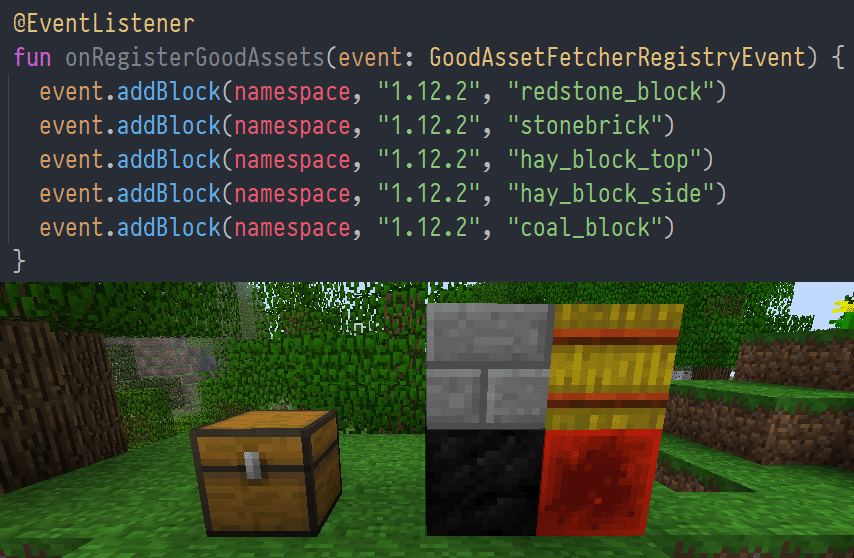
GoodAssetFetcherRegistryEventand calladdResourceFile,addBlock, oraddItem:public class ExampleEventListener { @Entrypoint.Namespace public static Namespace NAMESPACE; @EventListener public void onRegisterGoodAssets(GoodAssetFetcherRegistryEvent event) { // shorthands for blocks and items: event.addBlock(NAMESPACE, "1.12.2", "redstone_block"); event.addItem(NAMESPACE, "1.12.2", "stick"); // load an asset by full path: event.addResourceFile(NAMESPACE, "1.12.2", "assets/minecraft/textures/blocks/stone.png"); } }Use the textures under
assets/your-mod/stationapi/textures/block/stone.png:{ "parent": "minecraft:block/cube_all", "textures": { "all": "your-mod:block/stone" } }
How it works
During the game's init phase, before resource packs are loaded, Good Asset Fetcher loads the version manifest from the
Minecraft Launcher to get a listing of all game versions. This listing is then cached indefinitely at.minecraft/mods/good-asset-fetcher/asset-cache/versionManifest-$modVersion.json.
Then, GoodAssetFetcherRegistryEvent is called to fetch the resource definitions for every mod. Mods may request to
fetch assets from (almost?) any version of the game.
When resource packs are loaded, the mod injects its own dynamic resource pack at runtime. When this is first loaded
during a session, it checks for any missing assets in the mod's cache directory,.minecraft/mods/good-asset-fetcher/asset-cache.
Armed with the knowledge of all the missing assets and their associated game versions, good-asset-fetcher will
download each version's manifest and jar in-memory, validate the hash, and extract the required files. This process is
done during resource pack load, so it will block the game the first time it happens, and then ideally remain cached
permanently in .minecraft/mods/good-asset-fetcher/asset-cache.
Since StationAPI stores assets in a slightly different location to most versions of vanilla, the mod performs the
following path conversions to the destination file path automatically:
| Source path | Cached path |
|---|---|
assets/minecraft/textures/blocks |
assets/${namespace}/stationapi/textures/block |
assets/minecraft/textures/items |
assets/${namespace}/stationapi/textures/item |
If your use case is not properly covered, theaddResourceFile(Namespace namespace, String gameVersion, String sourcePath, String destPath) overload is available for
you to specify your own destination path. Note, however, that it will still go through the same string replacements as
above.
License
This mod is licensed under the MIT license.
Available Versions
How to Install Good Asset Fetcher on Your Server
Order Server
Order a Minecraft Java server with at least 3 GB RAM (4 GB recommended).
Set babric Loader
In the panel under "Egg", select the babric loader and matching Minecraft version (b1.7.3).
Install Mod
Open the mod browser in the dashboard and search for "Good Asset Fetcher". Click "Install" – done! Alternatively, upload the .jar via SFTP to the /mods folder.
Compatibility
Mod Loaders
Minecraft Versions
b1.7.3
Server-side
✗ UnsupportedRecommended RAM
4 GB(min. 3 GB)Frequently Asked Questions
Good Asset Fetcher server crashes on startup – what to do?
Most common cause: wrong babric version or insufficient RAM. Check the server log (latest.log) for "OutOfMemoryError" or "Mixin" errors. With Mado Hosting: ensure at least 3 GB RAM is allocated and the loader matches the mod version (b1.7.3). You can switch loaders with one click in the panel.
Is Good Asset Fetcher compatible with babric and fabric?
Good Asset Fetcher officially supports babric, fabric for Minecraft b1.7.3. The Mado dashboard automatically detects incompatible loader combinations.
Server lagging with Good Asset Fetcher – how to optimize performance?
Recommended RAM: 4 GB (per 8 players). Use /spark profiler to check if Good Asset Fetcher consumes the most tick time. Common fixes: reduce server view-distance to 8-10, install "performant" or "starlight" as supplementary mods on Forge. With Mado Hosting, your server runs on NVMe SSDs with dedicated CPU cores for minimal latency.
Similar Mods



Rent Modded Server
Install Good Asset Fetcher with just one click on your server.