
Goop Forge
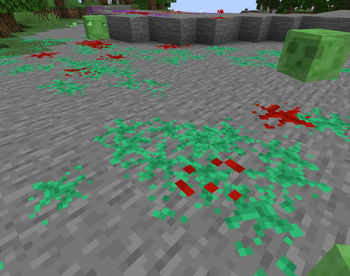
Add Goop that spawns from entity interactions
Screenshots
About this Mod
This is a fork of Goop for 1.20.1 Forge.
Goop
Originally released as part of ULTRACRAFT, Goop is now a standalone mod. It can be used to easily add Slime and Splatter Visual Effects. There have been some major improvements since its debut in ULTRACRAFT as well.
Improvements in 0.4
As of 0.4, the mod has been overhauled and improved in many aspects and completely changing how it works.
- The Mod is no longer purely a library; it adds some Optional Built-In Effects now!
- Calculations have been optimized
- More accurate surface detection and Puddle placement
- Improved Rendering
- Puddle and drip Scale changes are now smooth instead of jittery
- Fancy Goop now has dynamic faces on walls and ceilings as well
- Changed Emitter API to be Datadriven using JSON files in Resourcepacks
- You no longer need to make a mod with goop as a dependency! You can add your own emitters using mostly simple JSON. Here's a Guide on this.
- Added Client Only Mode
- If the Server doesn't have Goop installed, Damage Emitters will still somewhat work. Vanilla doesn't send enough data to clients to make advanced emitters work, unfortunately.
Built-in Effects
Since emitters work using Resourcepacks, there's 3 Optional Resourcepacks included in the mod.
- Slimier Slimes
- Slimes and Magma Cubes leave behind puddles when they hit the ground and splatter when taking damage
- Sensible Blood
- Adds Damage Emitters to all Mobs where it makes sense that they could bleed
- Some Mobs bleed different colors
- Only Red Blood is marked as mature; all other effects are unaffected by the censor client config
EVERYTHING BLEEDS- Adds Red Blood Damage Emitters to all Living Entities
That's cool, but how do I add my own // change them
To make your own Goop emitters, start by making a Resourcepack.
Now, add a goop_emitters directory in your namespace directory. In there you can put your Emitter JSON files; and that's already it!
For in-depth documentation on how to write emitters, please check here. You can also double-check with the builtin packs since compatibility with the original is not guaranteed
Available Versions
How to Install Goop Forge on Your Server
Order Server
Order a Minecraft Java server with at least 3 GB RAM (4 GB recommended).
Set forge Loader
In the panel under "Egg", select the forge loader and matching Minecraft version (1.20.6).
Install Mod
Open the mod browser in the dashboard and search for "Goop Forge". Click "Install" – done! Alternatively, upload the .jar via SFTP to the /mods folder.
Compatibility
Mod Loaders
Minecraft Versions
1.20.6, 1.20.5, 1.20.4 (+3 more)
Server-side
✓ RequiredRecommended RAM
4 GB(min. 3 GB)Frequently Asked Questions
Goop Forge server crashes on startup – what to do?
Most common cause: wrong forge version or insufficient RAM. Check the server log (latest.log) for "OutOfMemoryError" or "Mixin" errors. With Mado Hosting: ensure at least 3 GB RAM is allocated and the loader matches the mod version (1.20.6). You can switch loaders with one click in the panel.
Is Goop Forge compatible with forge?
Goop Forge officially supports forge for Minecraft 1.20.6, 1.20.5, 1.20.4. The Mado dashboard automatically detects incompatible loader combinations.
Server lagging with Goop Forge – how to optimize performance?
Recommended RAM: 4 GB (per 8 players). Use /spark profiler to check if Goop Forge consumes the most tick time. Common fixes: reduce server view-distance to 8-10, install "performant" or "starlight" as supplementary mods on Forge. With Mado Hosting, your server runs on NVMe SSDs with dedicated CPU cores for minimal latency.
Similar Mods





Rent Modded Server
Install Goop Forge with just one click on your server.