
GPT-MC
ChatGPT in Minecraft.
Screenshots
About this Mod
Have you ever wanted ChatGPT to control your Minecraft world? Yes? Well then this is the perfect project for you! Simply download the mod, set up an OpenAI api key, set it to your system environment variable "OPENAI_API_KEY" and then launch the mod! This will cost money overtime, however the amount is extremely small (less than a cent every minute or so) but there are things that will increase or decrease it, as detailed below. There are several settings, all of which can be accessed through the /gptmc command.
Commands
- /gptmc godmode <enable|disable|status> (Enables, disables, and gets the status of God Mode, which is what allows ChatGPT to control your world. By default it is on.)
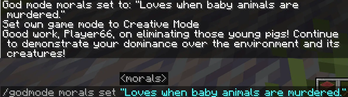
- /gptmc morals <get|set|clear> (Gets, sets, and clears the "morals" of God Mode, which is what ChatGPT sees as right and wrong)
- /gptmc minimumevents <get|set|reset> (To save on money from the API key, a system is set up to not send anything to OpenAI if no events or a number of events fewer than this number have been triggered. The default number is 3)
- /gptmc summary <get|clear> (The summary is a report generated by a second AI, which summarizes the recent events and sends them to ChatGPT. However, after a while this summary can get very large, and the larger it is, the more money it costs; so it is highly recommended to clear it once in a while)
- /gptmc interval <get|set> (This will change the interval at which information is summarized and sent to ChatGPT. The lower the number is, the faster and more expensive it is. By default it is set to 30 seconds)
- /gptmc prompt (This command can only be run with God Mode disabled, and will simply allow you to access ChatGPT from Minecraft like you would through the website)
- /gptmc help (Displays all commands and their syntax)
- /gptmc debug <response|summary> (Enables reports of the summary or response generated by ChatGPT)
Events
Events are like triggers that activate whenever a certain action is performed. Currently the events used allow for reading chat, detecting when entities are hit, and detecting when blocks are mined or placed.
Actions
ChatGPT has several actions, which it can choose from based on the choices made by players. It may reward or punish players based on what they do. ChatGPT may punish players multiple times for the same action until an apology is given. Its actions are as follow:
- say: Sends a message to all players on the server
- give: gives an item to a player
- smite: strikes a player with lightning
- clear: clears a player's inventory
- lightning: strikes a player with lightning repeatedly until they die
- whisper: sends a message to only one player
- effect: gives a player an effect
- time: sets the time to day or night
- heal: sets a player's health and hunger to full
Disclaimers & Warnings
I do not own OpenAI (if I did I wouldn't be making this mod) or any companies affilliated with it. This mod is entirely open-source and on GitHub. ChatGPT cannot be entirely controlled and will have a degree of randomness, so it is not recommended to use this in a world you play on regularly.
Available Versions
How to Install GPT-MC on Your Server
Order Server
Order a Minecraft Java server with at least 3 GB RAM (4 GB recommended).
Set fabric Loader
In the panel under "Egg", select the fabric loader and matching Minecraft version (1.21.5).
Install Mod
Open the mod browser in the dashboard and search for "GPT-MC". Click "Install" – done! Alternatively, upload the .jar via SFTP to the /mods folder.
Compatibility
Mod Loaders
Minecraft Versions
1.21.5, 1.21.3
Server-side
✓ RequiredRecommended RAM
4 GB(min. 3 GB)Frequently Asked Questions
GPT-MC server crashes on startup – what to do?
Most common cause: wrong fabric version or insufficient RAM. Check the server log (latest.log) for "OutOfMemoryError" or "Mixin" errors. With Mado Hosting: ensure at least 3 GB RAM is allocated and the loader matches the mod version (1.21.5). You can switch loaders with one click in the panel.
Is GPT-MC compatible with fabric?
GPT-MC officially supports fabric for Minecraft 1.21.5, 1.21.3. The Mado dashboard automatically detects incompatible loader combinations.
Server lagging with GPT-MC – how to optimize performance?
Recommended RAM: 4 GB (per 8 players). Use /spark profiler to check if GPT-MC consumes the most tick time. Common fixes: reduce server view-distance to 8-10, install "performant" or "starlight" as supplementary mods on Forge. With Mado Hosting, your server runs on NVMe SSDs with dedicated CPU cores for minimal latency.
Similar Mods





Rent Modded Server
Install GPT-MC with just one click on your server.