
GTCEu Greenhouse
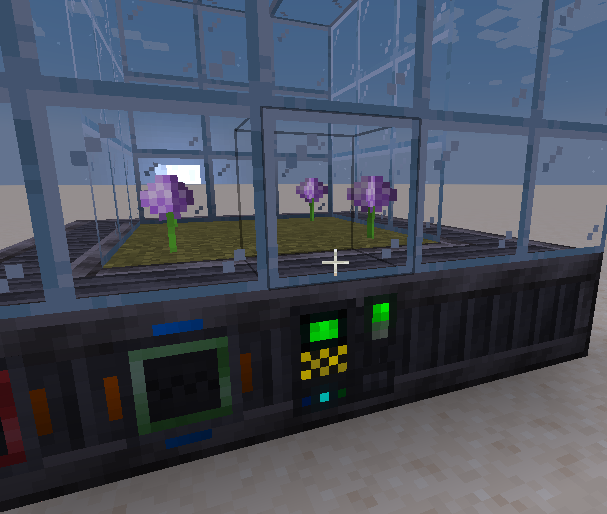
A mod that adds the capability to create multiblock greenhouses with renders of the current recipe
Screenshots
About this Mod
This mod does not add a greenhouse multibock. It adds a system that allows you to create a greenhouse multiblock using KubeJS or Java.
Why use this mod? It adds a custom renderer that makes plants appear and grow when a recipe is running.
Usage
KubeJS
You can create a greenhouse multiblock machine by using the "greenhouse" type in the "gtceu:machine" startup event.
All methods are the same as the ones for "multiblock", except the ones for renderers are omitted, and you must call the following methods:
textures(base: string, overlay: string), which acts like a workable casing renderer with the base and overlay;offsets(offsets: [number, number, number][]), which specifies the positions where the plants will grow with respect to the controller.
Example:
GTCEuStartupEvents.registry('gtceu:machine', event => {
    event.create('greenhouse', 'greenhouse')
        .rotationState(RotationState.NON_Y_AXIS)
        .recipeTypes(GTRecipeTypes.COMPRESSOR_RECIPES)
        .recipeModifiers([GTRecipeModifiers.PARALLEL_HATCH])
        .appearanceBlock(GTBlocks.CASING_STEEL_SOLID)
        .pattern(definition => FactoryBlockPattern.start()
            .aisle('CCCCC', 'ggggg', 'ggggg', 'ggggg', 'ggggg')
            .aisle('CGGGC', 'gpppg', 'gpppg', 'gpppg', 'ggggg')
            .aisle('CGGGC', 'gpppg', 'gpppg', 'gpppg', 'ggggg')
            .aisle('CGGGC', 'gpppg', 'gpppg', 'gpppg', 'ggggg')
            .aisle('CC@CC', 'ggggg', 'ggggg', 'ggggg', 'ggggg')
            .where('@', Predicates.controller(Predicates.blocks(definition.get())))
            .where('p', Predicates.air())
            .where('g', Predicates.blocks(Blocks.GLASS))
            .where('G', Predicates.blocks(Blocks.GRASS_BLOCK))
            .where('C', Predicates.blocks(GTBlocks.CASING_STEEL_SOLID.get())
                .or(Predicates.autoAbilities(definition.getRecipeTypes())))
            .build())
        .offsets([
            [1, -1, -1],
            [-1, -1, -1],
            [1, -3, -1],
            [-1, -3, -1]
        ])
        .textures("gtceu:block/casings/solid/machine_casing_solid_steel", "gtceu:block/multiblock/gcym/large_mixer")
});
Java
First, add the JitPack repository:
repositories {
    // ...
    maven { url 'https://jitpack.io' }
}
Next, add a dependency to the project:
dependencies {
    // ...

    implementation fg.deobf("com.github.RubenVerg:GTCEu-Greenhouse:main-SNAPSHOT")
}
There are two main exported classes which you will need: GreenhouseMachineRenderer and SyncedProgressElectricMultiblockMachine. When registering a multiblock, use the synced progress machine as the machine class and the renderer as a renderer. You will need to enable TESR.
Example:
GREENHOUSE = MyMod.REGISTRATE
  .multiblock("greenhouse", SyncedProgressElectricMultiblockMachine::new)
  .rotationState(RotationState.NON_Y_AXIS)
  .recipeType(GregPackRecipeTypes.GREENHOUSE_RECIPES)
  .recipeModifiers(GTRecipeModifiers.PARALLEL_HATCH)
  .appearanceBlock(GTBlocks.CASING_STEEL_SOLID)
  .pattern(definition -> FactoryBlockPattern.start()
    .aisle("CCCCC", "CgggC", "CgggC", "CCCCC")
    .aisle("CdddC", "g   g", "g   g", "CgggC")
    .aisle("CdddC", "g   g", "g   g", "CgggC")
    .aisle("CdddC", "g   g", "g   g", "CgggC")
    .aisle("CC#CC", "CgggC", "CgggC", "CCCCC")
    .where('C', Predicates.blocks(GTBlocks.CASING_STEEL_SOLID.get())
      .or(Predicates.autoAbilities(definition.getRecipeTypes()))
      .or(Predicates.autoAbilities(true, false, false)))
	.where('#', Predicates.controller(Predicates.blocks(definition.getBlock())))
	.where('d', Predicates.blocks(Blocks.DIRT))
	.where('g', Predicates.blocks(GTBlocks.CASING_TEMPERED_GLASS.get()))
	.build())
  .renderer(() -> new GreenhouseMachineRenderer(GTCEu.id("block/casings/solid/machine_casing_solid_steel"),
    GTCEu.id("block/multiblock/gcym/large_mixer")))
  .hasTESR(true)
  .register();
If you do not want your machine to be electric, you can implement ISyncedProgress and use that as a machine instead:
public class MySyncedProgress extends Whatever implements ISyncedProgress {
	protected static final ManagedFieldHolder MANAGED_FIELD_HOLDER = new ManagedFieldHolder(SyncedProgressElectricMultiblockMachine.class, Whatever.MANAGED_FIELD_HOLDER);

	@Persisted
	@DescSynced
	@RequireRerender
	private double progressPercent;

	public SyncedProgressElectricMultiblockMachine(IMachineBlockEntity holder, Object... args) {
		super(holder, args);
	}

	{
		subscribeServerTick(() -> {
			progressPercent = recipeLogic.getProgressPercent();
		});
	}

	@Override
	public @NotNull ManagedFieldHolder getFieldHolder() {
		return MANAGED_FIELD_HOLDER;
	}

	@Override
	public double getProgressPercent() {
		return progressPercent;
	}
}
Available Versions
How to Install GTCEu Greenhouse on Your Server
Order Server
Order a Minecraft Java server with at least 3 GB RAM (4 GB recommended).
Set forge Loader
In the panel under "Egg", select the forge loader and matching Minecraft version (1.20.1).
Install Mod
Open the mod browser in the dashboard and search for "GTCEu Greenhouse". Click "Install" – done! Alternatively, upload the .jar via SFTP to the /mods folder.
Compatibility
Mod Loaders
Minecraft Versions
1.20.1
Server-side
✓ RequiredRecommended RAM
4 GB(min. 3 GB)Frequently Asked Questions
GTCEu Greenhouse server crashes on startup – what to do?
Most common cause: wrong forge version or insufficient RAM. Check the server log (latest.log) for "OutOfMemoryError" or "Mixin" errors. With Mado Hosting: ensure at least 3 GB RAM is allocated and the loader matches the mod version (1.20.1). You can switch loaders with one click in the panel.
Is GTCEu Greenhouse compatible with forge?
GTCEu Greenhouse officially supports forge for Minecraft 1.20.1. The Mado dashboard automatically detects incompatible loader combinations.
Server lagging with GTCEu Greenhouse – how to optimize performance?
Recommended RAM: 4 GB (per 8 players). Use /spark profiler to check if GTCEu Greenhouse consumes the most tick time. Common fixes: reduce server view-distance to 8-10, install "performant" or "starlight" as supplementary mods on Forge. With Mado Hosting, your server runs on NVMe SSDs with dedicated CPU cores for minimal latency.
Similar Mods





Rent Modded Server
Install GTCEu Greenhouse with just one click on your server.