
GTFO Craft: Protocol
Mechanics From The Game GTFO
Screenshots


About this Mod

REQ://GECKOLIB 1.12.2
Sketchfab: https://sketchfab.com/treehero
Planet Minecraft: https://www.planetminecraft.com/mod/gtfo-craft-protocol
Curseforge: https://www.curseforge.com/minecraft/mc-mods/gtfo-craft-protocol
OBJ://Summary:
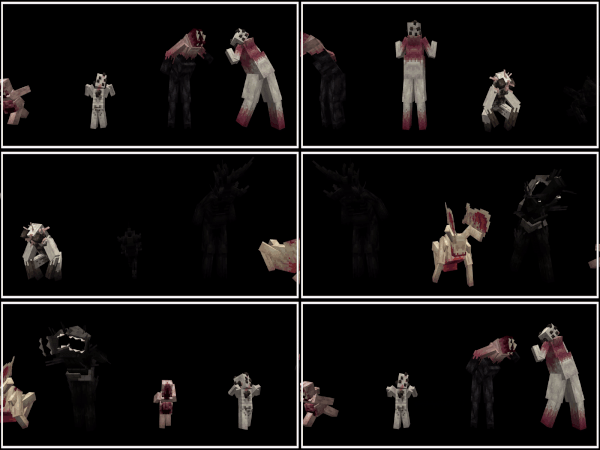
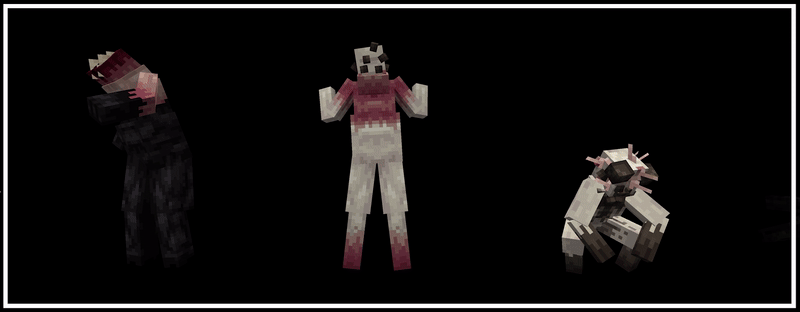
GTFO Craft: Protocol is a Forge mod for 1.12.2 that contains enemies, items and mechanics from the game "GTFO"! Currently, the mod does not contain any survival elements and is purely designed to be used for mapmaking or campaign purposes. While still early in development it is entirely possible to create levels very similar to the original game with features such as Scans, Doors, Generators and Scouts (With the help of other mapmaking tool mods).
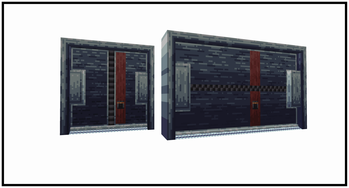
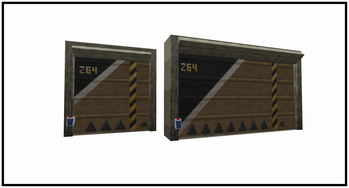
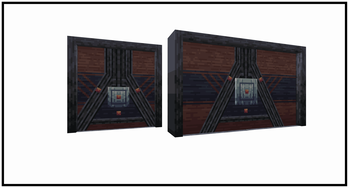
Security, Apex, Blood and Bulk Doors can all be opened by a redstone input - but they cannot be closed. Common/Breakable doors can be opened repeatedly by players but beware they can be broken through by enemies. Terminals and Generators output a redstone signal - it can reach behind solid walls. Cells can be picked up by right-clicking them and placed down by crouching and right-clicking (place cells into generators by right clicking them with a cell in your hand). /scan command can be used to create a physical space in which players must stand within to complete. Glowsticks can be thrown to produce light and Fog Repellers can be thrown to temporarily remove fog. Sentries can be placed down to damage enemies in front of them. Fog blocks can obstruct your view when inside of them and spitters will damage you when you get close to them. Mobs will either have melee, ranged or a tongue attack depending on the type. The bigger - the more dangerous they are. Mobs can be spawned in sleeping for rooms in front of you or awake to simulate an alarm wave.
OBJ://Commands:
Spawn a floor scan with a command output once it completes.
/scan x1 y1 z1 x2 y2 z2 (Length In Ticks) (Needed_Players) (Hex_Color) (Line_Coordinate) (Command)
Spawn any of the mobs in a sleeping state. Only flyers cannot sleep.
/summon gtfo_craft:"Mob_Name" x y z {sleeping:1}
Spawn a normal, charger or shadow scout with a command it'll output after screaming.
/summon gtfo_craft:"Scout_Type" x y z {command:"Command"}
OBJ://Configurations:
The current exsisting way of customizing the values of enemies is to add a file similar to the example below in your world folder (Same folder where your level.dat is located). Of course certain values won't apply to all enemies.
[
 {
    "entity": "mob_name",
    "maxHealth": 1,
    "knockBackResistance": 1,
    "movementSpeed": 1,
    "flyingSpeedAttackDamage": 1,
    "attackSpeed": 1,
    "armor": 1,
    "armorToughness": 1,
    "projectileDamage": 1,
    "attackDamage": 1,
    "attackDamage": 1
  }
]
Available Versions
How to Install GTFO Craft: Protocol on Your Server
Order Server
Order a Minecraft Java server with at least 3 GB RAM (4 GB recommended).
Set forge Loader
In the panel under "Egg", select the forge loader and matching Minecraft version (1.12.2).
Install Mod
Open the mod browser in the dashboard and search for "GTFO Craft: Protocol". Click "Install" – done! Alternatively, upload the .jar via SFTP to the /mods folder.
Compatibility
Mod Loaders
Minecraft Versions
1.12.2
Server-side
✓ RequiredRecommended RAM
4 GB(min. 3 GB)Frequently Asked Questions
GTFO Craft: Protocol server crashes on startup – what to do?
Most common cause: wrong forge version or insufficient RAM. Check the server log (latest.log) for "OutOfMemoryError" or "Mixin" errors. With Mado Hosting: ensure at least 3 GB RAM is allocated and the loader matches the mod version (1.12.2). You can switch loaders with one click in the panel.
Is GTFO Craft: Protocol compatible with forge?
GTFO Craft: Protocol officially supports forge for Minecraft 1.12.2. The Mado dashboard automatically detects incompatible loader combinations.
Server lagging with GTFO Craft: Protocol – how to optimize performance?
Recommended RAM: 4 GB (per 8 players). Use /spark profiler to check if GTFO Craft: Protocol consumes the most tick time. Common fixes: reduce server view-distance to 8-10, install "performant" or "starlight" as supplementary mods on Forge. With Mado Hosting, your server runs on NVMe SSDs with dedicated CPU cores for minimal latency.
Similar Mods




![[TaCZ] Timeless and Classics Zero](https://cdn.modrinth.com/data/SzzJttH8/fd27766d2bb8390d284696b1dbd358f87e081439_96.webp)

Rent Modded Server
Install GTFO Craft: Protocol with just one click on your server.