
Guess The Block Minigame
Tired of building a minigame all by yourself? Bored of playing minecraft too? A new minigame now awaits you!
Screenshots
About this Mod
DESCRIPTION
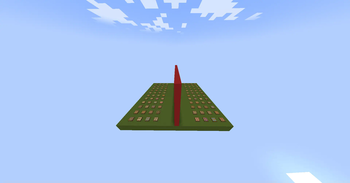
This datapack/mod summons a minigame structure at coordinates 0, 100, 0. The minigame structure
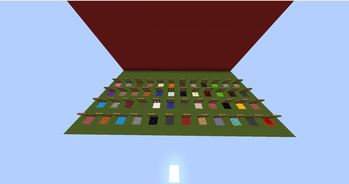
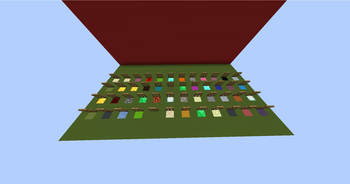
comprises of a platform made out of green concrete and a wall made out of red concrete at the center of the platform. The wall divides the platform into two equal parts. The platform further consists of 96 trapdoors for identifying the block and 96 random blocks.
HOW TO USE THE DATAPACK/MOD
execute the following command to summon the minigame structure:
function minigame:guesstheblock
You can execute this command after you are done playing and if you want to play again too
ABOUT THE MINIGAME
The minigame is known as "Guess The Block". As the name suggests, you have to guess the block. However this minigame requires two players. The platform is divided into parts by a red concrete wall for the players, the players must be on either sides of the platform.
There will be 96 random blocks, 48 for one player and another 48 for the other. 96 trapdoors will be placed above the random blocks for identification. After the players start the game, they will have to choose any one block from their opponent's side/territory, and the opponent has to do the same.
After the block is chosen, you have to start asking your opponent the characteristics of their block, for example: "Does your block drop something?" or "Is your block related to gold". The opponent will do the same as well. Once the opponent guesses your chosen block or you guess your opponent's chosen block, you win or the opponent wins.
INSTALLATION GUIDE
go to your saves folder located here on Windows:
C:\Users(your name)\AppData\Roaming\.minecraft\saves
put the zipped file in the data packs folder, and either restart your world or execute /reload
OTHER THINGS TO NOTE
- Please consider asking me at my discord if you have any other doubts or problems regarding this datapack/mod. My discord username is
oshielder - Kindly note that some blocks may be placed more than twice, so make sure to replace them with the block of your choice
Available Versions
How to Install Guess The Block Minigame on Your Server
Order Server
Order a Minecraft Java server with at least 3 GB RAM (4 GB recommended).
Set datapack Loader
In the panel under "Egg", select the datapack loader and matching Minecraft version (1.21.4).
Install Mod
Open the mod browser in the dashboard and search for "Guess The Block Minigame". Click "Install" – done! Alternatively, upload the .jar via SFTP to the /mods folder.
Compatibility
Mod Loaders
Minecraft Versions
1.21.4, 1.21.3, 1.21.2 (+36 more)
Server-side
✓ RequiredRecommended RAM
4 GB(min. 3 GB)Frequently Asked Questions
Guess The Block Minigame server crashes on startup – what to do?
Most common cause: wrong datapack version or insufficient RAM. Check the server log (latest.log) for "OutOfMemoryError" or "Mixin" errors. With Mado Hosting: ensure at least 3 GB RAM is allocated and the loader matches the mod version (1.21.4). You can switch loaders with one click in the panel.
Is Guess The Block Minigame compatible with datapack and fabric and forge and neoforge and quilt?
Guess The Block Minigame officially supports datapack, fabric, forge, neoforge, quilt for Minecraft 1.21.4, 1.21.3, 1.21.2. Note: Forge and Fabric mods are NOT cross-compatible – pick one loader and stick with it. The Mado dashboard automatically detects incompatible loader combinations.
Server lagging with Guess The Block Minigame – how to optimize performance?
Recommended RAM: 4 GB (per 8 players). Use /spark profiler to check if Guess The Block Minigame consumes the most tick time. Common fixes: reduce server view-distance to 8-10, install "performant" or "starlight" as supplementary mods on Forge. With Mado Hosting, your server runs on NVMe SSDs with dedicated CPU cores for minimal latency.
Similar Mods




Rent Modded Server
Install Guess The Block Minigame with just one click on your server.