
GUI Maker
This datapack allows the player to create GUIs in their worlds freely and avoiding the hassle to hardcode them!
Screenshots
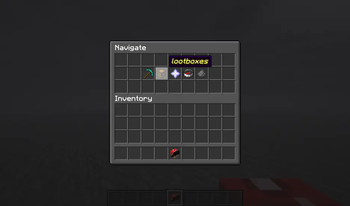
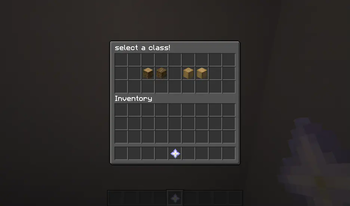
About this Mod

- 1.20.2-1.21.11+ supported! (make sure to check versions before installing!)
- Make sure to follow this project to get notified about new features!
- For versions 1.21.6+, Restart your World upon uploading the datapack.
About Me
GUI Maker is a datapack mapmaking tool that allows mapmakers to create Inventory GUI in their minecraft worlds! This is a storage-based datapack which stores page layout details in appropriate storage paths and draws from them with the help of macros. This datapack is released under MIT license, meaning that if you wish to make changes, you can download its source code and modify accordingly.
Features
Create Multiple Inventory GUI
This datapack allows for an easy way to create multiple GUI in the same minecraft world! It also allows for easy navigation and page-changing feature!
Performance-Efficient!
This datapack has been made to account for performance load and prevent lag spikes caused by its functions. If you feel that the datapack is not efficient enough and can be further improved, feel free to contact me or make your own version of this datapack.
Points to Note
Setup ALL of your GUI Layouts before Using!
It is advised that users set up everything relating to the pages before attempting to use this datapack. If you do this, it will surely speed up your creation process.
How to Make a GUI
Key Note: Once you've uploaded the datapack onto the world, you need to rejoin the world if you're in singleplayer, or restart the server if you're using the datapack in a server. This is because the datapack uses a new /dialog system and that is only reloaded upon world restart.
Here's a video tutorial.
First, Make a GUI
- Open the GUI Maker v2.0 Menu™ by running the function /function gm:menu
- Click on CREATE GUI
- Click "CREATE GUI PROFILE"
- A GUI ID will be displayed in the chat, keep it in mind!
- Now, to append pages to your GUI, open the menu again.
- Click on CREATE GUI, then click on Append a Page instead.
- Find the GUI you've made by recalling the GUI ID.
That way, you've created the GUI. Now, the next step is to make buttons do things.
Second, Edit the Page
- Open the GUI Maker v2.0 Menu™ by running the function /function gm:menu.
- Click on Edit Page.
- Navigate to your GUI ID and PAGE
- Choose between Editing Page Name and Editing Contents
- Once you press Editing Contents, a prototypical layout of the Menu will be displayed to you. If your GUI has empty slots, only the slots which have items will be shown.
- Hovering over the Button gives detail about the Item present in that slot, use it to find the button you want to make changes to. Once you've found it, press on it
- Another Dialog Menu will pop up. Here, make all the changes you need. Do not keep the text inputs empty. Once done, click Apply.
Lastly, Spawn the GUI
- Open the GUI Maker v2.0 Menu™ by running the function /function gm:menu, again.
- Click on "Spawn GUI"
- Navigate to the Page you want to Summon.
- Choose between Spawning it as a Barrel or Chest Minecart.
- Once the button is clicked, a message will appear in chat for the command to summon the GUI without dialog, this can be copied by the developer to put it in specific parts of their datapack.
Other
You must NOT re-upload this exact datapack under any circumstances.
You can package this datapack + your function files and upload them, as you wish.
You can make changes you want as you wish and use it/upload it as you wish.
You are allowed to use this datapack in your creations and upload this datapack with your creation combined.
Extras
Thanks for reading the description of this project. Since the last version of the datapack, alot of changes have made. Initially, the datapack was split into two parts. But this time, they've been merged into one. Until Mojang makes major changes with dialogs, the current system will be upgraded/maintained for future minecraft versions to come.
Thank you!
- Thanks for downloading this datapack (if you've downloaded it)!
- Thanks for using this datapack in your creations!
- Thanks for showing interest in this datapack project!
Available Versions
How to Install GUI Maker on Your Server
Order Server
Order a Minecraft Java server with at least 3 GB RAM (4 GB recommended).
Set datapack Loader
In the panel under "Egg", select the datapack loader and matching Minecraft version (1.21.11).
Install Mod
Open the mod browser in the dashboard and search for "GUI Maker". Click "Install" – done! Alternatively, upload the .jar via SFTP to the /mods folder.
Compatibility
Mod Loaders
Minecraft Versions
1.21.11, 1.21.10, 1.21.9 (+14 more)
Server-side
✓ RequiredRecommended RAM
4 GB(min. 3 GB)Frequently Asked Questions
GUI Maker server crashes on startup – what to do?
Most common cause: wrong datapack version or insufficient RAM. Check the server log (latest.log) for "OutOfMemoryError" or "Mixin" errors. With Mado Hosting: ensure at least 3 GB RAM is allocated and the loader matches the mod version (1.21.11). You can switch loaders with one click in the panel.
Is GUI Maker compatible with datapack and fabric and forge and neoforge and quilt?
GUI Maker officially supports datapack, fabric, forge, neoforge, quilt for Minecraft 1.21.11, 1.21.10, 1.21.9. Note: Forge and Fabric mods are NOT cross-compatible – pick one loader and stick with it. The Mado dashboard automatically detects incompatible loader combinations.
Server lagging with GUI Maker – how to optimize performance?
Recommended RAM: 4 GB (per 8 players). Use /spark profiler to check if GUI Maker consumes the most tick time. Common fixes: reduce server view-distance to 8-10, install "performant" or "starlight" as supplementary mods on Forge. With Mado Hosting, your server runs on NVMe SSDs with dedicated CPU cores for minimal latency.
Similar Mods



Rent Modded Server
Install GUI Maker with just one click on your server.