
GuidedMod
A mod for modpack creators to guide players through mode selection and physically toggle mods on/off.
Screenshots
About this Mod
GuidedMod
A customizable Minecraft client-side guide mod
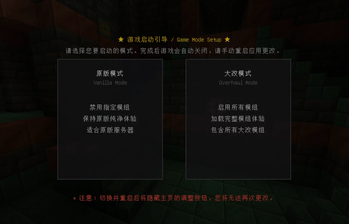
GuidedMod intercepts players on the first game startup, prompting them to choose between "Vanilla Mode" and "Overhaul Mode". The mod physically controls mod loading states by renaming .jar files (appending or removing the .disabled suffix).
🌟 Features
- 3D Rotating Panorama: Beautiful Trial Chamber panorama background with clean rendering.
- Dual Cards Selector: Offers card selectors with hover highlights, outer glows, and custom click sounds.
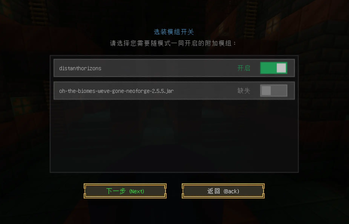
- Optional Mods Screen: Upgrades standard buttons to sleek iOS/Material-style slider switches linked to ON/OFF states.
- Missing Mod Detection: Automatically renders disabled missing mods as gray and displays
Missing. - Hover Tooltips: Shows the exact JAR filename being controlled when hovering over the mod item.
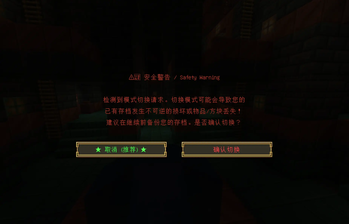
- Anti-Accidental-Click: Cancel button on the left (selected by default) and red warning text on the right.
- One-Time Interception Lock: Hide menu entry and bypass subsequent startup screens once configured.
- Defensive Matching: Strips common version brackets and version prefixes before doing a prefix starts-with check. Rejects keywords < 3 characters to prevent mass-renaming bugs.
⚙️ Configuration
Generates configuration files in config/:
1. config/guidedmod-mods.txt
# Mods controlled by primary modes (Vanilla/Overhaul)
# Example:
# appleskin

[optional]
# Optional mods controlled individually by sliders
# Example:
# justenoughitems
Available Versions
How to Install GuidedMod on Your Server
Order Server
Order a Minecraft Java server with at least 3 GB RAM (4 GB recommended).
Set neoforge Loader
In the panel under "Egg", select the neoforge loader and matching Minecraft version (1.21.1).
Install Mod
Open the mod browser in the dashboard and search for "GuidedMod". Click "Install" – done! Alternatively, upload the .jar via SFTP to the /mods folder.
Compatibility
Mod Loaders
Minecraft Versions
1.21.1
Server-side
✗ UnsupportedRecommended RAM
4 GB(min. 3 GB)Frequently Asked Questions
GuidedMod server crashes on startup – what to do?
Most common cause: wrong neoforge version or insufficient RAM. Check the server log (latest.log) for "OutOfMemoryError" or "Mixin" errors. With Mado Hosting: ensure at least 3 GB RAM is allocated and the loader matches the mod version (1.21.1). You can switch loaders with one click in the panel.
Is GuidedMod compatible with neoforge?
GuidedMod officially supports neoforge for Minecraft 1.21.1. The Mado dashboard automatically detects incompatible loader combinations.
Server lagging with GuidedMod – how to optimize performance?
Recommended RAM: 4 GB (per 8 players). Use /spark profiler to check if GuidedMod consumes the most tick time. Common fixes: reduce server view-distance to 8-10, install "performant" or "starlight" as supplementary mods on Forge. With Mado Hosting, your server runs on NVMe SSDs with dedicated CPU cores for minimal latency.
Similar Mods






Rent Modded Server
Install GuidedMod with just one click on your server.