
The Guild
Quests, expeditions and adventures await you!
About this Mod
Introduction
Welcome to The Guild, a quest mod inspired by Bountiful.
Have you ever wanted to go on an adventure? Or maybe you're more inclined for a stable life?
Either way The Guild has got you covered!
Choose between 15 different professions (5 available at the moment) and embark on a journey of questing!
This mod adds quests to the game.
Ok, but what are quests?
A quest is a set of randomly generated tasks usually accompanied by a corresponding reward based on said tasks.
Quests are highly customizable through datapacks, with a solid base of defaults so you can start adventuring out of the box.
Getting started
To start, find a Guild Master in a plains village, and buy a Profession Licence.
Here's The Guild, a build found mainly in plains villages and more rarely in other ones. Here you can buy professions licences to start accepting quests or to expand your choices.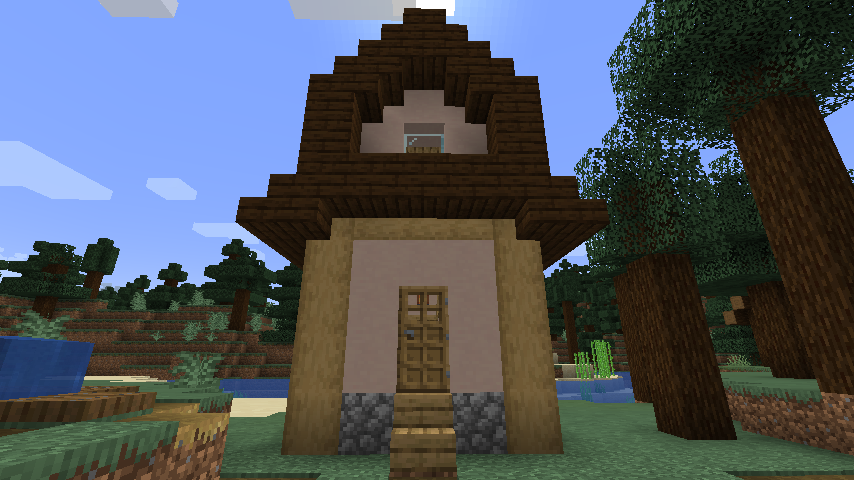
Quests screen
Obtaining and using a licence will unlock the entire Questing system.
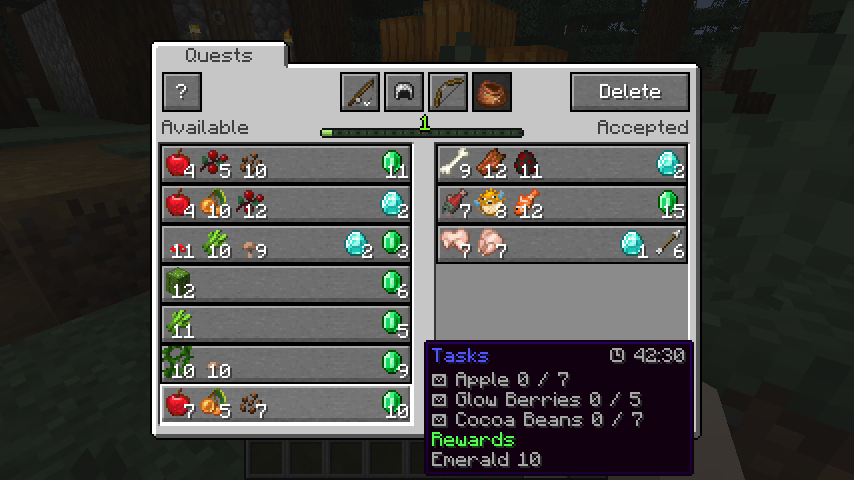
To open the Quests Screen press the Guild Screen Key (J by default).
The Quests Screen showing available quests (on the left) and accepted quests (on the right). Professions are also visible on the top.
Datapack guide
Customizing quests is easy, you can follow the guide here to create your own quests datapacks in minutes!
https://github.com/Fulmineo64/Guild/tree/master/examples/datapacks
FAQ
Is there gonna be a Forge version?
No, but you can download the Bountiful mod which offers many of the functionalities.
Discord
You can discuss, suggest new features and get previews of my mods on my Discord server!
Have fun living your adventures!
Available Versions
How to Install The Guild on Your Server
Order Server
Order a Minecraft Java server with at least 4 GB RAM (6 GB recommended).
Set fabric Loader
In the panel under "Egg", select the fabric loader and matching Minecraft version (1.20.4).
Install Mod
Open the mod browser in the dashboard and search for "The Guild". Click "Install" – done! Alternatively, upload the .jar via SFTP to the /mods folder.
Compatibility
Mod Loaders
Minecraft Versions
1.20.4, 1.20.3, 1.20.2 (+11 more)
Server-side
✓ RequiredRecommended RAM
6 GB(min. 4 GB)Frequently Asked Questions
The Guild server crashes on startup – what to do?
Most common cause: wrong fabric version or insufficient RAM. Check the server log (latest.log) for "OutOfMemoryError" or "Mixin" errors. With Mado Hosting: ensure at least 4 GB RAM is allocated and the loader matches the mod version (1.20.4). You can switch loaders with one click in the panel.
Is The Guild compatible with fabric?
The Guild officially supports fabric for Minecraft 1.20.4, 1.20.3, 1.20.2. The Mado dashboard automatically detects incompatible loader combinations.
Server lagging with The Guild – how to optimize performance?
Recommended RAM: 6 GB (per 5 players). Use /spark profiler to check if The Guild consumes the most tick time. Common fixes: reduce server view-distance to 8-10, install "performant" or "starlight" as supplementary mods on Forge. With Mado Hosting, your server runs on NVMe SSDs with dedicated CPU cores for minimal latency.
Similar Mods




Rent Modded Server
Install The Guild with just one click on your server.