
Hardcore Revive+
A highly configurable data pack that lets you revive your friends in Hardcore mode.
Screenshots
About this Mod
Need help? Join our Discord.
Are you tired of standard Minecraft death mechanics? Maybe dying over and over again just to respawn is too easy, or playing Hardcore mode with one life is too difficult. Hardcore Revive+ solves this problem by adding a highly configurable lives system to your Minecraft world that fits all scenarios.
Key Features
- Once a player loses all of their lives, they become a ghost. Ghosts are spectators that can generate and load chunks and possess players to grant them buffs.
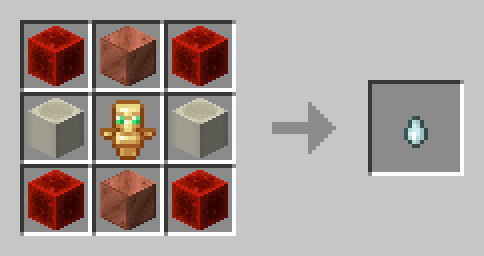
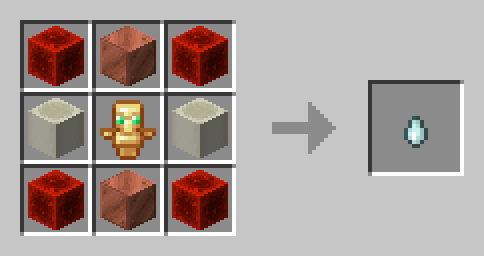
- You can revive another fallen player by crafting a Soul Charm and dropping it on the ground. Once a ghost touches a Soul Charm, they are revived with a set amount of lives.
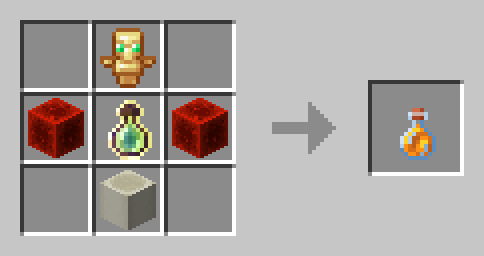
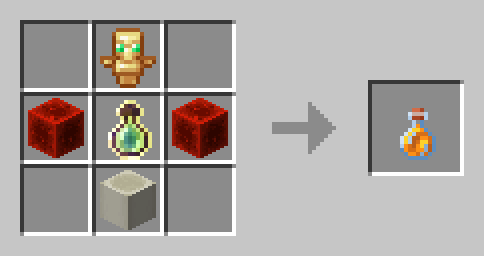
- Players are able to regain lost lives by consuming a Life Jam. You can regain as many lives as you want, as long as you do not go over the maximum.
- When Auto Revive is enabled, ghosts can be revived automatically after 10 minutes.
- When Lifesteal is enabled, killing another player grants another life.
Soul Charm Recipe
Life Jam Recipe
Configuration
Hardcore Revive+ comes with an expansive and easily accessible settings menu that can be opened using /trigger _hcrplus_settings. You will automatically be prompted to configure your preferred settings upon creating your world.
Lives
- Max Lives - The amount of lives each player receives. You can choose between 1, 3, or 5 lives.
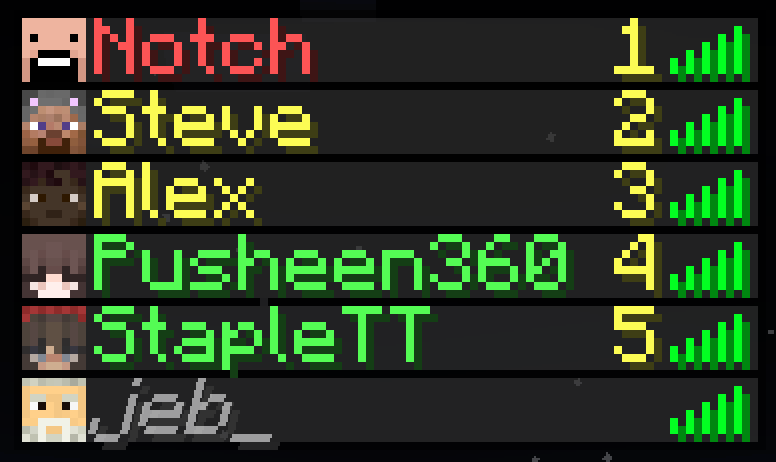
- Name Colors - If enabled, players' names will be colored according to the amount of lives they have.
- Lives in Tab List - If enabled, the amount of lives each player has will be displayed in the tab list.
- Lives on Revival - The amount of lives each player receives after being revived. You can choose between 1 life, half of max lives, or max lives.
- Possession - When enabled, ghosts can spectate other players to grant them a selection of buffs.
- Lifesteal - When enabled, killing a player grants another life.
- Auto Revive - When enabled, ghosts will automatically be revived after 10 minutes.
- Auto Revive Timer - The amount of time in seconds before a ghost is automatically revived.
Items
- Soul Charm - When disabled, Soul Charms will no longer be craftable and split into their crafting recipe when dropped.
- Life Jam - When disabled, Life Jams will no longer be craftable and split into their crafting recipe when consumed.
- Soul Charm Debuffs - When enabled, crafting a Soul Charm will grant a selection of debuffs for 5 minutes, and being revived will grant debuffs for 1 minute.
- Anounce Revives - Sends a global message when a player is revived.
Debug Menu
- Give Soul Charm
- Give Life Jam
Incompatibilities
- Any "Unlock all recipes" data pack
- Essential Mod world hosting
- WorldGameRules
Removal
Need to uninstall Hardcore Revive+? You can remove all features by executing the command /function hcrplus:_uninstall in-game, and then deleting Hardcore Revive+ from either your datapacks folder or your mods folder.
Available Versions
How to Install Hardcore Revive+ on Your Server
Order Server
Order a Minecraft Java server with at least 3 GB RAM (4 GB recommended).
Set datapack Loader
In the panel under "Egg", select the datapack loader and matching Minecraft version (26.1.2).
Install Mod
Open the mod browser in the dashboard and search for "Hardcore Revive+". Click "Install" – done! Alternatively, upload the .jar via SFTP to the /mods folder.
Compatibility
Mod Loaders
Minecraft Versions
26.1.2, 26.1.1, 26.1 (+12 more)
Server-side
✓ RequiredRecommended RAM
4 GB(min. 3 GB)Frequently Asked Questions
Hardcore Revive+ server crashes on startup – what to do?
Most common cause: wrong datapack version or insufficient RAM. Check the server log (latest.log) for "OutOfMemoryError" or "Mixin" errors. With Mado Hosting: ensure at least 3 GB RAM is allocated and the loader matches the mod version (26.1.2). You can switch loaders with one click in the panel.
Is Hardcore Revive+ compatible with datapack and fabric and forge and neoforge and quilt?
Hardcore Revive+ officially supports datapack, fabric, forge, neoforge, quilt for Minecraft 26.1.2, 26.1.1, 26.1. Note: Forge and Fabric mods are NOT cross-compatible – pick one loader and stick with it. The Mado dashboard automatically detects incompatible loader combinations.
Server lagging with Hardcore Revive+ – how to optimize performance?
Recommended RAM: 4 GB (per 8 players). Use /spark profiler to check if Hardcore Revive+ consumes the most tick time. Common fixes: reduce server view-distance to 8-10, install "performant" or "starlight" as supplementary mods on Forge. With Mado Hosting, your server runs on NVMe SSDs with dedicated CPU cores for minimal latency.
Similar Mods




Rent Modded Server
Install Hardcore Revive+ with just one click on your server.