
Harder Beds
🛏️ Secure your shelter before you can sleep!
Screenshots
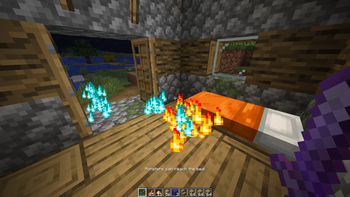
About this Mod
HarderBeds makes sleeping harder and more strategic. In normal gameplay, skipping the night is too easy and takes away from the survival challenge. This mod makes beds harder to get and only usable when well protected from mobs, so players have to plan and stay safe.
Features:
- Requires beds to be protected from mobs before sleep is allowed. The game checks for potential mob spawns and pathfinding within a 40x20x40 area around the bed. If mobs can spawn and reach the player, sleep is denied until the area is secured.

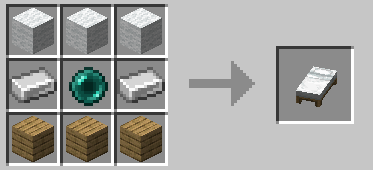
Changes the bed crafting recipe to include iron and one ender pearl, making beds harder to craft:
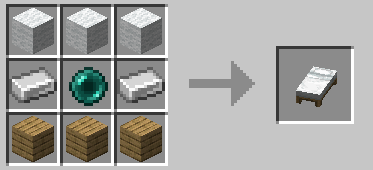
Adds penalties (adverse potion-effects) for using beds inside villages, increasing risk.

Prevents beds from dropping in villages, making them rarer.
Disables phantom spawning (no penalty for skipping sleep).
Notes:
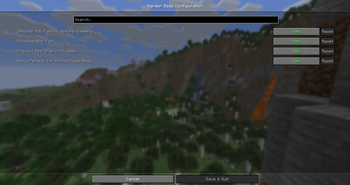
All settings can be adjusted easily via ModMenu.
If you prefer not to use the new crafting recipes, you can delete the JSON files from the mod’s
.jarto disable them.
Feedback on GitHub is always appreciated! :)
Available Versions
How to Install Harder Beds on Your Server
Order Server
Order a Minecraft Java server with at least 3 GB RAM (4 GB recommended).
Set fabric Loader
In the panel under "Egg", select the fabric loader and matching Minecraft version (26.1.2).
Install Mod
Open the mod browser in the dashboard and search for "Harder Beds". Click "Install" – done! Alternatively, upload the .jar via SFTP to the /mods folder.
Compatibility
Mod Loaders
Minecraft Versions
26.1.2, 1.21.11, 1.21.10 (+7 more)
Server-side
~ OptionalRecommended RAM
4 GB(min. 3 GB)Frequently Asked Questions
Harder Beds server crashes on startup – what to do?
Most common cause: wrong fabric version or insufficient RAM. Check the server log (latest.log) for "OutOfMemoryError" or "Mixin" errors. With Mado Hosting: ensure at least 3 GB RAM is allocated and the loader matches the mod version (26.1.2). You can switch loaders with one click in the panel.
Is Harder Beds compatible with fabric?
Harder Beds officially supports fabric for Minecraft 26.1.2, 1.21.11, 1.21.10. The Mado dashboard automatically detects incompatible loader combinations.
Server lagging with Harder Beds – how to optimize performance?
Recommended RAM: 4 GB (per 8 players). Use /spark profiler to check if Harder Beds consumes the most tick time. Common fixes: reduce server view-distance to 8-10, install "performant" or "starlight" as supplementary mods on Forge. With Mado Hosting, your server runs on NVMe SSDs with dedicated CPU cores for minimal latency.
Similar Mods




Rent Modded Server
Install Harder Beds with just one click on your server.
Details
- License
- Creative Commons Attribution Non Commercial 4.0 International
- Server-side
- Optional