
HarvestStats
Press H to see exactly how many of each crop you've harvested, with percentages and progress bars saved permanently per world.
About this Mod
HarvestStats
Ever wondered how many crops you've harvested? HarvestStats keeps track of every harvest and shows detailed statistics for each crop.
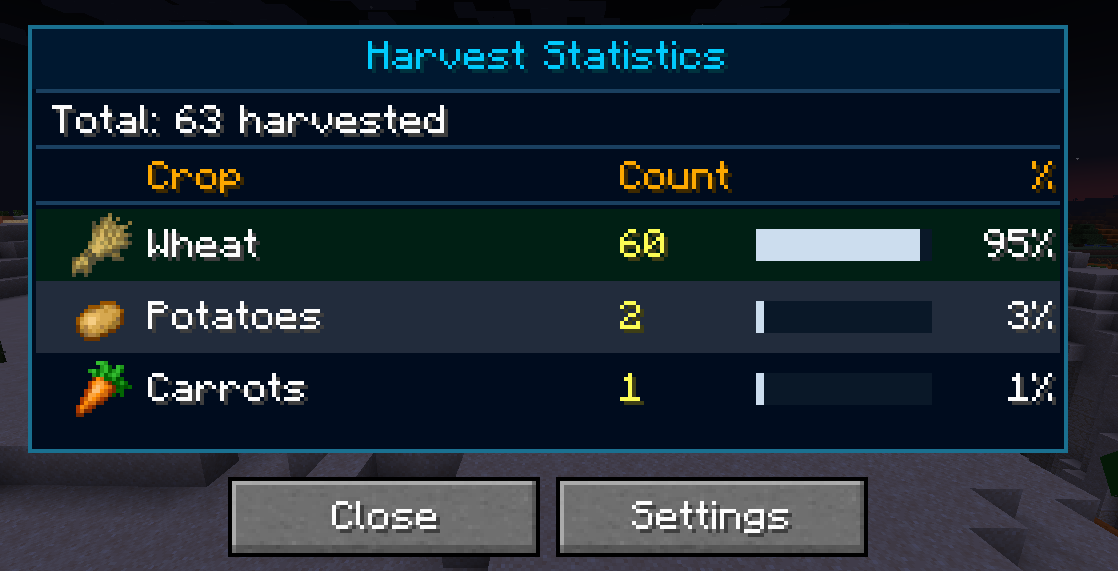
Open the statistics screen with H to view harvest counts, percentages, and progress bars. Your progress is saved automatically and stored separately for every world.
Features
Press H to open your harvest statistics.
View the total harvested amount for every supported crop.
See percentages and progress bars in a clean interface.
Right-Click Harvest
Right-click fully grown crops to harvest and automatically replant them in one click.
Auto Harvest
Automatically harvest fully grown crops within a 3-block radius.
Can be enabled or disabled in the settings.
Per-World Data
Statistics are stored separately for every world.
Progress is automatically saved.
Reset Statistics
Reset your statistics at any time.
Includes a confirmation screen to prevent accidental resets.
Requirements
Minecraft 1.21.1
Fabric Loader
Fabric API
Available Versions
How to Install HarvestStats on Your Server
Order Server
Order a Minecraft Java server with at least 3 GB RAM (4 GB recommended).
Set fabric Loader
In the panel under "Egg", select the fabric loader and matching Minecraft version (1.21.4).
Install Mod
Open the mod browser in the dashboard and search for "HarvestStats". Click "Install" – done! Alternatively, upload the .jar via SFTP to the /mods folder.
Compatibility
Mod Loaders
Minecraft Versions
1.21.4, 1.21.3, 1.21.2 (+1 more)
Server-side
✗ UnsupportedRecommended RAM
4 GB(min. 3 GB)Frequently Asked Questions
HarvestStats server crashes on startup – what to do?
Most common cause: wrong fabric version or insufficient RAM. Check the server log (latest.log) for "OutOfMemoryError" or "Mixin" errors. With Mado Hosting: ensure at least 3 GB RAM is allocated and the loader matches the mod version (1.21.4). You can switch loaders with one click in the panel.
Is HarvestStats compatible with fabric?
HarvestStats officially supports fabric for Minecraft 1.21.4, 1.21.3, 1.21.2. The Mado dashboard automatically detects incompatible loader combinations.
Server lagging with HarvestStats – how to optimize performance?
Recommended RAM: 4 GB (per 8 players). Use /spark profiler to check if HarvestStats consumes the most tick time. Common fixes: reduce server view-distance to 8-10, install "performant" or "starlight" as supplementary mods on Forge. With Mado Hosting, your server runs on NVMe SSDs with dedicated CPU cores for minimal latency.
Rent Modded Server
Install HarvestStats with just one click on your server.