
HC Autopsy
Capture Hardcore wipes, player stat snapshots, leaderboards, and lifetime run history on Fabric servers.
Screenshots
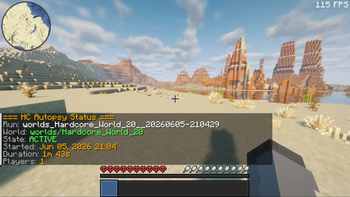
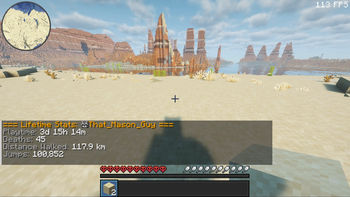
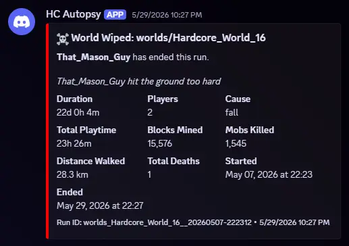
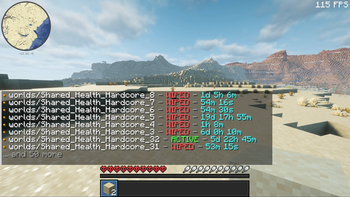
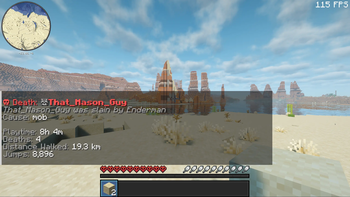
About this Mod
HC Autopsy is a lightweight Fabric server mod that turns Hardcore wipes into
durable run history, lifetime totals, and in-game postmortem tools.
Minecraft normally treats a Hardcore death as the end of the story. Servers get
reset, stat files move around, chat scrolls away, and the details of the run can
disappear. HC Autopsy keeps a separate server-side record in a fixed Tempest
Studios app-data folder, so each wipe leaves behind the death context, vanilla
stat snapshots, run totals, cached player names, and lifetime player and server
history.
It works server-side on dedicated Fabric servers. Players do not need to install
the mod. When the first player dies in a run, HC Autopsy records the wipe,
snapshots every player's vanilla stat JSON, aggregates the run, updates lifetime
totals, broadcasts an in-game wipe summary, and can optionally send a Discord
webhook summary. It now also posts readable, category-colored run leaderboards
after the wipe summary, including playtime, blocks broken, damage taken,
damage dealt, and diamond ore mined.
Features
- Persistent Hardcore wipe history across server resets
- First-death wipe detection for active runs
- Death message, damage source, attacker, player, and world metadata
- Raw vanilla player stat snapshots for complete stat fidelity
- Stores per-run metadata, per-player snapshots, aggregated run totals, and
cached player names - Maintains lifetime player and server totals across wiped runs
- In-game wipe summary and post-wipe stat leaderboard after stat capture
completes /hcautopsycommands for status, run history, cached players, player totals,
server totals, and lifetime leaderboards- Operator/console-safe tools for continuing a wiped run, recalculating
lifetime totals, reloading config, broadcasting full post-wipe leaderboards,
and testing Discord webhooks - Optional Discord webhook notifications for wipe summaries and category-colored
post-wipe leaderboards - Automatic post-wipe awards for playtime, blocks broken, damage taken, damage
dealt, and diamonds mined - Launcher-agnostic app-data storage with first-launch migration from the old
config/hc-autopsy/folder - Defensive config/data loading and atomic writes for persisted HC Autopsy data
- Server-only install; no client mod required
Good for
- Hardcore Fabric servers
- Challenge and limited-life runs
- Community worlds with seasonal resets
- Post-wipe stat review
- Comparing lifetime playtime, deaths, distance walked, and jumps
- Calling out the run's biggest post-wipe stat winners
- Rebroadcasting full post-wipe rankings to game chat and Discord
- Long-term server history
- Discord communities that want automatic wipe summaries
- Players who want the receipts after a run goes wrong
Install note
Install Fabric Loader, Fabric API, and the HC Autopsy jar that matches your
Minecraft version.
HC Autopsy is designed for server-side use. Install it in the dedicated Fabric
server mods folder. It does not need to be installed on players' clients.
Choose the compatibility-group jar that matches your server:
1.20-1.21.1126.1-26.2-pre-3
HC Autopsy stores config and run history outside launcher-local .minecraft
folders:
- Windows:
%APPDATA%\TempestStudios\HC-Autopsy\ - macOS:
~/Library/Application Support/TempestStudios/HC-Autopsy/ - Linux:
$XDG_DATA_HOME/tempest-studios/hc-autopsy/or~/.local/share/tempest-studios/hc-autopsy/
On first launch, existing config/hc-autopsy/ data is copied to the new
app-data folder when the new folder is empty. Old files stay in place as a
backup.
Available Versions
How to Install HC Autopsy on Your Server
Order Server
Order a Minecraft Java server with at least 3 GB RAM (4 GB recommended).
Set fabric Loader
In the panel under "Egg", select the fabric loader and matching Minecraft version (26.2-pre-3).
Install Mod
Open the mod browser in the dashboard and search for "HC Autopsy". Click "Install" – done! Alternatively, upload the .jar via SFTP to the /mods folder.
Compatibility
Mod Loaders
Minecraft Versions
26.2-pre-3, 26.1.2, 26.1.1 (+20 more)
Server-side
✓ RequiredRecommended RAM
4 GB(min. 3 GB)Frequently Asked Questions
HC Autopsy server crashes on startup – what to do?
Most common cause: wrong fabric version or insufficient RAM. Check the server log (latest.log) for "OutOfMemoryError" or "Mixin" errors. With Mado Hosting: ensure at least 3 GB RAM is allocated and the loader matches the mod version (26.2-pre-3). You can switch loaders with one click in the panel.
Is HC Autopsy compatible with fabric?
HC Autopsy officially supports fabric for Minecraft 26.2-pre-3, 26.1.2, 26.1.1. The Mado dashboard automatically detects incompatible loader combinations.
Server lagging with HC Autopsy – how to optimize performance?
Recommended RAM: 4 GB (per 8 players). Use /spark profiler to check if HC Autopsy consumes the most tick time. Common fixes: reduce server view-distance to 8-10, install "performant" or "starlight" as supplementary mods on Forge. With Mado Hosting, your server runs on NVMe SSDs with dedicated CPU cores for minimal latency.
Similar Mods




Rent Modded Server
Install HC Autopsy with just one click on your server.