
Health HUD
Show hearts for health above, under, left or right of the player. Show damage or heal numbers.
Screenshots
About this Mod
HealthHUD
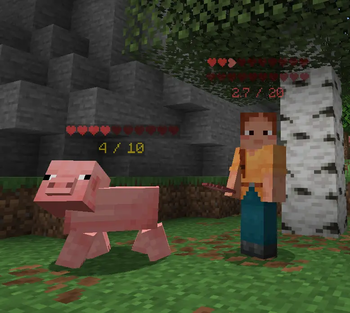
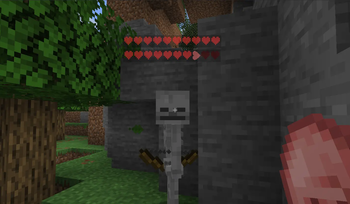
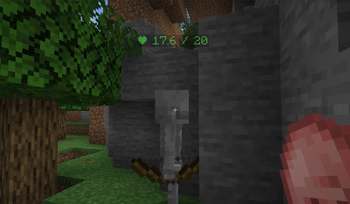
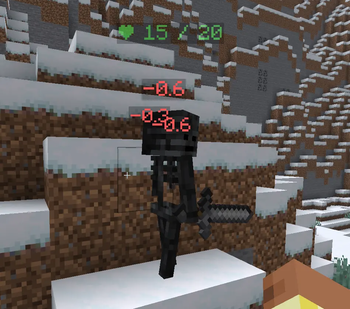
See the health of every nearby entity at a glance — floating hearts above their heads and damage numbers that fly off when they take a hit.
Features
Health Bars
Floating hearts rendered in world space above every living entity. Supports multiple display modes:
- Hearts — classic heart icons that fill and empty with health
- Numeric — shows
12.5 / 20style text - Percentage — shows health as a
%
The bar colour shifts from green → yellow → red as health drops.
Floating Damage & Heal Numbers
When an entity takes damage, a red number drifts upward from them. Healing shows a green number. Both fade out smoothly and drift at a configurable speed. No dark background — just clean coloured text in the world.
In-game Settings GUI
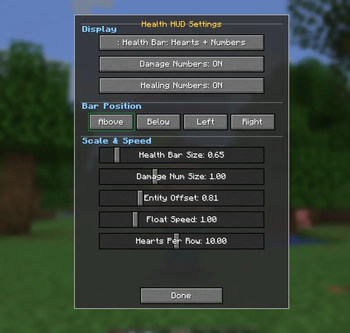
Open the settings screen any time with /healthhud. Adjust everything without touching a config file:
| Setting | Description |
|---|---|
| Health Bar Mode | Switch between Hearts / Numeric / Percentage |
| Damage Numbers | Toggle damage numbers on/off |
| Healing Numbers | Toggle healing numbers on/off |
| Bar Position | Above / Below / Left / Right of the entity |
| Health Bar Size | Scale the hearts up or down |
| Damage Number Size | Scale the floating numbers |
| Entity Offset | Push the bar closer or further from the entity |
| Float Speed | How fast damage numbers drift upward |
| Hearts Per Row | How many hearts per row before wrapping |
Usage
- Open settings:
/healthhudin chat or the chat bar - Hearts are shown for all living entities within 32 blocks
- Your own health bar is hidden in first-person view
Credits
Made by codx
Available Versions
How to Install Health HUD on Your Server
Order Server
Order a Minecraft Java server with at least 3 GB RAM (4 GB recommended).
Set fabric Loader
In the panel under "Egg", select the fabric loader and matching Minecraft version (26.1.2).
Install Mod
Open the mod browser in the dashboard and search for "Health HUD". Click "Install" – done! Alternatively, upload the .jar via SFTP to the /mods folder.
Compatibility
Mod Loaders
Minecraft Versions
26.1.2, 26.1.1, 26.1
Server-side
✗ UnsupportedRecommended RAM
4 GB(min. 3 GB)Frequently Asked Questions
Health HUD server crashes on startup – what to do?
Most common cause: wrong fabric version or insufficient RAM. Check the server log (latest.log) for "OutOfMemoryError" or "Mixin" errors. With Mado Hosting: ensure at least 3 GB RAM is allocated and the loader matches the mod version (26.1.2). You can switch loaders with one click in the panel.
Is Health HUD compatible with fabric and forge and neoforge?
Health HUD officially supports fabric, forge, neoforge for Minecraft 26.1.2, 26.1.1, 26.1. Note: Forge and Fabric mods are NOT cross-compatible – pick one loader and stick with it. The Mado dashboard automatically detects incompatible loader combinations.
Server lagging with Health HUD – how to optimize performance?
Recommended RAM: 4 GB (per 8 players). Use /spark profiler to check if Health HUD consumes the most tick time. Common fixes: reduce server view-distance to 8-10, install "performant" or "starlight" as supplementary mods on Forge. With Mado Hosting, your server runs on NVMe SSDs with dedicated CPU cores for minimal latency.
Similar Mods






Rent Modded Server
Install Health HUD with just one click on your server.
Details
- License
- Creative Commons Attribution Non Commercial No Derivatives 4.0 International
- Server-side
- Unsupported