
Health Tag
Displays entity health as nametags
Screenshots
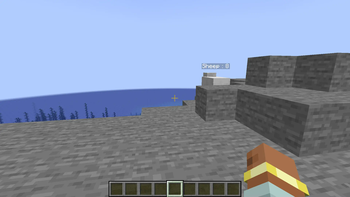
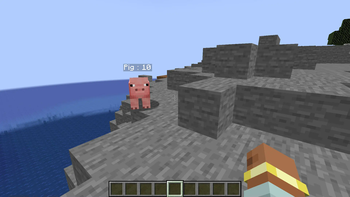
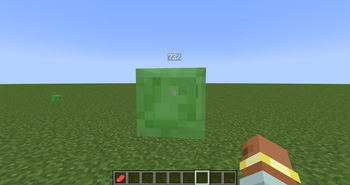
About this Mod
Visualize Entity Health! 👀
This client-side mod adds a discreet and informative visual interface to display the health of entities you are looking at in Minecraft! No more guessing if a mob is almost dead or still at full strength! 💪
⚙️ How does it work?
The "Health Tag Mod" works automatically and in real-time. Here are the key steps:
- 🎯 Target Detection: The mod detects the entity your player is directly looking at (the one that would be hit if you attacked).
- 📊 Interface Display: If the entity you are looking at is a living entity (mob, player, etc.) and is within range (about 10 blocks), the mod displays a discreet interface at the top left of your screen.
- Name and Health Bar: This interface displays:
- The entity's name clearly readable.
- A dynamic health bar that represents the entity's current health.
- A precise numerical display of the current and maximum health (e.g., "20 / 20").
- Dynamic Color: The color of the outline of the health bar changes depending on the entity's health:
- 💚 Green: High health.
- 🧡 Orange: Medium health.
- ❤️ Red: Critical health (less than 25%).
- Health Loss Animation: When the entity loses health, a visual red fade animation is temporarily displayed on the health bar, making the health loss more visible.
🎮 How to use it?
The "Health Tag Mod" is designed to be simple and intuitive. There is no configuration needed!
- 🕹️ Play!: Once in the game, the mod works automatically. Simply look at a living entity to see its health interface appear.
📌 Important Points:
- 💻 Client-Side ONLY: This mod is purely client-side. It should not be installed on a server.
- 🎛️ No Configuration: The mod is ready to use right after installation, with no settings to adjust.
- 👁️ Discreet Interface: The interface is designed to be informative without being intrusive or obstructing your vision in-game.
- ⚔️ Help with Combat and Exploration: Ideal for better assessing the health of mobs in combat or for quickly identifying wounded creatures during exploration.
📢 We're Recruiting French Speakers! Want to contribute to more awesome Minecraft mods and projects? We are looking for people who can speak French to join our team. For more information, please reach out via email: [email protected]
Available Versions
How to Install Health Tag on Your Server
Order Server
Order a Minecraft Java server with at least 3 GB RAM (4 GB recommended).
Set neoforge Loader
In the panel under "Egg", select the neoforge loader and matching Minecraft version (1.21.4).
Install Mod
Open the mod browser in the dashboard and search for "Health Tag". Click "Install" – done! Alternatively, upload the .jar via SFTP to the /mods folder.
Compatibility
Mod Loaders
Minecraft Versions
1.21.4, 1.21.1, 1.20.6 (+1 more)
Server-side
✓ RequiredRecommended RAM
4 GB(min. 3 GB)Frequently Asked Questions
Health Tag server crashes on startup – what to do?
Most common cause: wrong neoforge version or insufficient RAM. Check the server log (latest.log) for "OutOfMemoryError" or "Mixin" errors. With Mado Hosting: ensure at least 3 GB RAM is allocated and the loader matches the mod version (1.21.4). You can switch loaders with one click in the panel.
Is Health Tag compatible with neoforge?
Health Tag officially supports neoforge for Minecraft 1.21.4, 1.21.1, 1.20.6. The Mado dashboard automatically detects incompatible loader combinations.
Server lagging with Health Tag – how to optimize performance?
Recommended RAM: 4 GB (per 8 players). Use /spark profiler to check if Health Tag consumes the most tick time. Common fixes: reduce server view-distance to 8-10, install "performant" or "starlight" as supplementary mods on Forge. With Mado Hosting, your server runs on NVMe SSDs with dedicated CPU cores for minimal latency.
Similar Mods




Rent Modded Server
Install Health Tag with just one click on your server.