HealthCrosshair
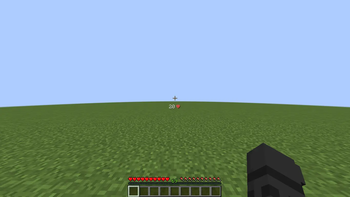
A lightweight, modern PvP health indicator that displays your health directly below the crosshair with a sleek 70% opacity and customizable display modes.
Screenshots
About this Mod
Health Crosshair
A sleek, minimalist PvP health indicator for Fabric.
Health Crosshair is a lightweight, client-side mod designed to keep your focus where it belongs—on your crosshair. It renders your current health directly in your line of sight with a modern, high-transparency aesthetic, making it perfect for competitive PvP and survival.
✨ Features
Modern HUD Design: A compact and clean layout that places essential health information right at your crosshair for faster reaction times.
Smart Transparency: The HUD features a balanced opacity, ensuring it remains fully readable against any block or entity without obstructing your view.
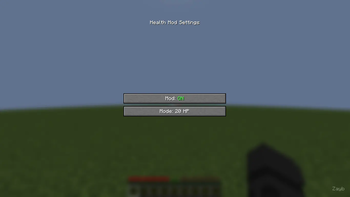
Dual Display Modes:
20 HP Mode: Shows your health in raw points (Standard 1–20 scale).
10 Hearts Mode: Shows your health in hearts (Standard 1–10 scale).
In-Game Customization: Press 'H' (default) to open the settings menu. Toggle the mod or switch display modes instantly without leaving your world.
Auto-Save Config: Your preferences are saved automatically, so your setup is ready to go every time you launch the game.
🛠 Technical Details
Environment: Client-side only.
Performance: Extremely lightweight with zero impact on FPS.
Compatibility: Works on any server and is compatible with most other HUD mods.
📜 Credits
Developed by Zayb.
Available Versions
How to Install HealthCrosshair on Your Server
Order Server
Order a Minecraft Java server with at least 3 GB RAM (4 GB recommended).
Set fabric Loader
In the panel under "Egg", select the fabric loader and matching Minecraft version (1.21.5).
Install Mod
Open the mod browser in the dashboard and search for "HealthCrosshair". Click "Install" – done! Alternatively, upload the .jar via SFTP to the /mods folder.
Compatibility
Mod Loaders
Minecraft Versions
1.21.5, 1.21.4, 1.21.3 (+3 more)
Server-side
✗ UnsupportedRecommended RAM
4 GB(min. 3 GB)Frequently Asked Questions
HealthCrosshair server crashes on startup – what to do?
Most common cause: wrong fabric version or insufficient RAM. Check the server log (latest.log) for "OutOfMemoryError" or "Mixin" errors. With Mado Hosting: ensure at least 3 GB RAM is allocated and the loader matches the mod version (1.21.5). You can switch loaders with one click in the panel.
Is HealthCrosshair compatible with fabric?
HealthCrosshair officially supports fabric for Minecraft 1.21.5, 1.21.4, 1.21.3. The Mado dashboard automatically detects incompatible loader combinations.
Server lagging with HealthCrosshair – how to optimize performance?
Recommended RAM: 4 GB (per 8 players). Use /spark profiler to check if HealthCrosshair consumes the most tick time. Common fixes: reduce server view-distance to 8-10, install "performant" or "starlight" as supplementary mods on Forge. With Mado Hosting, your server runs on NVMe SSDs with dedicated CPU cores for minimal latency.
Similar Mods



![[TaCZ] Timeless and Classics Zero](https://cdn.modrinth.com/data/SzzJttH8/fd27766d2bb8390d284696b1dbd358f87e081439_96.webp)


Rent Modded Server
Install HealthCrosshair with just one click on your server.