
Hedgehog Client
A lightweight, feature-rich PVP client built for Minecraft. Get every competitive edge you need — from HUD overlays and movement utilities to exclusive cosmetic cloaks.
Screenshots
About this Mod
🦔 Hedgehog Client
A lightweight, feature-rich PVP client built for Minecraft. Get every competitive edge you need — from HUD overlays and movement utilities to exclusive cosmetic cloaks.
⚡ Modules
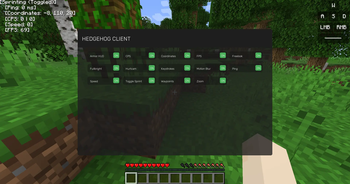
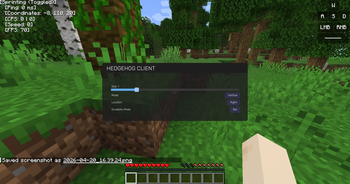
Hedgehog Client ships with 14 built-in modules, all configurable and toggleable in-game:
| Module | Description |
|---|---|
| Toggle Sprint | Automatically sprint without holding the key |
| KeyStrokes | Display your key inputs on screen |
| FPS Counter | Real-time frames-per-second overlay |
| Freelook | Look around without moving your camera direction |
| Fullbright | Max brightness — no more stumbling in the dark |
| CPS Counter | Track your clicks per second |
| Zoom | Smooth, optifine-style zoom |
| Ping | Live ping display on your HUD |
| Armor HUD | Always know your durability at a glance |
| Coordinates | On-screen XYZ coordinate display |
| Hurtcam | Toggle the screen shake when you take damage |
| Motion Blur | Smooth, cinematic motion blur effect |
| Waypoints | Mark and navigate to custom locations |
| Speed | Display your current movement speed |
🎭 Cosmetics — Exclusive Cloaks
Show off your style with 4 exclusive Hedgehog Client cloaks, unlockable in-game:
- 🎥 YouTube — For the content creators out there
- ☯️ Yin Yang — Balance and style in one
- 🕶️ Gangster — The Gangster Hedgehog cloak
- 🦔 Hedgehog Client — Rep the client with pride
📦 Installation
- Install Fabric Loader
- Download Hedgehog Client from this page
- Drop the
.jarinto yourmodsfolder - Launch and enjoy!
Built with love for the PVP community. More modules and cosmetics coming soon!
Available Versions
How to Install Hedgehog Client on Your Server
Order Server
Order a Minecraft Java server with at least 3 GB RAM (4 GB recommended).
Set fabric Loader
In the panel under "Egg", select the fabric loader and matching Minecraft version (1.21.5).
Install Mod
Open the mod browser in the dashboard and search for "Hedgehog Client". Click "Install" – done! Alternatively, upload the .jar via SFTP to the /mods folder.
Compatibility
Mod Loaders
Minecraft Versions
1.21.5, 1.21.4, 1.21.3 (+3 more)
Server-side
✗ UnsupportedRecommended RAM
4 GB(min. 3 GB)Frequently Asked Questions
Hedgehog Client server crashes on startup – what to do?
Most common cause: wrong fabric version or insufficient RAM. Check the server log (latest.log) for "OutOfMemoryError" or "Mixin" errors. With Mado Hosting: ensure at least 3 GB RAM is allocated and the loader matches the mod version (1.21.5). You can switch loaders with one click in the panel.
Is Hedgehog Client compatible with fabric?
Hedgehog Client officially supports fabric for Minecraft 1.21.5, 1.21.4, 1.21.3. The Mado dashboard automatically detects incompatible loader combinations.
Server lagging with Hedgehog Client – how to optimize performance?
Recommended RAM: 4 GB (per 8 players). Use /spark profiler to check if Hedgehog Client consumes the most tick time. Common fixes: reduce server view-distance to 8-10, install "performant" or "starlight" as supplementary mods on Forge. With Mado Hosting, your server runs on NVMe SSDs with dedicated CPU cores for minimal latency.
Similar Mods





Rent Modded Server
Install Hedgehog Client with just one click on your server.