
Helix
A utility mod adding various features
Screenshots

About this Mod

Helix Utility Client
Helix is a QOL Mod that aims to improve your experience by adding various features.
Helix is free and open source, forever.


Installation
Helix requires the Kotlin language adapter and the Fabric API to work correctly
How to install, step by step
- Download the latest release of Helix, the matching Fabric API and Kotlin language adapter
- Put all 3 mods in your mods folder
- Make sure you have the correct java version installed (17)
- Make sure you have the fabric loader installed
- Launch the fabric loader
- Have fun!
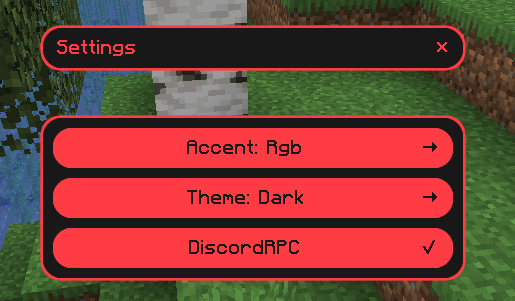
Accent colors
Rgb

Orange

Red

Green

Yellow

Pink

Purple

Blue

Themes
Dark

Light

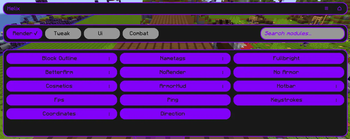
In-Game features
Crystal Optimizer
Optimized the placing and breaking of crystals clientside to improve crystal speed (removing broken crystals on the client...)
Block Outline
Changes your block outline and adds optional entity outlines
Armor Hud
Shows you your armor on the screen without having to open your inventory
Autosprint
Presses the sprint key for you
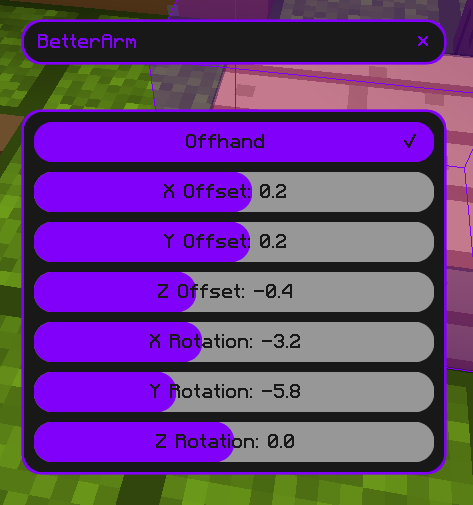
Better Arm
Changes the rendering of your In-Game hand
Coordinates
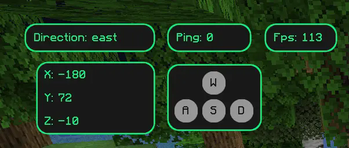
Shows you your coordinates in the world
Cosmetics
Render cosmetics clientside, for free
Directions
Shows in what direction you are facing
Fps Display
Shows your current Fps
Fullbright
See in the dark
Hotbar
Changes several status bars to literal bars
Keystrokes
Shows what keys are being pressed
Nametags
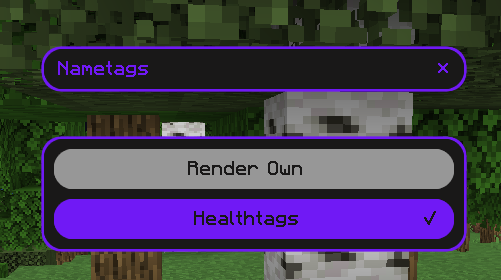
See your own nametag and add information to it
No Armor
Hides your armor clientside
No Render
Disables the rendering of certain things
Ping Display
Shows your current ping
Chat Format
Create gradients without leaving minecraft
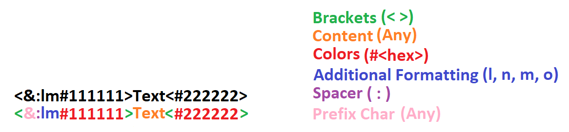
Also has the option so solve simple math, for example
<solve>1+2*(27-5)/5<solve>
Commands
/helix
Opens the main UI/gmc [player]
Puts you or the optionally specified player in creative mode (only works if you have permission on the server since we are just redirecting commands)/gms [player]
Puts you or the optionally specified player in survival mode (only works if you have permission on the server since we are just redirecting commands)/gma [player]
Puts you or the optionally specified player in adventure mode (only works if you have permission on the server since we are just redirecting commands)/gmsp [player]
Puts you or the optionally specified player in spectator mode (only works if you have permission on the server since we are just redirecting commands)
Discord Presence
Shows some information about the server or world you are on to your friends on discord
For Developers and Server Owners
The following example code can be used to block modules from being used on your server.
In the future, there may be more options for configuring the mod via the server.
Json Structure for the payload
This is the structure to use in the payload of the message sent to the player. Invalid json and incorrect module ids will be ignored. You can find the module ids in the respective modules.
The ids can always be found in the header of the module and will always be in the following scheme: moduleName.
{
  "disabled": [
    "armorHud",
    "autoSprint"
  ]
}
Sending the configuration json in your plugin
This code can be put for example in the onJoin listener. Once disabled, modules stay disabled until the player rejoins the server.
Then they need to be disabled again.
<player>.sendPluginMessage(<plugin-instance>, "helix:config",
     <json-payload>.toByteArray()
);
How to Install Helix on Your Server
Order Server
Order a Minecraft Java server with at least 3 GB RAM (4 GB recommended).
Set fabric Loader
In the panel under "Egg", select the fabric loader and matching Minecraft version (1.20.5).
Install Mod
Open the mod browser in the dashboard and search for "Helix". Click "Install" – done! Alternatively, upload the .jar via SFTP to the /mods folder.
Compatibility
Mod Loaders
Minecraft Versions
1.20.5, 1.20.4
Server-side
✗ UnsupportedRecommended RAM
4 GB(min. 3 GB)Frequently Asked Questions
Helix server crashes on startup – what to do?
Most common cause: wrong fabric version or insufficient RAM. Check the server log (latest.log) for "OutOfMemoryError" or "Mixin" errors. With Mado Hosting: ensure at least 3 GB RAM is allocated and the loader matches the mod version (1.20.5). You can switch loaders with one click in the panel.
Is Helix compatible with fabric?
Helix officially supports fabric for Minecraft 1.20.5, 1.20.4. The Mado dashboard automatically detects incompatible loader combinations.
Server lagging with Helix – how to optimize performance?
Recommended RAM: 4 GB (per 8 players). Use /spark profiler to check if Helix consumes the most tick time. Common fixes: reduce server view-distance to 8-10, install "performant" or "starlight" as supplementary mods on Forge. With Mado Hosting, your server runs on NVMe SSDs with dedicated CPU cores for minimal latency.
Rent Modded Server
Install Helix with just one click on your server.