
Hemomancy
Blood Magic reimagined for new adventures
Screenshots
About this Mod
What this
Hemomancy is a large-scale and cinematic reimagining of the legendary Blood Magic mod, author WayOfTime, ported to modern versions of Minecraft. This is not just an update, but a full-fledged rebirth of the iconic fashion, reinterpreted and significantly expanded by the author easynull.
Plunge into the dark world of hematomancy, the magic of blood, where strength is measured at a sacrificial price, and power is gained through risk and austerity. Explore a complex and deep system of rituals, alchemy, and the creation of magical artifacts that has become a benchmark for an entire generation of mods.
Downloads
The mod can be installed both on the CurseForge page and on the Modrinth page
-d48526?style=for-the-badge&logo=curseforge&logoColor=000000&labelColor=FFFFFF)
-349a46?style=for-the-badge&logo=modrinth&logoColor=000000&labelColor=FFFFFF)
To use this mod, you need to download the API - NullCore (only 1.21.4 NeoForge)
Features
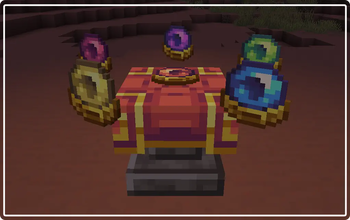
A redesign and update of the Blood Orbs you might be used to seeing here. They contain sparks of memories.

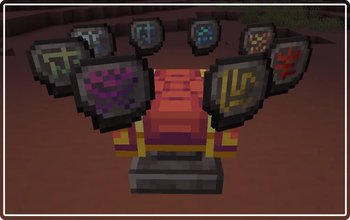
Redesign and update of the Slate collection, our new name is Glyphs.

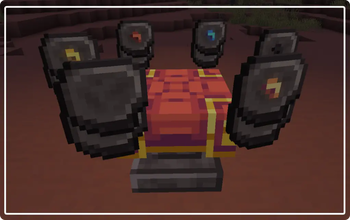
Sigils have been redesigned with all possible compatibility and balance. Experience their potential anew!

A new and important element of the Hemomancy mod: Crimson Steel. Infuse metal with crimson blood!

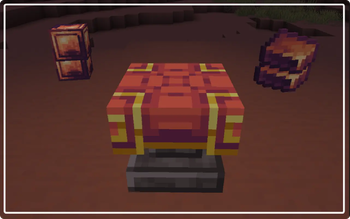
New structure of Blood Altar tiers!
Licensing
The license uses the terms of the Blood Magic licenses(CC-BY-4.0) and is fully obligated to comply with them.
Contacts
Email address: [email protected]
Github issues: link to
For developers
To connect your project's dependency to Hemomancy you need to write this code in your
build.gradle
repositories {
  //from Modrinth:
  maven {
       name = "Modrinth"
       url = "https://api.modrinth.com/maven"
   }
  //from CurseForge:
  maven { url "https://cursemaven.com"}
}

dependencies {
  //from Modrinth:
  implementation "maven.modrinth:hemomancy:${hemomancy_version}"
  //from CurseForge:
  implementation "curse.maven:hemomancy-1340370:${hemomancy_file_id}"
}
Available Versions
How to Install Hemomancy on Your Server
Order Server
Order a Minecraft Java server with at least 3 GB RAM (4 GB recommended).
Set fabric Loader
In the panel under "Egg", select the fabric loader and matching Minecraft version (1.21.4).
Install Mod
Open the mod browser in the dashboard and search for "Hemomancy". Click "Install" – done! Alternatively, upload the .jar via SFTP to the /mods folder.
Compatibility
Mod Loaders
Minecraft Versions
1.21.4, 1.20.1
Server-side
✓ RequiredRecommended RAM
4 GB(min. 3 GB)Frequently Asked Questions
Hemomancy server crashes on startup – what to do?
Most common cause: wrong fabric version or insufficient RAM. Check the server log (latest.log) for "OutOfMemoryError" or "Mixin" errors. With Mado Hosting: ensure at least 3 GB RAM is allocated and the loader matches the mod version (1.21.4). You can switch loaders with one click in the panel.
Is Hemomancy compatible with fabric and neoforge?
Hemomancy officially supports fabric, neoforge for Minecraft 1.21.4, 1.20.1. The Mado dashboard automatically detects incompatible loader combinations.
Server lagging with Hemomancy – how to optimize performance?
Recommended RAM: 4 GB (per 8 players). Use /spark profiler to check if Hemomancy consumes the most tick time. Common fixes: reduce server view-distance to 8-10, install "performant" or "starlight" as supplementary mods on Forge. With Mado Hosting, your server runs on NVMe SSDs with dedicated CPU cores for minimal latency.
Similar Mods




![[TaCZ] Timeless and Classics Zero](https://cdn.modrinth.com/data/SzzJttH8/fd27766d2bb8390d284696b1dbd358f87e081439_96.webp)

Rent Modded Server
Install Hemomancy with just one click on your server.